






Yes, ChatGPT saves data by default. OpenAI stores your prompts, uploaded files, account details, and device information unless you turn off the "Improve the model for everyone" setting. Your data isn't sold for advertising, but it can be used for AI model training. You can disable data saving or permanently delete everything through OpenAI's Privacy Portal. ChatGPT data saving means OpenAI retains your conversation inputs, file uploads, and account metadata on its servers indefinitely until you manually delete them. Unlike session-only tools, ChatGPT's default behavior feeds your interactions into model improvement pipelines, though you can opt out through Data Controls without losing access to the service.
Quick Guide to ChatGPT Data and Privacy: Clear FAQs Answered
Before getting into the details, here's a quick-reference table covering the most common ChatGPT privacy questions. Bookmark it, share it with your compliance team, or use it as a checklist for your next internal AI policy review.
| Question | Quick Answer |
|---|---|
| Does ChatGPT save my data? | Yes, by default. You can manage this in Settings > Data Controls. |
| What data does ChatGPT save? | Prompts, uploads, account information, IP address, device data, and cookies. |
| How can I stop ChatGPT from saving data? | Disable "Improve the model for everyone" in Data Controls. |
| How do I permanently delete my ChatGPT data? | Submit a request via the OpenAI Privacy Portal. |
| Does ChatGPT sell my data? | No. OpenAI does not sell user data for advertising. |
| Can OpenAI employees read my chats? | Possibly, unless you disable training or request deletion. |
| Is ChatGPT GDPR-compliant? | Yes. OpenAI complies with GDPR and provides data request mechanisms. |
| How long does ChatGPT keep my data? | Indefinitely, unless you delete it or close your account. |
| Does deleting my account remove all data? | Yes, account deletion triggers permanent data removal. |
Does ChatGPT Save Data?
Yes. Every prompt you type, every file you upload, and every image you share with ChatGPT gets stored on OpenAI's servers. This isn't a secret buried in fine print. OpenAI's privacy policy states it plainly: the company collects and retains user content to operate and improve its services.
The default behavior is what catches most users off guard. Unless you've gone into Settings and explicitly turned off data saving, OpenAI uses your conversations to train future AI models. According to AIPrixa's analysis, ChatGPT trains on your data by default on personal Free, Go, Plus, and Pro plans. Enterprise and Team plans are the exception, with training opt-out enabled automatically.
For businesses running customer support operations, this distinction matters. If your team uses ChatGPT to draft responses or analyze support tickets, those conversations could end up in training datasets. That's one reason many companies evaluate chatbot alternatives that offer full data ownership.
What Data Does ChatGPT Save?
ChatGPT collects seven categories of personal data, according to AIPrixa's 2026 audit. Here's the full breakdown:
1. Account information: Your name, email address, date of birth (for age verification in certain regions), and payment details if you're on a paid plan.
2. User content: The prompts you type, code you paste, images you upload, and documents you attach. OpenAI calls this "Content" in their privacy policy.
3. Communication data: Any emails to support, forum posts, or social media interactions with OpenAI are logged.
4. Log data: IP addresses, browser type, timestamps, and request metadata.
5. Usage data: How often you interact, what types of content you engage with, your time zone, and session duration.
6. Device information: Operating system, device identifiers, and hardware markers.
7. Cookies and tracking: Session cookies maintain your login and preferences. OpenAI also uses analytics cookies to track usage patterns.
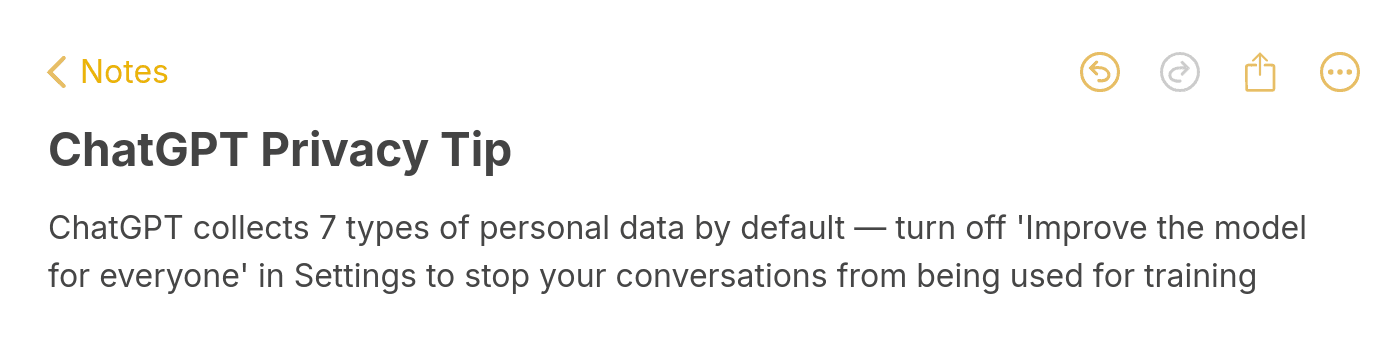
What surprises most users is the retention policy. According to the OpenAI Community forum, ChatGPT retains your conversations indefinitely unless you actively delete them. Retention and model training are two separate things. Even if you opt out of training, your chat history stays on OpenAI's servers until you remove it.
How Long Does ChatGPT Keep Your Data?
There's no automatic expiration date. ChatGPT stores your conversations indefinitely unless you take action to delete them. That applies to every query, instruction, and file upload, as Nightfall AI's 2025 analysis confirmed.
A legal wrinkle makes this even more complicated. As of June 2025, OpenAI must retain deleted ChatGPT conversations indefinitely (rather than the previous 30-day deletion window) due to a lawsuit from The New York Times. This means even if you hit "delete," OpenAI may still hold your data for legal compliance purposes.
For IT directors and compliance officers at B2B companies, this creates a real headache. You can't guarantee data deletion through the ChatGPT interface alone. If your organization handles sensitive customer data and your team uses ChatGPT, building an internal AI usage policy isn't optional.
How to Stop ChatGPT from Saving Your Data in 2026
You have two paths depending on how far you want to go: stop future data collection, or permanently erase everything OpenAI has on you.
Option 1: Disable Data Saving for Future Conversations
This is the faster option. It stops OpenAI from using your new conversations for model training, though it won't erase past data.
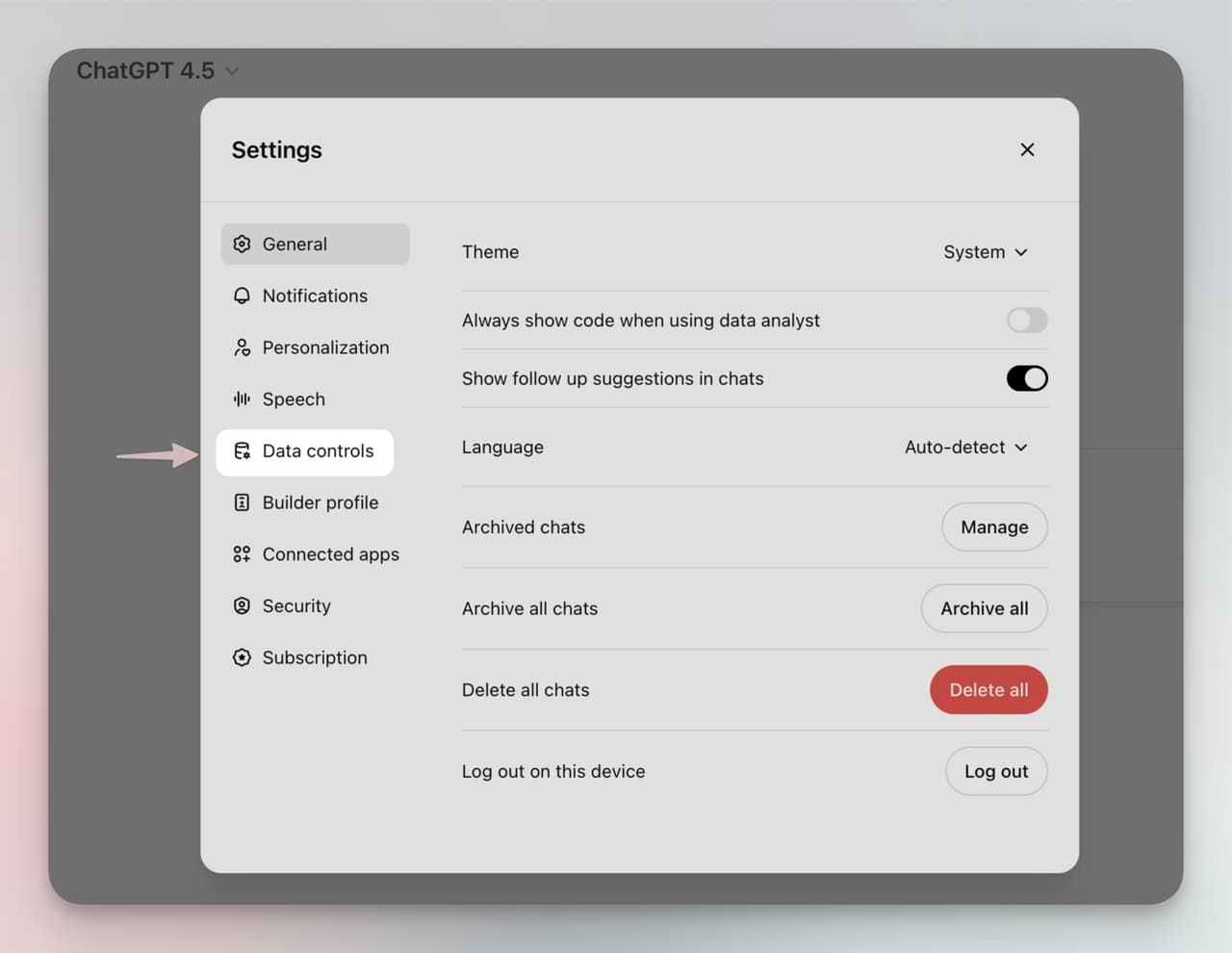
Step 1: Open ChatGPT and go to Settings, then Data Controls.
Step 2: Toggle "Improve the model for everyone" to OFF.
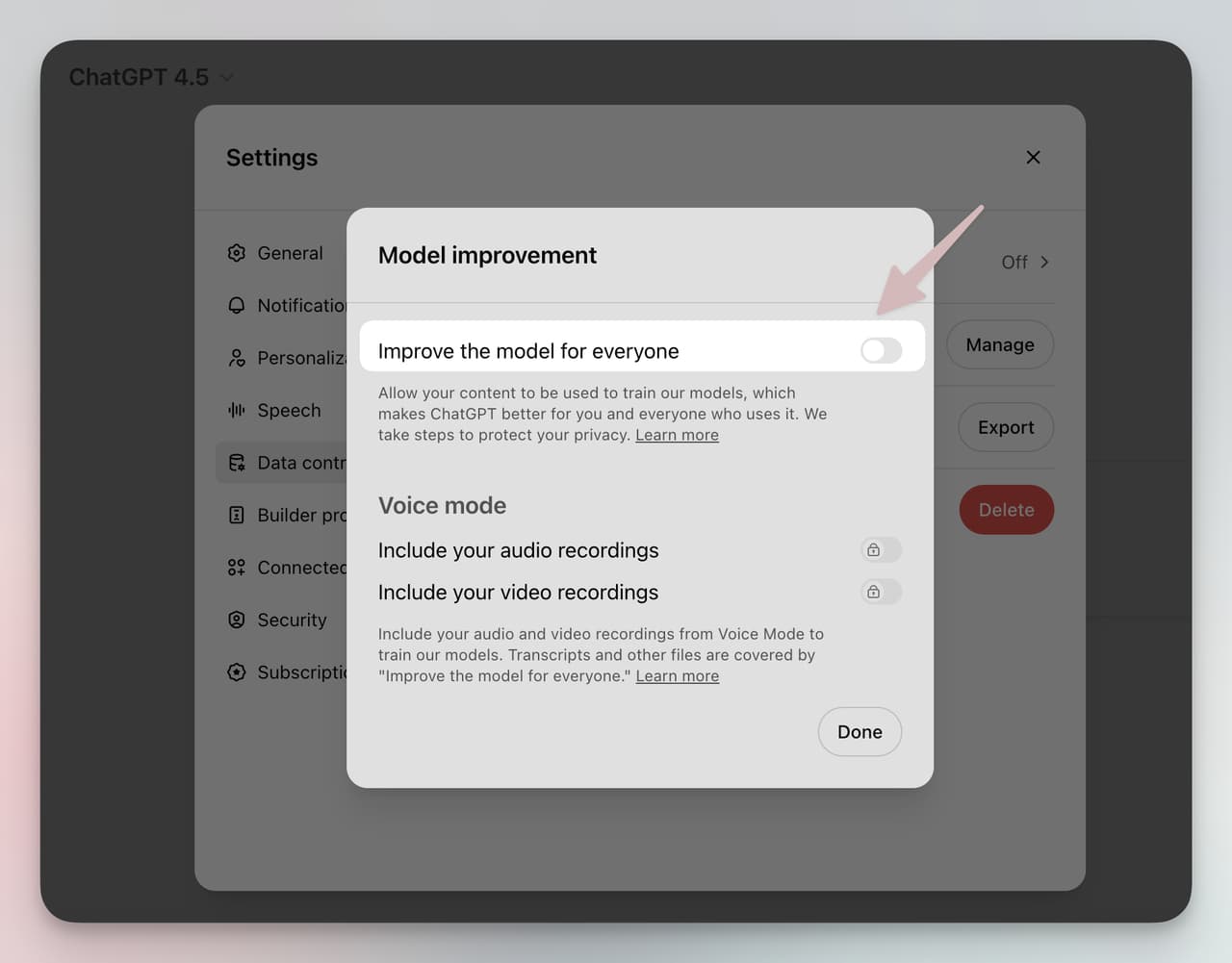
Once disabled, your future conversations won't be used for training AI models. New chats also won't appear in your chat history.
Want to clear previous conversations too? Go to Settings, then General, then "Delete all chats."
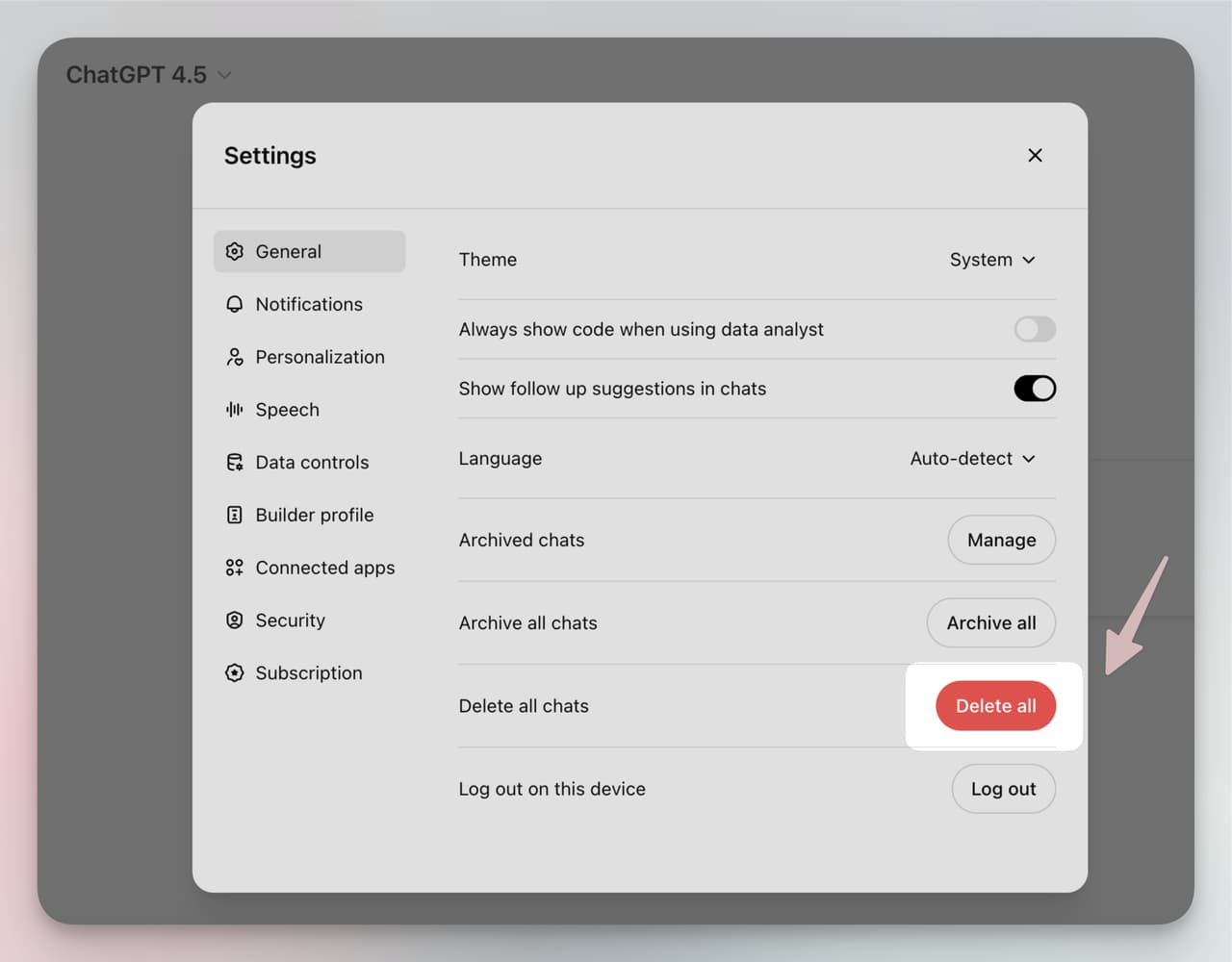
Keep in mind: deleting chat history removes conversations from your view, but it doesn't guarantee removal from OpenAI's backend systems. For that, you need Option 2.
Official reference: OpenAI Data Controls FAQ
Option 2: Permanently Delete All Your Data
If your goal is full data removal from OpenAI's systems, follow these steps:
1. Visit the OpenAI Privacy Portal.
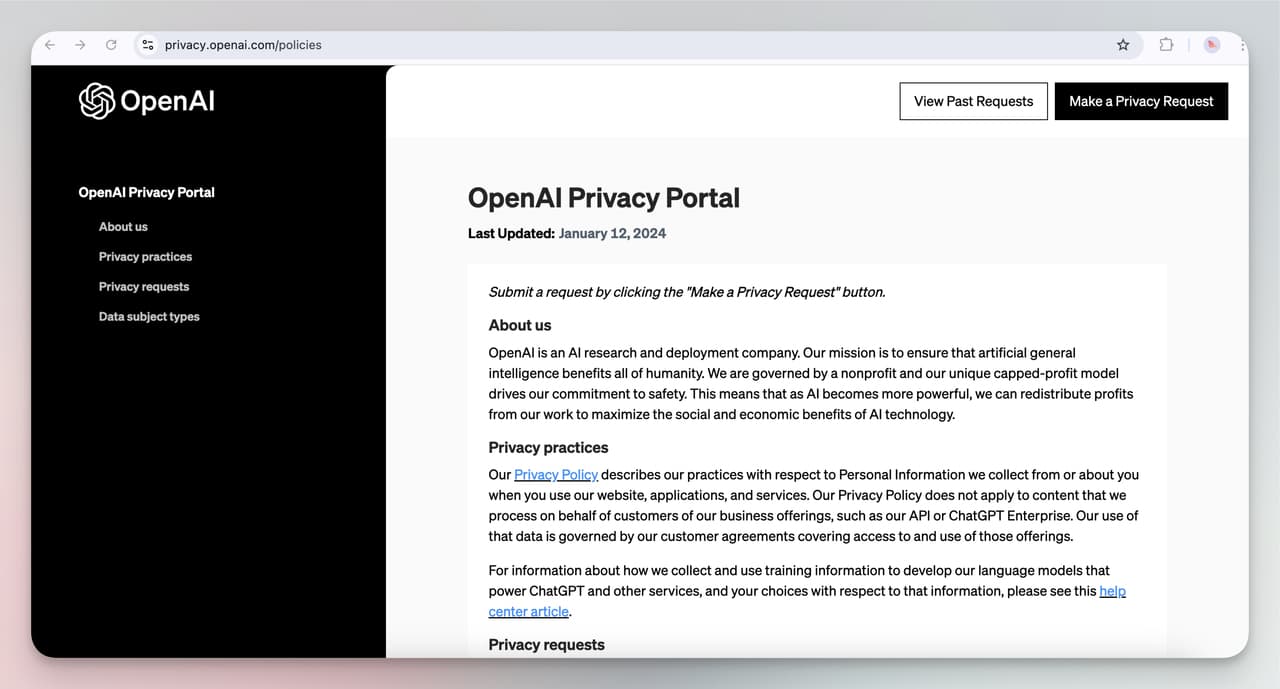
2. Click "Make a Privacy Request" and log in.
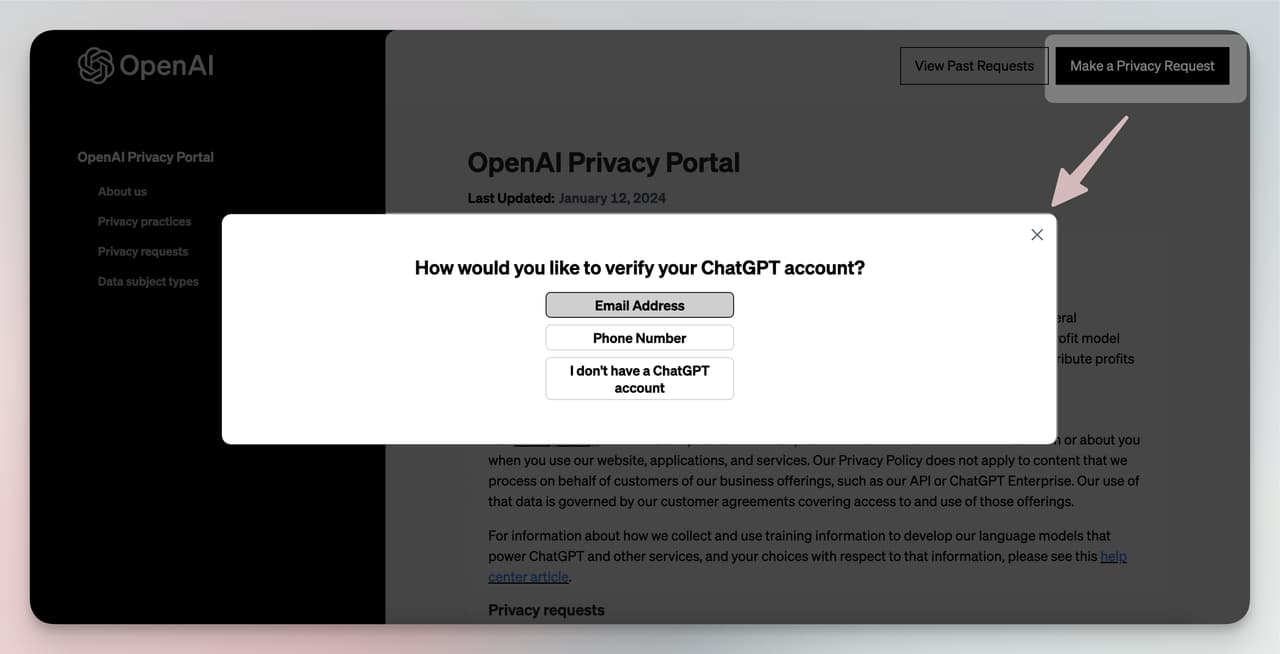
3. Choose your request type:
• Delete My Data: Permanently erases all stored data from OpenAI's systems.
• Stop Processing My Data: Prevents OpenAI from using your data for model training going forward.
• Email alternative: Send a request to privacy@openai.com.
This is the only reliable path to full data erasure. I'd recommend exporting your data first (Settings > Data Controls > Export) so you have a local copy before it's gone for good.
Does ChatGPT Sell or Share Your Data?
No. OpenAI does not sell user data to advertisers or data brokers. That's stated directly in their privacy policy. But "not selling" doesn't mean "not sharing." There are some gray areas worth understanding.
Model training: Your conversations can be used to improve future AI models. This isn't a sale in the legal sense, but your data does feed a commercial product. Opting out through Data Controls stops this.
Third-party integrations: If you use ChatGPT plugins or connect it to external tools, your data passes through third-party APIs. According to the OpenAI Privacy Portal, data shared with these services falls under separate terms. OpenAI won't sell your data, but a connected service might operate under different rules.
Human review: OpenAI employees may review conversations to improve model quality. This happens more often than most users realize. If that concerns you, disabling the training toggle is the minimum step you should take.
For B2B teams, the third-party integration risk is the real concern. Every plugin or API connection creates a new data pathway that your compliance team needs to audit.
ChatGPT Data Security: What Protections Are in Place?
OpenAI uses encryption for data in transit and at rest. They also run bug bounty programs and conduct regular security audits. But no platform is breach-proof.
With over 180 million users and 600 million monthly visits as of early 2025, ChatGPT is a high-value target. The platform reached 100 million active users in a record two months, which means the attack surface grew faster than most security teams could keep up with.
If OpenAI experiences a data breach, they're legally required to notify affected users under GDPR and similar privacy regulations. Their privacy policy outlines the notification process, including what data may have been affected and what steps users can take.
For enterprise use, OpenAI offers ChatGPT Enterprise and Team plans with additional security features: no training on your data by default, SOC 2 compliance, and admin controls for managing user access. If your organization processes sensitive data, these plans are worth evaluating, or consider a custom AI chatbot alternative with full data ownership.
Common Myths About ChatGPT Privacy
Myth: "Deleting a chat permanently erases it." Not necessarily. Deleting from your chat history removes it from your view, but OpenAI may retain backend copies for safety, legal compliance, or abuse prevention. The NYT lawsuit has extended retention requirements indefinitely for some data.
Myth: "ChatGPT's Memory feature stores my personal info forever." ChatGPT's Memory feature remembers details within and across conversations to give more relevant responses. But you can review, edit, or clear all memories through Settings. Memory is separate from the training data pipeline. You can use Memory while having training turned off.
Myth: "If I'm not logged in, ChatGPT doesn't save anything." ChatGPT still collects technical data (IP address, browser info, device data) from logged-out users. Your prompts in temporary chats are retained for up to 30 days for abuse monitoring, even without an account.
Myth: "Enterprise plans mean zero data risk." Enterprise plans don't train on your data by default, which is a significant improvement. But data still passes through OpenAI's infrastructure. For industries with strict regulatory requirements (healthcare, finance), that may not clear the compliance bar. Running an accuracy and risk assessment before deploying any AI tool is standard practice.
Best Practices for Businesses Using ChatGPT
If your team uses ChatGPT for customer support, content creation, or internal workflows, these steps minimize your data exposure:
1. Create a company-wide AI usage policy. Define what types of data employees can and can't paste into ChatGPT. Customer PII, financial data, and proprietary code should be off-limits.
2. Disable training on every team member's account. Walk through the Settings > Data Controls process with your team. One missed toggle means that person's conversations feed into model training.
3. Use Enterprise or Team plans. These disable training by default and add admin controls. The cost difference pays for itself when you factor in the compliance risk of consumer plans.
4. Audit third-party integrations quarterly. Every ChatGPT plugin or API connection creates a data pathway outside OpenAI's privacy controls. Document them and review their terms.
5. Consider a custom AI chatbot for sensitive workflows. Tools like LiveChatAI let you train an AI on your own content while keeping full data ownership. Your data stays on your infrastructure, not someone else's servers.
6. Export data regularly. Even if you trust the platform, maintain local backups of any conversations your team needs for compliance or documentation. Go to Settings > Data Controls > Export.
For customer support teams specifically, the privacy question often leads to a bigger realization: a custom GPT built for your business gives you both the AI capability and the data control that generic ChatGPT can't match. You get AI-powered customer service without the privacy trade-offs.
Conclusion
ChatGPT saves your data by default, and understanding exactly what gets collected, how long it's kept, and what controls you have is the first step toward responsible AI use. The good news: OpenAI provides clear opt-out mechanisms through Data Controls and the Privacy Portal. The bad news: full deletion isn't always guaranteed, especially with ongoing legal holds.
For individual users, disabling the training toggle and periodically clearing your chat history covers the basics. For businesses handling customer data, the calculus is different. You need company-wide policies, Enterprise-tier plans, or a dedicated AI solution where you control the data end to end.
If data ownership is non-negotiable for your team, LiveChatAI's AI agent gives you the conversational AI capabilities without sending your data to third-party training pipelines. Worth exploring if privacy is a priority, not just a checkbox.
Frequently Asked Questions
Does ChatGPT Keep Your Data Even if You Delete It?
It depends on the method. Deleting individual chats removes them from your visible history but may not erase backend copies. OpenAI retains some data for safety monitoring and legal compliance. For full deletion, submit a formal request through the OpenAI Privacy Portal. Even then, the June 2025 NYT lawsuit created indefinite retention requirements for certain data categories.
Does ChatGPT Save Your Data if You Are Not Logged In?
Yes, partially. ChatGPT collects technical data like your IP address, browser type, and device information from all users, including those without accounts. Prompts entered in temporary chats are stored for up to 30 days for abuse detection. Logging out reduces what's collected but doesn't eliminate it entirely.
Does ChatGPT Keep Your Data Private?
OpenAI doesn't sell user data or share it with advertisers. However, your conversations may be reviewed by human trainers unless you disable the "Improve the model for everyone" setting. Data shared through third-party plugins falls under separate privacy terms. For business use, Enterprise plans offer stronger privacy guarantees with no-training defaults and SOC 2 compliance.
How Do I Permanently Delete My ChatGPT Data?
Go to the OpenAI Privacy Portal, click "Make a Privacy Request," log in, and select "Delete My Data." You can also email dsar@openai.com. Before deleting, export your data through Settings > Data Controls > Export. Account deletion is irreversible and removes all associated conversation data from OpenAI's systems. Reference: OpenAI Data Controls FAQ.
Is ChatGPT Data Shared with Third Parties?
OpenAI doesn't sell data to third parties. But if you use ChatGPT plugins, custom GPTs with external actions, or API integrations, your data passes through those third-party services under their own privacy terms. Always review the privacy policy of any plugin or integration before connecting it to your ChatGPT account.
Is ChatGPT GDPR-Compliant?
Yes. OpenAI states GDPR compliance in its privacy policy and provides mechanisms for data access, correction, deletion, and portability requests as required by the regulation. EU users can exercise their rights through the Privacy Portal or by contacting OpenAI's data protection team directly.
Check out these blog posts as well: