






The customer service model you pick decides whether your team scales or cracks — more than headcount or tools do. This guide covers the eight models actually in play for 2026, real examples of each, and a five-step process for building your own.
A customer service model is the operational framework — people, channels, processes, tools, and SLAs — that determines how a business handles every customer interaction. The model you choose directly shapes ticket deflection, cost per contact, and retention. A strong one is structural, not aspirational.
A customer service model combines team structure, support channels, routing processes, and technology into one system for handling customer interactions from first inquiry through resolution.
What Is a Customer Service Model?
A customer service model is the operational blueprint that decides how support gets delivered. It's not a script or a tone-of-voice guide. It's the combination of team structure, channel mix, routing rules, escalation paths, tooling, and performance measurement that determines what a customer experiences from the moment they hit a problem.
Five components sit inside every working model:
- People: Tier 1 generalists, Tier 2 specialists, success managers, and increasingly AI agents that handle triage. Roles and ownership boundaries matter more than headcount.
- Channels: Email, live chat, phone, social, in-app messaging, knowledge base, community forum. The mix depends on where your customers actually reach out.
- Processes: Intake rules, priority scoring, escalation paths, refund workflows, and handoffs between human and AI agents.
- SLAs and KPIs: First response time, full resolution time, CSAT, NPS, CES, deflection rate, cost per ticket. Numbers you commit to publicly and review weekly.
- Tech stack: Help desk software, CRM, knowledge base, AI chatbot, analytics, and the integrations that stitch them together.
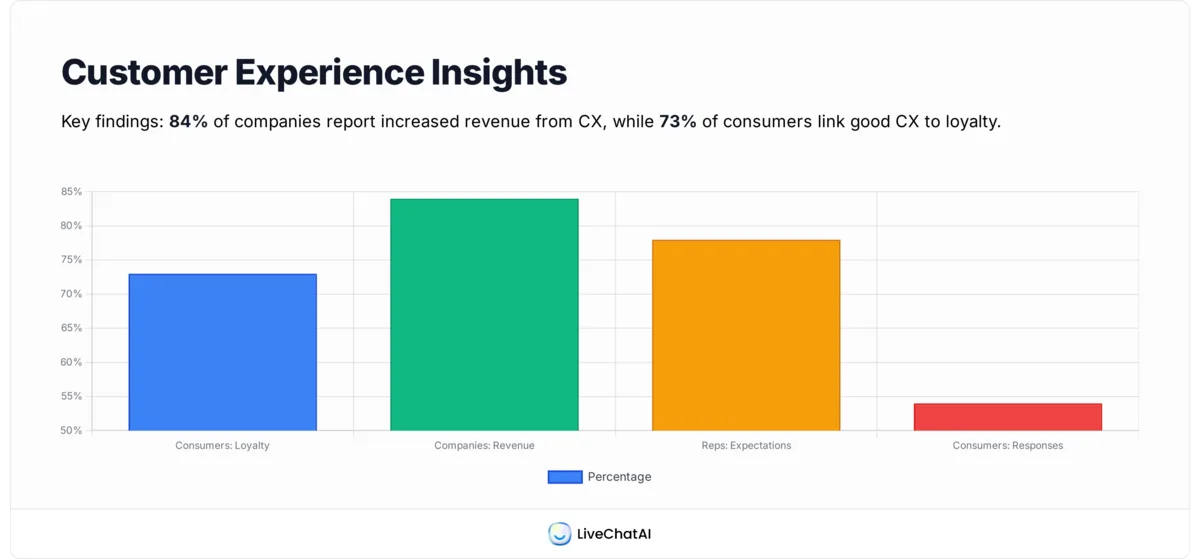
Why this matters: Nextiva reports that 78% of customer service reps agree customer expectations are higher than they've ever been. Without an explicit model, teams drift into reactive ticket chasing — the cheapest short-term choice and the most expensive one over 24 months.
The Two Main Types of Customer Service Models
Every customer service model sits somewhere on a spectrum between reactive and proactive. Understanding the difference is the first choice you'll make as you build yours.
Reactive Customer Service Model
A reactive model waits for the customer to start the conversation. Tickets come in by email, chat, or phone, and agents respond. It's the oldest and simplest setup — cheap to stand up, easy to staff, and perfectly adequate for businesses with predictable, low-complexity questions.
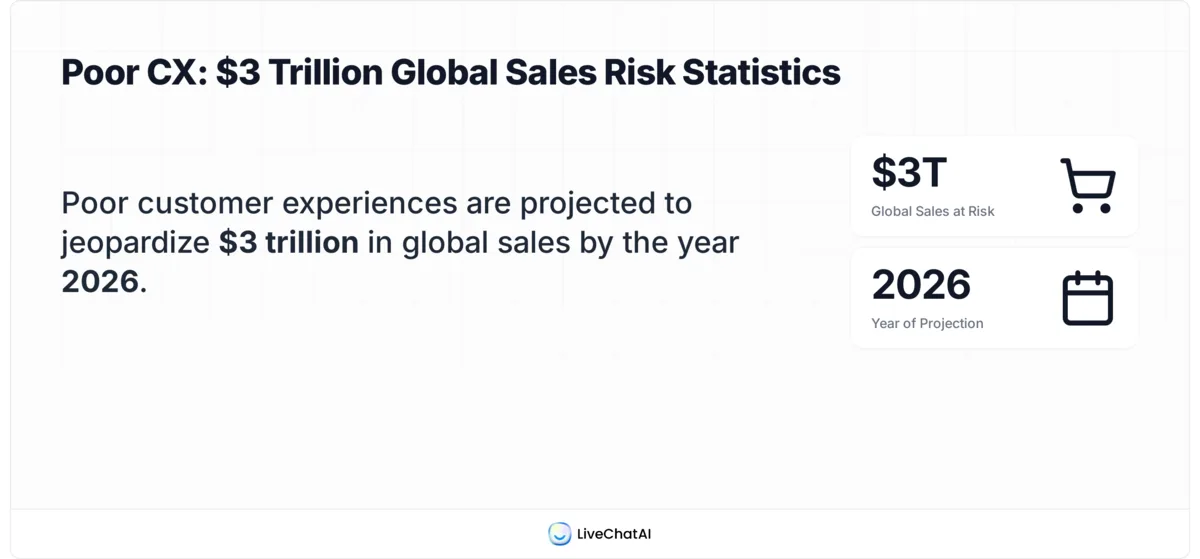
When it fits: low-ticket-volume SaaS, one-time product purchases, B2C retail where purchase decisions are small. The reactive model's weakness is that it only measures what customers complain about. You learn nothing about the 80% of frustrated users who leave without writing in. According to AmplifAI's 2026 data, poor customer experiences put $3 trillion in global sales at risk in 2026, with consumers cutting back $2.1 trillion and ceasing spending entirely on another $865 billion. A reactive-only model will never see that revenue walk out the door.
Proactive Customer Service Model
A proactive model intervenes before the customer has to ask. It uses product telemetry, onboarding milestones, and behavioral triggers to send the right help at the right moment — a nudge when a user hasn't activated a key feature, a heads-up when an invoice is about to fail, a weekly health check for accounts close to the renewal date.
When it fits: subscription SaaS, enterprise accounts with annual contract cycles, any product where retention is the real metric. Proactive support costs more to design and requires clean data pipelines, but it compounds. A proactive check-in that saves one $50k ARR account pays for the entire quarter's support tooling. In practice most strong teams blend the two — reactive as the floor, proactive for the accounts that matter.
Top 8 Customer Service Models to Implement
Below are the eight customer service models I see actually working in B2B SaaS and e-commerce in 2026. Each one has a shape, a fit, and a set of trade-offs. Pick the one that matches your customer mix and ticket complexity — not the one that sounds most impressive on a board deck.
1. Self-Service Model
The self-service model gives customers a knowledge base, searchable FAQ, video tutorials, and a community forum — the full set of resources they need to resolve issues without talking to a human. It works by surfacing answers at the moment of intent, often through in-app search or a help widget that reads the current page context. A good self-service layer typically deflects 30-50% of ticket volume in the first 90 days of launch.
When to use it: high-volume products with repeatable questions, price-sensitive segments, and customers who prefer to solve problems at 2 a.m. rather than wait for a reply.
Strengths and weaknesses: scales infinitely once articles are written, cost per deflected ticket trends toward zero. But it demands constant article maintenance — a stale KB article is worse than none — and it fails for emotional issues where customers need to feel heard. I've seen teams misjudge this and watch CSAT drop four points in a quarter.
Example: Notion's help center is the reference example. Dense internal search, short answer-first articles, deep links from the product UI. For a deeper walkthrough of how to build a support-worthy self-service layer, see our guide on what is self-customer service.
2. Omnichannel Model
Omnichannel means a single customer conversation that moves cleanly across channels without losing context. A user starts on live chat, continues the next morning over email, and finishes on a phone call — and the agent sees the entire history in one thread. The operational enabler is a unified inbox or CRM that merges identity and history across touchpoints.
When to use it: businesses with customers who use three or more channels, enterprise accounts where stakeholders shift (procurement asks by email, the admin pings chat), and any brand where friction across channels directly damages perception.
Strengths and weaknesses: higher CSAT and lower repeat-contact rates because customers never retell their story. But the tooling is the single most expensive piece of customer service tech, and integrations break more often than anyone admits. You also need disciplined tagging across channels or the "unified view" becomes a mess.
Example: Amazon's support threads persist across web, app, and call center — the agent can see every prior interaction. Our deep dive on customer support channels breaks down the 14 channels worth considering and how to weight them.

3. AI-Powered (Automated) Model
An AI-powered model puts a trained chatbot or agent as the first layer of support. Modern AI agents handle onboarding questions, billing lookups, password resets, and tier-1 troubleshooting without a human in the loop. The good ones ingest your knowledge base and past tickets, and they hand off to humans when confidence drops or the customer asks for a person.
When to use it: any team where ticket volume is outpacing headcount, SaaS products with repeatable technical questions, and e-commerce businesses handling 24/7 shopper inquiries.
Strengths and weaknesses: Crescendo.ai data shows chatbots can respond up to 3x faster than human agents, and the global chatbot market is projected to reach $15.5 billion by 2028. The flip side: a badly trained bot tanks CSAT within days, and customers smell scripted answers quickly. Budget six to eight weeks for training and another four for tuning. For the marketing-side angle, conversational marketing with bots covers pre-sale use cases.
Example: Klarna's AI assistant handled two-thirds of its customer service chats within one month of launch, matching human CSAT scores. That's the public benchmark every AI-first team is chasing.
4. Traditional / Reactive Model
The traditional model is humans answering tickets as they arrive — no AI triage, no proactive outreach, no automated workflows beyond basic routing. Most agencies, small law firms, and early-stage startups still run on this model by default because it requires the least investment.
When to use it: very low ticket volumes (under 50/week), highly custom services where every ticket is unique, or new businesses where you don't yet have the data to train automation.
Strengths and weaknesses: full human empathy, total flexibility, and zero tooling cost. But it caps out hard — the moment volume passes roughly 100 tickets per agent per week, quality collapses. It also generates no structured data you can analyze later, which handicaps every improvement effort.
Example: most boutique consulting firms. Works beautifully at their scale, wouldn't survive a 10x volume spike. A good script resource for teams still operating this way: our collection of live chat canned response examples.
5. Proactive Support Model
The proactive model reaches out before the customer hits a wall. It uses product usage signals, lifecycle triggers, and health scores to deliver help at moments of friction — a tooltip when a user tries something unusual, an in-app message when an integration stops syncing, a CSM call when product usage drops 40%.
When to use it: mid-market and enterprise SaaS with clear renewal events, high-touch B2B products with $10k+ ACV, and subscription businesses where churn cost exceeds proactive outreach cost by at least 3x.
Strengths and weaknesses: Kayako's research shows 84% of companies that work to improve their customer experience report an increase in their revenue. Proactive support is the cleanest path to that lift. The downside: it's the hardest model to instrument. You need product analytics, a segmentation layer, and clear ownership between product, success, and support teams.
Example: Intuit QuickBooks flags unusual transactions before tax season with in-app guidance. Users report 40%+ fewer confused support tickets in Q1 as a direct result.
6. Tiered / Multi-Tier Model
A tiered model layers support by complexity. Tier 0 is self-service (KB, AI bot). Tier 1 is generalist human agents handling common questions. Tier 2 is product specialists. Tier 3 is engineering. Each tier has a clear definition of what it owns and when it escalates.
When to use it: technical products with a wide spread of ticket complexity, teams larger than 10 agents where specialization pays, and businesses with enterprise contracts that demand named specialists.
Strengths and weaknesses: predictable cost per ticket, clear career ladder for agents, and the ability to let senior engineers focus on the 5% of tickets that actually need them. The main risk is escalation friction — customers hate retelling their story at every handoff. You fix that with disciplined context-passing and a unified ticket object. Our breakdown of help desk practices covers the workflow side in depth.
Example: Shopify's four-tier support structure — Gurus for SMB, Plus support for enterprise, API specialists for partners, and engineering escalations for critical bugs.
7. Hybrid (Human + AI) Model
The hybrid model pairs AI agents with humans in a handoff workflow. The AI handles the first 60-80% of volume — lookups, simple resets, onboarding nudges. Human agents take what the AI can't close confidently, with full context on what was already tried. It's the model I see winning in 2026 because it captures AI's speed without sacrificing human empathy on hard cases.
When to use it: almost every mid-market and enterprise SaaS team, e-commerce brands with ticket volume above 500/week, and agencies managing multi-client support queues.
Strengths and weaknesses: combines the deflection economics of self-service with the resolution power of humans. Downside: the handoff moment is the single biggest UX risk — a bad one feels like the customer got abandoned. You have to design the transition carefully and give the human full AI transcript context.
Example: Duolingo routes subscription and login issues through an AI layer that closes roughly 70% of volume, then passes language-learning questions to human mentors. The AI handoff carries the transcript and the user's learning history.
8. Community / Peer-Support Model
A community model turns experienced customers into a support layer. A moderated forum, a Discord server, or a Slack community where users answer each other's questions. The brand seeds content, recognizes top contributors, and intervenes on moderation issues. Community support is slow to build — usually 12-18 months before it generates meaningful deflection — but it compounds like a content library.
When to use it: developer-facing products, creator tools, and enthusiast communities where users already discuss the product unprompted. Less useful for transactional B2C products where customers don't want to chat with strangers.
Strengths and weaknesses: near-zero marginal cost per deflected ticket, strong brand loyalty from active contributors, and SEO gains from user-generated Q&A content. Weaknesses: moderation overhead, quality variance, and the risk of toxic threads damaging brand perception if you go hands-off.
Example: Figma's community forum and the Webflow University forum both function as real tier-0 support layers with engineering staff contributing alongside power users.
Real-World Examples of Customer Service Models
Looking at how specific brands combine these models tells you more than any abstract framework can. Four quick case studies that anchor the choices above.
Apple: Hybrid Premium Support
Apple runs a hybrid model tuned for premium perception. AppleCare combines tiered phone support (Tier 1 generalists → Tier 2 product specialists → Genius Bar for hardware), a rich self-service knowledge base, and an in-store human layer. The phone queue uses voice-AI triage to route faster, but a human always closes the conversation. The combination is expensive per contact, but it's also why Apple's CSAT consistently tops 90%+ across hardware categories. Kayako's research reports that 73% of consumers say a good experience is critical in influencing their brand loyalties — Apple's support cost is really a retention investment.
Amazon: Omnichannel at Scale
Amazon runs omnichannel across app, web, chat, email, phone, and voice assistant, with every conversation threaded to a single account record. A customer can start a return in the app, ask a follow-up over chat, and finish with a phone call — the agent sees all three. The operational feat is keeping the ticket object clean across channels at Amazon's volume. For any team considering omnichannel, the Amazon blueprint is the ceiling; most businesses need a stripped-down version.
Duolingo: Community + Hybrid Stack
Duolingo stacks a peer-support community (the Duolingo Forum) on top of an AI + human hybrid for account and billing issues. Language learning questions get answered by fellow learners and volunteer mentors; subscription and technical issues go through the AI-first support layer. The result is near-zero support cost for the 60-70% of user questions that are really peer-level discussion, and focused human effort where it actually matters.
Shopify: Tiered Multi-Segment Model
Shopify runs four parallel tiered models — one each for SMB merchants, Shopify Plus enterprise accounts, Partners/developers, and Shopify Payments. Each tier has a dedicated queue, dedicated specialists, and distinct SLAs (SMB responds within 4 hours, Plus within 15 minutes). The segmentation means the highest-ARR accounts never compete with onboarding questions, and the company can invest different cost-per-contact budgets per segment.
Steps to Develop Your Own Customer Service Model
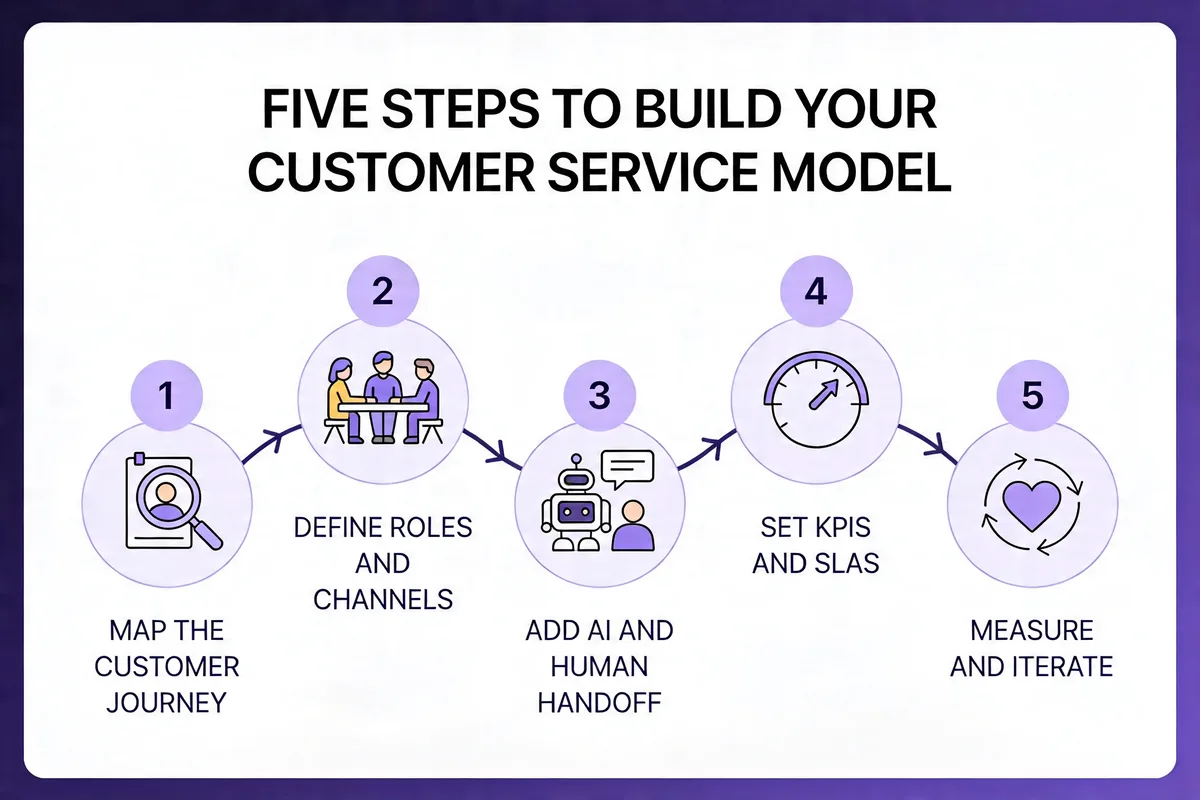
Designing your own model is less a creative act than a disciplined sequence. Five steps, in this order. Skip any and you'll pay for it inside a quarter.
Step 1: Map the Customer Journey
Start by listing every touchpoint where a customer might need help — pre-sale evaluation, onboarding, daily use, upgrade moments, renewal, cancellation, and post-cancellation recovery. For each, write down the top three questions or failures customers hit. Most teams already have this data in their ticket system; you just haven't categorized it.
Pull your last 90 days of tickets and tag them by journey stage. If you're under 500 tickets, do it manually in a spreadsheet. Over that, use your help desk's tag and topic reports. The goal is a one-page heatmap showing which journey stages generate the most volume and which have the lowest CSAT. That heatmap tells you where the model needs to be strongest.
What to look for: a disproportionate share of tickets concentrated in 2-3 journey stages. That's where your service model lives or dies. For me, onboarding was always the single biggest contributor — typically 35-45% of total volume for SaaS teams I've observed.
Step 2: Define Roles and Channels
Decide who answers what, on which channel, and during which hours. Write it as a matrix: rows are channels (live chat, email, phone, in-app, community, social), columns are the roles (AI agent, Tier 1, Tier 2, CSM, engineering). Fill every cell with "yes/no + SLA" and you'll expose the gaps in minutes.
Two rules that always apply. First, pick channels your customers actually use, not channels you wish they'd use — Nextiva's 2026 survey finds that 54% of consumers say fast responses are a must, and you can't be fast on a channel you don't staff. Second, don't open a channel you can't maintain for at least six months. A dead Twitter support account damages trust more than not having one.
Deliverable: a coverage matrix with SLAs per cell. Review it weekly for the first quarter, monthly after. Our deep dive on customer support channels is worth reading before you finalize the mix.
Step 3: Add AI and Human Handoff Logic
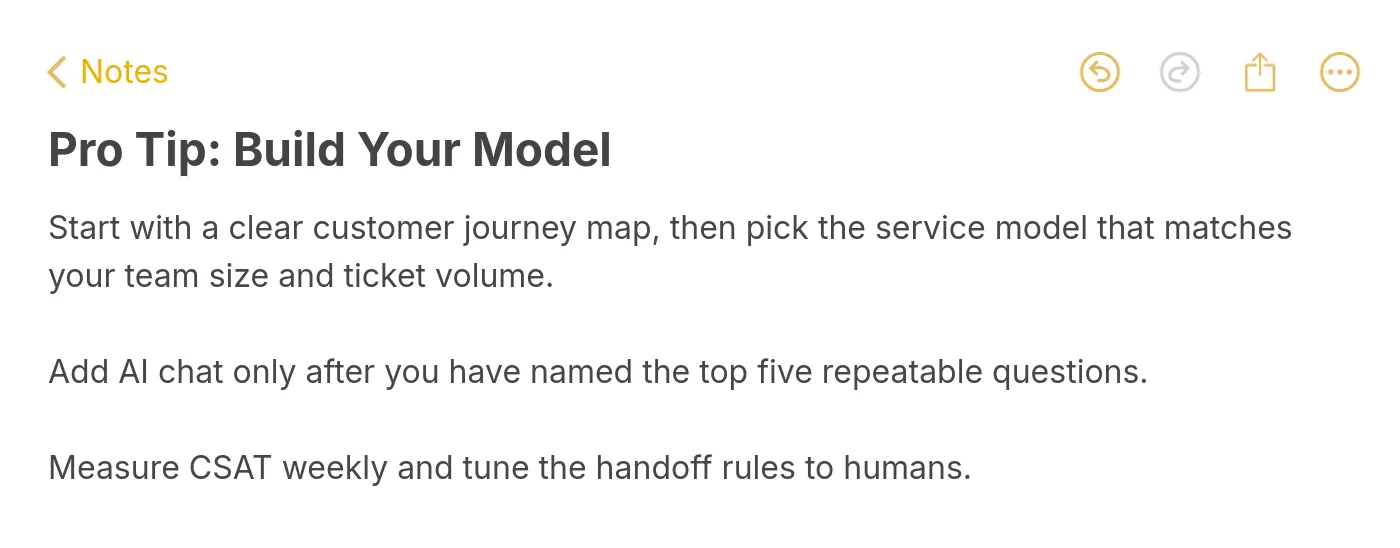
This is where most teams either win big or create a worse experience than they started with. Decide what your AI agent owns (typically lookups, password resets, billing questions, basic troubleshooting) and write an explicit handoff rule: when confidence is below threshold X, when the customer asks for a human, when sentiment score drops, when the topic is refunds or cancellations.
The handoff itself has to carry the full transcript and any structured data the AI captured. If the human has to ask the customer to re-explain their issue, you've already lost. In my experience, a smooth handoff drops handling time by 30-40% and cuts CSAT drop-off on escalated tickets almost to zero. A bad handoff does the opposite.
Pro tip: Run the AI on 100% of incoming tickets in shadow mode for two weeks before go-live. You'll spot 20-30 handoff rules you missed — and you'll build trust with the human team when they see the AI getting the 80th-percentile case right.
Step 4: Set KPIs and SLAs
Pick a small number of metrics and commit to them publicly. The five that matter for most B2B SaaS teams:
- First response time (FRT): aim for under 2 hours on email, under 60 seconds on chat.
- Full resolution time (FRT-full): target under 24 hours for 80% of tickets.
- CSAT: post-ticket score, target 85%+.
- Deflection rate: percentage of conversations resolved without a human. Set a floor (e.g., 40%) and chase it up over time.
- Cost per contact: total support spend divided by ticket volume. The only metric that keeps the model honest.
Publish the targets internally. Review against them in a weekly 30-minute meeting. Don't add more metrics for at least a quarter — five is already at the edge of what a team can actually move in parallel.
Step 5: Measure and Iterate
Every customer service model decays. Product changes, customer mix shifts, ticket topics mutate, and what worked last quarter slowly stops working. Build iteration into the model from day one.
Run a monthly review that asks three questions: Which journey stage is trending worst on CSAT? Which channel is under- or over-staffed? Which ticket topic is growing fastest (and does the model handle it)? Make one structural change per quarter — a new AI intent, a channel closure, a tier split. More than one change per quarter and you can't isolate what moved the numbers. Less than one and you're drifting.
Every six months, revisit the full model from Step 1 and rebuild the coverage matrix. You'll be surprised how much has shifted.
Best Practices for Enhancing Customer Service in B2B SaaS
Six practices I come back to whenever a team asks how to lift their existing model without ripping it out:
- Write answers first, articles second: Every KB article should start with a 1-2 sentence direct answer, then expand. This is what AI search engines extract, and it's what customers scan for. Our collection of live chat canned response examples shows the pattern at the message level.
- Treat onboarding as a service layer, not a marketing channel: The first 14 days decide retention. Staff onboarding check-ins like support shifts, with owned SLAs and CSAT targets. According to Crescendo.ai, customers who use live chat are likely to spend 60% more when purchasing from a brand — the ROI on early human touch is unambiguous.
- Use positive scripting without sounding scripted: Replace "we can't" with "here's what we can do." It sounds small; it changes CSAT outcomes measurably. See our guide to positive scripting for the language patterns that actually work.
- Feed support tickets back to product weekly: A 15-minute Friday sync between support and product shrinks ticket volume faster than any scaling tool. If your top 10 ticket topics don't change over 6 months, product isn't listening.
- Measure cost per contact, not just CSAT: Cost-blind CSAT optimization turns into a money pit. Track both and make the trade-off explicit every quarter.
- Run one "mystery shopper" round per quarter: Submit 10 tickets anonymously across channels. The gap between what you think you deliver and what customers actually get is always larger than it should be.
Common Challenges and Solutions of Customer Service Models
Four challenges I see every support leader wrestling with this year — each with a concrete fix that doesn't require a bigger budget.
Challenge 1: AI hallucinations damaging trust. Customers who catch a chatbot making something up lose faith instantly and churn at above-average rates. Solution: ground every AI response in your own documentation with retrieval-augmented generation, and build an explicit "I don't know, let me get a human" fallback. Better to look cautious than to look confidently wrong.
Challenge 2: Ticket volume growing faster than headcount. This is where most teams hit the wall in 2026. Solution: push Tier 0 self-service aggressively (aim for 40%+ deflection) before you hire another generalist. Our guide to handling multiple customers at once breaks down the triage-first approach that keeps a small team from drowning.
Challenge 3: Rising customer expectations across the board. AmplifAI's data shows poor customer experiences put $3 trillion in global sales at risk in 2026. Solution: publish SLAs externally. Customers who know the SLA complain 40% less when you meet it, and they recognize you when you beat it. Hiding response times is always a mistake.
Challenge 4: Channel fragmentation killing context. A customer starts on chat, switches to email, then calls — and each agent starts from zero. Solution: unify identity first, then worry about channels. If every channel writes to a single customer record with full history, you've solved 80% of the fragmentation pain without needing full omnichannel tooling.
Challenge 5: Burnout in Tier 1 teams. Agents who handle the same repetitive questions all day leave within 14 months on average. Solution: rotate generalists into proactive outreach work one day per week. It lowers attrition, improves product empathy, and generates the exact telemetry that makes proactive support work.
Future Trends in Customer Service Models
Looking at what's actually shipping in 2026 versus what's getting keynote airtime, a few shifts feel real rather than speculative.
Agentic AI workflows. The next step past chatbots is AI agents that complete multi-step tasks — issuing a refund, updating a subscription, rescheduling a delivery — without human approval for routine cases. Teams that get the guardrails right will see 50-70% deflection; teams that don't will see refund fraud and compliance issues. The winners will define a narrow scope per agent, not a general-purpose one.
Voice AI as a first-contact layer. Voice interfaces have crossed the uncanny valley for routine inquiries. Expect major call centers to move 30-40% of inbound volume to AI voice agents by end of 2026, with humans handling the complex or emotional calls. The cost savings are real; the CSAT risk is equally real if deployment is rushed.
Hyper-personalization at the message level. AI agents with full customer context can tailor tone, language, and even proposed solutions to each customer's history. A long-time enterprise customer hitting a known bug gets a different message than a trialist hitting the same bug. Whether this feels helpful or creepy depends almost entirely on execution.
Service-as-a-growth-channel. The line between support and success is blurring. Every support conversation is now a touchpoint that can drive upsell, referral, or retention — and the teams organized around that reality are outpacing teams that still treat support as a cost center.
Where to Go From Here
If you're starting from scratch or rebuilding, pick one thing to do this week and don't let it expand. My three recommendations, ranked by impact per hour of effort:
First, map your ticket volume by customer journey stage. A two-hour spreadsheet exercise will show you exactly where your model needs the most structure. Every improvement after that gets cheaper.
Second, audit your handoff logic. Whether you already run AI + human or still escalate between humans, context loss at handoffs is the silent CSAT killer. Fix that one friction point and watch your repeat-contact rate drop.
Third, pilot an AI layer on a narrow scope. Don't deploy a general-purpose bot. Pick your top three ticket topics (password resets, billing lookups, basic troubleshooting are the usual suspects), train an AI agent on just those, and measure deflection for 30 days. A tool like LiveChatAI — which learns from your existing help content — is a reasonable starting point for that kind of narrow pilot because it reduces the training overhead. Whatever you pick, scope matters more than the platform.
Frequently Asked Questions
What are the 5 C's of customer service?
The 5 C's are a useful shorthand for the qualities every strong customer service interaction exhibits: Communication (clear, timely, context-aware), Consistency (the same experience across channels and agents), Care (empathy for the actual human on the other end), Competence (agents who know the product deeply), and Closure (issues resolved fully, not just answered). The 5 C's aren't a model themselves — they're the quality layer that sits on top of whichever model you've chosen. A hybrid AI + human model with weak communication will underperform a traditional reactive model with strong communication.
What are examples of proactive customer service models?
Proactive examples include Intuit QuickBooks flagging unusual transactions before tax deadlines, Duolingo sending re-engagement nudges when a user's streak breaks, and mid-market SaaS CSMs making scheduled health-check calls 60 days before renewal. Proactive support can also be automated — an in-app message that fires when a user hasn't activated a key feature after 7 days, or a billing reminder 14 days before a failed payment retry. The defining trait is that the business initiates the conversation based on signal, not wait for a complaint. Proactive approaches typically deliver the highest retention lift per dollar spent in subscription businesses.
How do you choose the right customer service model for SaaS?
Match the model to three inputs: ticket volume and complexity mix, customer ACV distribution, and your team's technical capacity. Low volume and low ACV → traditional + self-service is enough. High volume and low ACV → lean into AI-powered with a self-service layer. High ACV enterprise accounts → tiered model with dedicated CSMs and proactive outreach. Most mid-market SaaS teams land on hybrid (AI + human) with a self-service base layer. Do not pick the fanciest model you can afford — pick the simplest one that covers your current customer mix, and build toward the next tier as you outgrow it.
What is the difference between reactive and proactive service models?
Reactive service waits for customers to report a problem, then responds. Proactive service uses product signals, lifecycle triggers, and health scores to intervene before the customer has to ask. Reactive is cheaper to stand up and appropriate for low-volume, low-complexity businesses. Proactive is more expensive to instrument but compounds over time through higher retention and lower churn costs. The difference shows up in what gets measured — reactive teams optimize resolution time on reported issues, proactive teams track deflection of issues that never got reported. Most modern B2B SaaS teams combine both, with proactive reserved for high-ACV accounts.
For further reading, you might be interested in the following:
• Chat Surveys: What Are They & How They Work
• How to Build a Smart Q&A Bot for FAQs - Support and More
• How to Use AI Chatbots to Automate Lead Generation with Ways
• Chatbot vs. Live Chat: In-Depth Comparison for Better Support