






Chatbot vs live chat is the wrong fight. AI chatbots win on speed, scale, and cost for FAQs, order tracking, and after-hours coverage. Live chat wins on empathy, complex troubleshooting, and high-value sales. The hybrid setup, bot first and human on escalation, beats either one alone in CSAT, response time, and cost per ticket.
What is a chatbot?
A chatbot is a software program that talks with customers over text, usually inside a website widget, a help center, or a messaging app. The category covers two very different things, and the difference matters for this comparison.
Old-school rule-based bots followed scripted decision trees. You typed "refund," it surfaced a canned reply, and anything off-script broke the flow. Plenty of sites still run them, and they still frustrate customers who type one word the script didn't anticipate.
Modern AI chatbots are a different animal. They use large language models trained on your help docs, product pages, past tickets, and chat transcripts, then answer in natural language. I've audited dozens of chatbot rollouts over the last two years, and the gap between a 2022-era rule bot and a 2026 LLM-powered one is roughly the gap between a fax machine and a smartphone. The bot understands intent, asks clarifying questions, pulls live order data through APIs, and hands off to a human when it hits a wall.
What people mean when they say "chatbot" in 2026 is almost always the second kind, an AI agent trained on a specific company's content. That's the version we'll compare against live chat for the rest of this guide. If you want a deeper split, our breakdown of rule-based vs AI chatbots walks through both sides.
What is live chat?
Live chat is a real-time text conversation between a customer and a human support agent, usually through a chat widget on a website or in-app. The customer types, an agent on the other end types back, and the whole exchange happens in seconds or minutes rather than hours.
Modern live chat in 2026 looks different from the 2018 version. Most teams now run live chat with agent assist baked in, which means the human still types the reply but an AI suggests responses, surfaces relevant help articles, summarizes the customer's history, and drafts the closing message. According to Harvard Business School, AI helped human agents respond to chats some 20 percent faster, and the speedup was even bigger for less experienced agents.
Live chat sits inside a wider mix of customer support channels like email, phone, and social DMs, but it's the only one that combines real-time speed with human judgment. That combo is why it still scores so well on satisfaction surveys, even as bots get smarter.
The catch is staffing. Live chat needs a human at the keyboard, and that human costs money, sleeps at night, and can only handle two or three conversations at once before quality drops. Those constraints shape every other decision in this comparison.
Chatbot vs live chat: head-to-head comparison
Here's the side-by-side look at how AI chatbots and live chat stack up across the seven dimensions support managers actually care about. None of these are tie-breakers on their own, which is why the hybrid setup keeps winning the overall scorecard.
| Dimension | AI Chatbot | Live Chat | Edge |
|---|---|---|---|
| Response time | 2-5 seconds | 4-8 minutes | Chatbot |
| Availability | 24/7/365 | Business hours, unless you staff shifts | Chatbot |
| Cost per chat | ~$0.10-$0.50 | ~$3-$8 | Chatbot |
| Personalization | Good with CRM data | Naturally human | Live chat |
| Scalability under load | Unlimited concurrent | 2-3 chats per agent | Chatbot |
| Setup time | Hours to days | Days to weeks (hiring + training) | Chatbot |
| CSAT | ~60-65% solo | 73-83% | Live chat |
Speed and response time
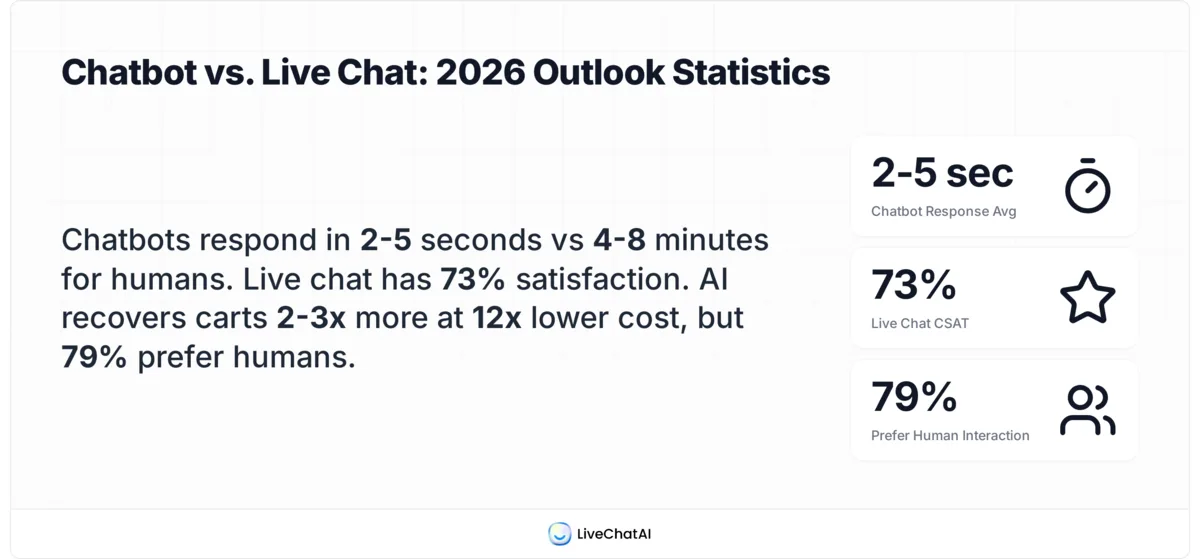
Speed is the cleanest win for the bot. According to Robylon, AI chatbots respond in 2-5 seconds on average, while human agents on live chat take 4-8 minutes and email takes 6-24 hours. That's a 60x to 100x gap. For a customer asking "where's my order," the bot answers before the human has even read the message. The speed gap also compounds across a queue: a bot at 1,000 simultaneous chats still answers in 5 seconds, while a 5-agent live chat team at the same volume puts most customers in a 30+ minute hold.
Availability (24/7 vs business hours)
The bot never logs off. A live chat team in one time zone covers maybe 8-10 hours a day. To get round-the-clock human coverage you need a follow-the-sun rotation across three regions, which roughly triples your headcount cost. In our LiveChatAI customer audits, the after-hours window (8 PM to 8 AM local) is where bots quietly resolve 30-40% of total ticket volume that would otherwise sit in a queue until morning.
Cost per interaction
The unit economics don't favor humans. A bot conversation costs cents in API and infrastructure spend. A human chat costs the agent's loaded hourly rate divided by however many chats they handle that hour, usually $3 to $8 per resolved ticket. According to Neuwark, AI chatbots recover 2-3x more abandoned carts at 12x lower cost than live chat in ecommerce. The cost gap widens as volume grows, which is why fast-growing SaaS companies hit a bot-or-bust moment somewhere between 5,000 and 20,000 monthly tickets.
Personalization and empathy
Bots can be personalized with CRM data, order history, and segment tags, and that gets you maybe 70% of the way to "feels human." The remaining 30% is where live chat still wins. A customer venting about a delayed wedding gift wants a person to acknowledge that the wedding is the weekend, not a bot that pulls up the tracking number. Empathy is currently a moat humans hold. The bot can fake warmth with friendly copy, but it can't read between the lines when a customer says "this is fine" and means the opposite. Agents pick that up in seconds and adjust the tone of the next reply, which is the difference between a saved relationship and a churn.
Scalability under load
A bot handles 1 conversation or 10,000 the same way. A live chat team hits a wall fast. During Black Friday or a viral moment, queues balloon, agents context-switch, and CSAT drops. After watching support teams transition from human-only to hybrid setups during peak season, the pattern is brutal: human-only teams see CSAT drop 15-25 points during traffic spikes; hybrid teams hold within 3-5 points of baseline because the bot absorbs the routine surge.
Setup time and complexity
A modern AI chatbot trained on your help docs goes live in hours, not weeks. Hiring and onboarding a live chat agent takes 4-6 weeks before they're productive, plus ongoing training for product changes. The bot scales setup time at zero marginal cost, the live chat team scales it linearly with headcount. There's also a maintenance angle, the bot needs its knowledge base refreshed when product or policies change, but that's a half-day job for the docs team. Updating an entire support team takes a kickoff meeting, a Loom recording, and three weeks of "wait, did we change that?" follow-ups.
Customer satisfaction (with the human-preference nuance)
This one needs a careful read. According to Nextiva, live chat earns a 73% satisfaction score versus 61% for email and 44% for phone. Live chat by itself wins satisfaction. But there's a twist: per SurveyMonkey, 79% of Americans strongly prefer interacting with a human over an AI agent, especially for anything emotional or complex. The takeaway isn't "humans always win on CSAT." It's "humans win on CSAT for the moments they're worth waiting for, and bots win for the moments customers want answered immediately."
When to use a chatbot
The bot is the right tool when speed matters more than nuance and the question has a known answer somewhere in your knowledge base. The pattern across these use cases is repeatable, deterministic queries with high volume, the kind of work that burns out human agents and rewards the bot's ability to grind through identical questions without context-switching costs. Six use cases where chatbots consistently outperform live chat:
• FAQs and policy questions: Returns policy, shipping times, business hours, account setup. These are the highest-volume tickets in almost every support inbox, and they have stable, repeatable answers. A bot trained on your help docs resolves them in seconds with zero queue.
• Order tracking and account lookups: Anything the bot can pull from an API in real time. "Where's my order," "what's my plan," "when does my subscription renew." These are deterministic queries with one correct answer, which is exactly what bots do well.
• Lead qualification: Before a prospect ever talks to a human, a bot can ask the basic qualifying questions, pull data from enrichment APIs, and route hot leads straight to sales. Live chat triggers work well for this too, but the bot does the qualifying without burning agent time.
• After-hours coverage: Anything that comes in between 8 PM and 8 AM local. Even if the bot can't fully resolve the ticket, it captures the question, sets expectations, and queues the conversation for the morning team with full context.
• Repetitive task triggers: Password resets, address changes, refund initiation, invoice resends. These are workflow steps, not conversations. The bot fires the API call and confirms.
• Multi-language support: A bot translates on the fly. A live chat team needs a multilingual agent on the roster for every language you serve, which gets expensive fast for any company with international customers.
For the last category, our piece on self-service support goes deeper into how bots and knowledge bases pair to deflect ticket volume.
When to use live chat
Live chat earns its cost the moment a conversation needs judgment, empathy, or persuasion. The unifying trait across these scenarios is that the right answer depends on context only a human can fully read, the customer's tone, the relationship history, the political reality of the situation. Six use cases where you want a human at the keyboard:
• Complex multi-step troubleshooting: When the issue spans multiple systems, requires diagnostic back-and-forth, or doesn't match anything in the knowledge base. A senior support agent can connect dots a bot can't see, especially for technical products with edge cases.
• Sensitive or emotional matters: Billing disputes that involve real money, account closures, complaints about a frustrating experience, anything where the customer is upset. A human can de-escalate. A bot will make it worse.
• High-value customers: Enterprise accounts, top-tier subscribers, customers who spent $50K with you last quarter. The unit economics flip when one conversation could save a $100K renewal, an $8 chat is cheap insurance.
• Formal complaints and refund disputes: When the customer feels wronged, they want a human to hear them out and say "I see what happened, here's what we'll do." Bots can't grant that closure. Different customer service models handle escalations differently, but the principle holds across all of them.
• Sales conversations and product demos: Asking discovery questions, surfacing objections, recommending the right plan. Sales is consultative work, and consultative work needs a human who can read tone and adjust the pitch in real time.
• Onboarding and white-glove setup: When a new customer is wiring up integrations, importing data, or making the first decisions that shape their long-term workflow. A 20-minute live chat session here can save 20 hours of churn-driven support six months later.
The shared thread across all six is that the conversation needs a person who can change the answer based on context, not just retrieve the right one.
Why hybrid (chatbot + live chat) wins in 2026
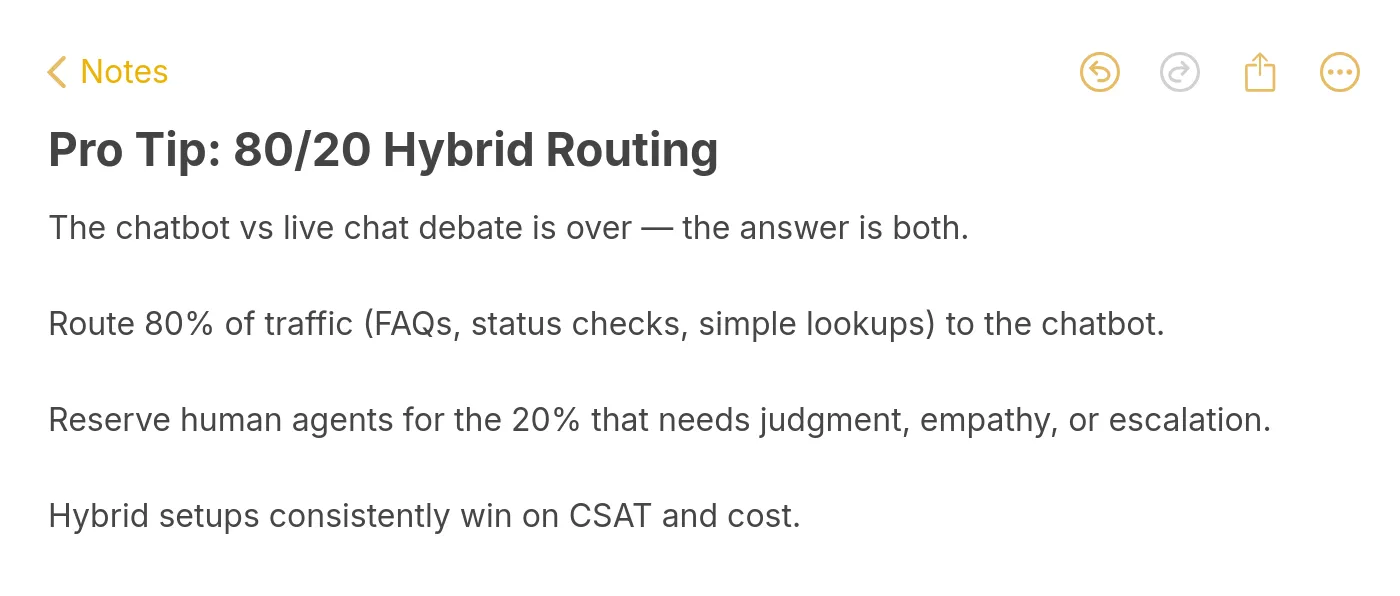
Neither tool wins on its own. Bots are too cold for hard moments. Humans are too slow and expensive for easy ones. The setup that wins is hybrid, where the bot handles the front door and the human steps in when it matters. The 80/20 split is the rule of thumb that keeps showing up in the data.
According to Conferbot, the hybrid approach (chatbot plus live chat plus form) achieved a 4.5/5 CSAT score, higher than any single channel alone, and generated 47% more conversations than chatbot or live chat in isolation. The reason is intuitive once you watch it run: the bot resolves the easy stuff in seconds without burning an agent, the agent gets handed the hard stuff with full context already collected, and the customer never sits in a queue for a question that didn't need a human anyway.
The 80/20 split works across most B2B SaaS and ecommerce support inboxes. Bot handles the 80% routine, agents handle the 20% complex. In our LiveChatAI customer audits, teams that hit a clean 80/20 split typically see ticket-resolution cost drop 50-70% while CSAT holds steady or improves. The improvement comes from two places: agents stop burning time on "where's my order" and start spending it on the conversations where their judgment matters, and customers with quick questions stop waiting in line behind customers with hard ones.
The market is pricing this in fast. According to ChatMaxima, the global AI customer service market was valued at $12.06 billion in 2024 and is climbing every quarter. The growth isn't bot-replacing-humans, it's bot-multiplying-humans. Teams that adopt hybrid early get to scale ticket volume without scaling headcount linearly, which is the only way to handle viral spikes, seasonal surges, or 3x growth quarters without melting down.
The agent experience also changes for the better in a hybrid model, which most teams don't see coming until they live it. When agents stop fielding "where's my order" 50 times a day, the work that lands in front of them is meatier, the cases that need actual problem-solving and customer relationship judgment. Burnout drops, retention climbs, and the senior agents who used to leave for product roles start wanting to stay.
This is also why the framing of AI chatbots vs human service as a winner-take-all fight misses the point. The teams winning in 2026 don't pick a side. They build the routing logic that pushes each conversation to whichever option delivers the best outcome for that ticket type, in that time zone, at that customer tier.
How to set up a hybrid chatbot + live chat workflow
Building the hybrid workflow takes four moving parts: routing logic, escalation triggers, handoff with context, and bot training that improves over time. Here's how to wire each one without overengineering it.
1. Routing logic: Default every incoming chat to the bot. Don't make customers pick "talk to a human" up front, that adds friction and trains them to skip the bot even for questions it could answer in two seconds. Let the bot try first, and let it know when it's beat.
2. Escalation triggers: Build explicit triggers that hand off to a human. The four that matter most: the customer types "agent," "human," "rep," or "person"; the bot's intent confidence drops below a threshold (usually 60-70%); the customer mentions a refund, complaint, or cancellation; the customer is on a high-value plan or named-account list. Hit any trigger, route to a live agent immediately.
3. Handoff with context: The agent should never have to ask "what's this about?" Pass the full transcript, the customer's plan and order history, and the bot's best guess at intent. A clean handoff turns a frustrating "I just explained this to a robot" moment into a "the agent already knew the situation, they just confirmed and fixed it" moment. This is the single biggest CSAT lever in the hybrid setup.
4. Train the bot on past chat logs: The bot gets smarter when you feed it the conversations agents resolved well. Pull anonymized transcripts of high-CSAT live chats, extract the question-answer pairs, and add them to the bot's knowledge base on a weekly cadence. Within a quarter, the bot starts handling tickets that used to require escalation, and the 80/20 split slowly tilts toward 85/15 without quality dropping.
One pattern I'd skip: trying to build the perfect hybrid from day one. Ship the bot with the top 20 FAQs, route everything else to humans, and tighten the bot's coverage week by week based on what the agents are actually answering. The teams that try to launch with a 200-FAQ knowledge base usually end up with a bot that gives confidently wrong answers across half the topics, and customer trust takes months to recover.
Another piece worth wiring in early is feedback collection. Add a one-click "did this help?" prompt at the end of every bot conversation, and pipe the negatives into a weekly review queue. The patterns surface fast, the bot keeps misreading "cancel my plan" as "cancel my order," or it keeps citing the wrong help article for refund questions. Each fix shaves a few escalations off the weekly count, and within a quarter the bot stops needing the same handholding it did at launch.
Pick your chatbot + live chat split this week
You don't need a 6-month rollout to start running hybrid support. Pick one ticket category your team handles 50+ times a week, like order tracking or password resets, and route it through the bot starting Monday. Keep live chat as the fallback for everything else. Measure first-touch resolution and CSAT for two weeks, then expand the bot's coverage to the next category. Most teams hit a clean 80/20 split inside a quarter doing it this way, and the cost-per-ticket curve starts bending almost immediately.
If your team is already running both and feels stuck, the highest-impact fix is usually the handoff. Audit the last 20 escalations and check whether the agent had to ask the customer to repeat themselves. If yes, that's where to start, not at the bot's accuracy and not at the routing rules. Customers don't rate a hybrid setup on whether the bot is brilliant, they rate it on whether the human picked up where the bot left off without making them re-explain the situation. Fix the handoff and the rest of the workflow tends to fall into place.
Frequently asked questions
What's the real tradeoff between a chatbot and live chat?
The tradeoff is speed and cost versus empathy and judgment. A chatbot answers in 2-5 seconds at roughly a tenth of the cost of a live chat ticket, but it struggles with anything emotional, ambiguous, or off-script. Live chat handles those moments well but takes 4-8 minutes per response and costs $3-$8 per conversation. Most teams stop trying to pick one and run both.
When is live chat preferable over a chatbot?
Live chat wins when the question needs human judgment, when the customer is upset, when the conversation has real money on the table (refund disputes, enterprise renewals, sales calls), or when the issue is too complex for the bot's training data. The pattern is consistent: if the answer changes based on context the bot can't see, hand it to a human.
Can chatbots and live chat coexist?
Yes, and the hybrid setup is now the dominant pattern in B2B SaaS support. The bot takes the front door, handles the routine 80%, and escalates the complex 20% to a human with full transcript and context. Hybrid teams consistently outperform single-channel teams on CSAT, response time, and cost per ticket.
Which is easier to set up on my website, a chatbot or live chat?
A modern AI chatbot is faster to set up. Train it on your help docs and product pages, drop the widget on your site, and you're live within hours or days. Live chat takes longer because the bottleneck is hiring, you need agents on the roster, training on the product, and a shift schedule that covers your support hours.
Can chatbots learn from live chat sessions and improve?
Yes, this is one of the highest-impact moves in a hybrid setup. Anonymized live chat transcripts are gold-standard training data because they're real customer questions matched to high-quality human answers. Most platforms let you feed transcripts into the bot's knowledge base on a weekly or monthly cadence, and the bot's first-touch resolution rate climbs steadily as a result.
How much does a chatbot cost compared to live chat?
Per-conversation, a chatbot runs roughly $0.10-$0.50 in API and infrastructure spend. A live chat conversation runs $3-$8 once you factor in the agent's loaded cost. Annual platform pricing varies, AI chatbot platforms typically start at $50-$500 per month for SMB plans, while live chat tooling adds the agent salary on top of $20-$100 per agent per month for the software.
Do customers actually prefer talking to a chatbot or a human?
The data is split and that's the whole point. Customers prefer humans for anything emotional or complex, 79% of Americans say so. But the same customers prefer the bot for "where's my order" because they want the answer immediately, not in 8 minutes. The hybrid setup honors both preferences, which is why it scores higher than either channel alone.
For further reading, you might be interested in the following:
Mastering FAQ Chatbots: A Helpful Guide with Use Cases