







A smart Q&A chatbot for FAQs is a retrieval-augmented assistant trained on your own help docs and question-answer pairs that resolves repeat tickets without hallucinating. To build one, curate 50 sharp Q&A pairs, pick an LLM-with-RAG approach, train on your data sources, tune the system prompt, set escalation rules, and ship.
What is a Q&A chatbot for FAQs?
A Q&A chatbot for FAQs is a narrow-scope conversational assistant that answers a defined set of repeat customer questions by retrieving from a curated knowledge base instead of generating freeform text. The clearest way to think about it: a generic chatbot tries to be a friend, while a Q&A chatbot tries to be your fastest support agent on her best day.
The technical anatomy is simpler than most write-ups make it sound. A user asks a question, the bot embeds the question into a vector, retrieves the closest matching documents from your indexed help content, and an LLM rewrites the retrieved passages into a clean answer with a source citation. That retrieval-first pattern is what stops the bot from inventing pricing, refund policies, or product specs that do not exist.
I run customer success at LiveChatAI and we ship FAQ bots every week, so the failure mode I see most often is teams skipping the "narrow scope" part. They paste their entire 4,000-page help center into a generic LLM, get plausible-sounding nonsense, and conclude that AI is not ready. The opposite is true. A bot trained on 60 sharp Q&A pairs almost always outperforms one trained on 600 padded ones, because the retriever has cleaner signal to match against.
What separates a Q&A chatbot from a broader assistant or AI agent is the boundary. It does not book hotels, write code, or roleplay. It answers questions that already have correct answers in your documentation, and it escalates everything else to a human. That focused contract is what makes deflection rates of 60 to 80 percent realistic for support teams that build it right. For a deeper background read, our guide to FAQ chatbots covers types, benefits, and architecture in more detail.
Why FAQ chatbots matter in 2026
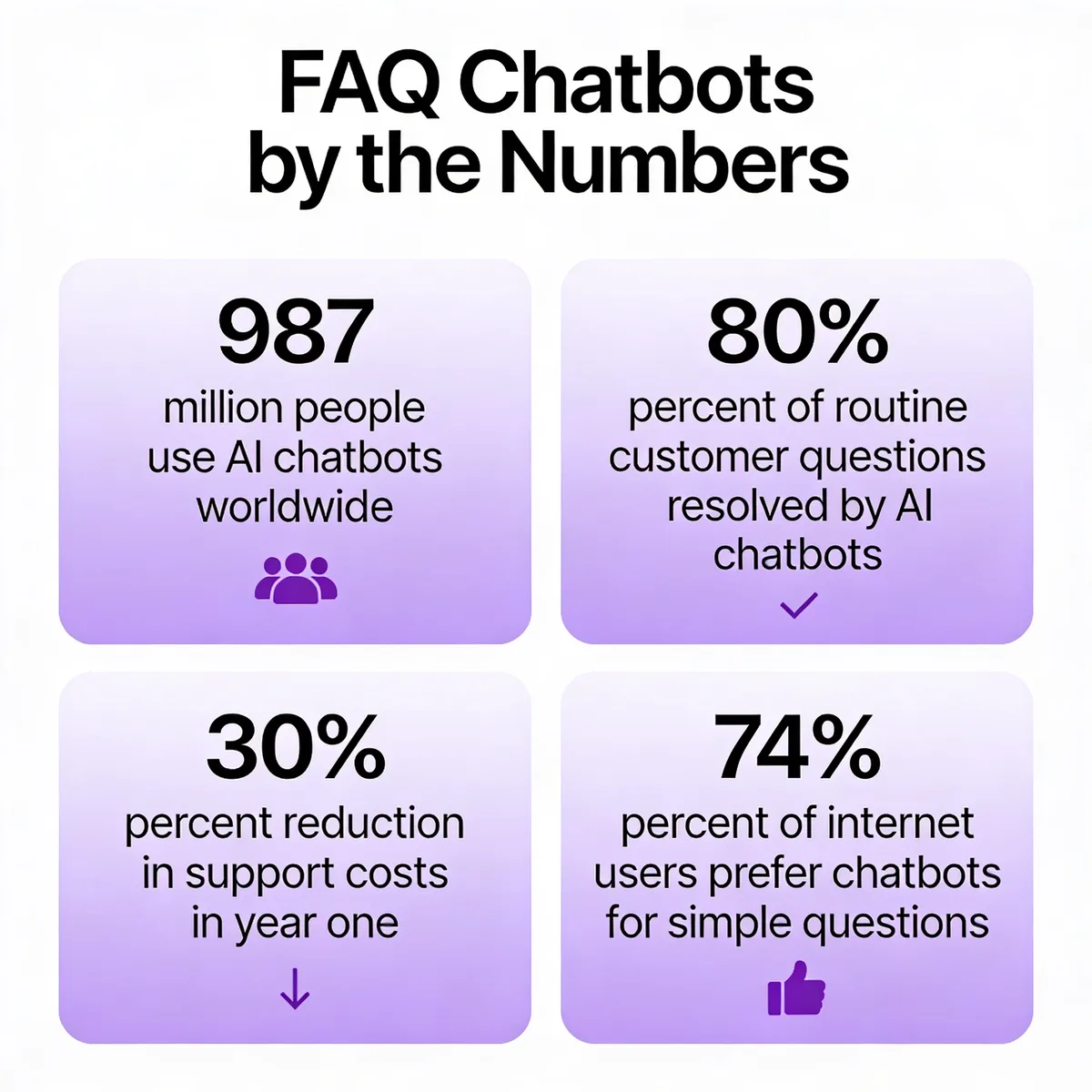
The market has stopped arguing about whether chatbots work and started arguing about how to deploy them well. According to Orbilon Technologies, about 987 million people now use AI chatbots worldwide and the global market has crossed 11 billion dollars, with adopters reporting an 8-to-1 return on every dollar spent. The volume alone changes the math for any support team still triaging password resets manually.
The deflection numbers are even harder to ignore. According to Boei, 80 percent of routine customer questions can be resolved by AI chatbots, freeing human agents to focus on the 20 percent that drive customer loyalty. In our customers' deployments, we see the same pattern: the first thousand resolved tickets are almost all variations of "where is my order," "how do I cancel," and "do you ship to my country."
The forward-looking shift in 2026 is architectural. Generic chatbots are being replaced by retrieval-augmented systems that cite the source paragraph for every answer, which both reduces hallucinations and gives AI search engines like Perplexity and Google AI Overviews a clean fact to extract. If your bot cannot show its work, it will be replaced inside 12 months by one that can.
What are the benefits of building a Q&A chatbot?
The headline benefit most teams chase is cost reduction, and the data supports the chase. According to Boei, companies using AI-powered FAQ deflection report a 30 percent reduction in support costs within the first year of deployment. That number is not a marketing fairy tale once you do the unit math: the average human-handled ticket costs 5 to 12 dollars, while a contained chatbot conversation costs cents.
24/7 deflection without staffing nights: A Q&A bot answers password resets at 3 a.m. without paying overtime. For global SaaS companies, that single shift covers the entire APAC business day at zero marginal cost.
Agent time savings on repeatable tickets: When the bot handles tier-zero questions, your humans get to spend their day on the gnarly account migrations and refund disputes that actually need empathy. Burnout drops, CSAT on escalated tickets goes up, and the queue stops feeling endless.
Response consistency across every channel: Three agents will give three slightly different answers to the same refund question. A trained bot gives the same correct answer every time, which makes legal, compliance, and brand voice review tractable instead of a perpetual game of whack-a-mole.
Multilingual support without hiring translators: Modern LLM-backed bots handle 50 plus languages out of the box. For early-stage SaaS expanding into a new market, that removes one of the largest gating costs of internationalization.
Knowledge-base reusability you can finally measure: The same Q&A pairs that train your bot also power site search, in-app help, and onboarding tooltips. Your help center stops being a graveyard nobody visits and starts being the source of truth your whole product references.
Customer self-service customers actually like: According to Master of Code, 74 percent of internet users prefer using chatbots for simple questions. The bot is not foisted on customers who hate it, it is given to customers who already wanted it.
Pipeline-quality lead capture as a side effect: When the bot answers product questions on your pricing page, it can also collect emails, qualify intent, and route warm leads to sales. The same widget that deflects support tickets becomes a low-friction pipeline channel.
What are the common use cases for Q&A chatbots?
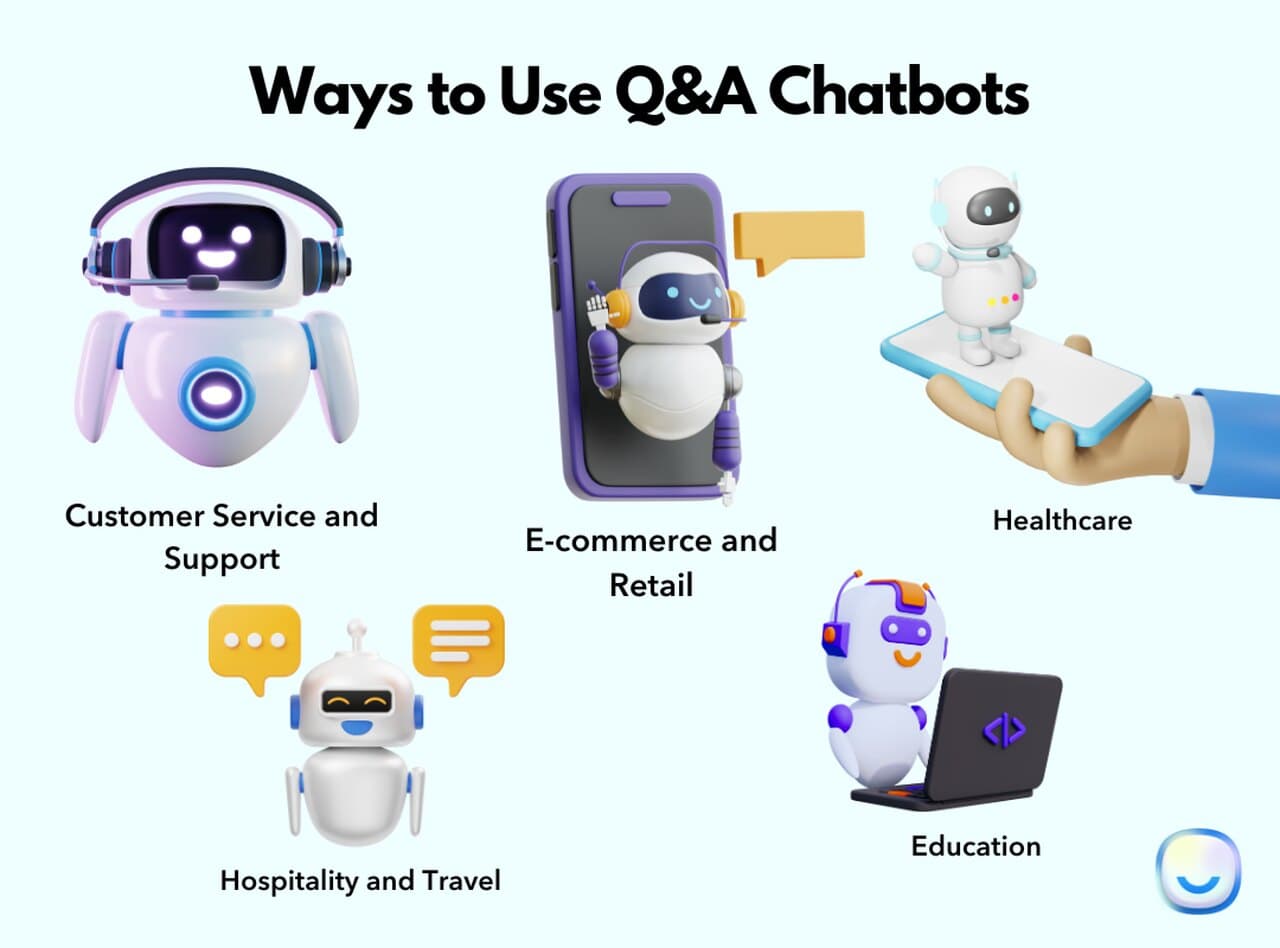
Customer support and help-center deflection: The flagship use case. Companies from early-stage SaaS to enterprise contact centers use FAQ bots to handle repeat questions about account access, billing, integrations, and product behavior. A well-trained bot resolves the predictable 70 percent of tickets and escalates the rest with full conversation context.
E-commerce product and order assistance: Online stores deploy Q&A bots to answer "where is my order," "what is your return window," and "does this come in size medium." The same bot can recommend products, send shipping updates, and recover abandoned carts. Our breakdown of e-commerce chatbots walks through the specific patterns that work for Shopify and WooCommerce stores.
Healthcare information and triage: Hospital systems and clinics use Q&A bots to answer questions about visiting hours, appointment scheduling, insurance, and basic symptom information. The bots are tuned to escalate anything clinical and to never give medical advice, which keeps them on the right side of regulators and patient safety.
Hospitality, travel, and concierge: Hotels and travel platforms run Q&A bots as virtual concierges that field questions about check-in times, local restaurants, transportation, and booking adjustments. The pattern works because guests have a finite, predictable set of questions and the answers do not change hour to hour.
Education and student services: Universities and online learning platforms use Q&A bots to handle questions about deadlines, course registration, financial aid, and campus services. The bot reduces the workload on advising staff and gives students answers at midnight when nobody is in the registrar's office.
Internal IT, HR, and employee helpdesk: One of the fastest-growing use cases is employee-facing FAQ bots that answer "how do I reset my SSO password," "what is our PTO policy," and "how do I expense this." Internal deployments are easier to launch because the data is internal and the audience is forgiving of early bugs.
How to build a smart Q&A chatbot for FAQs in 8 steps
The 8 steps below work whether you are building on a no-code platform like LiveChatAI or coding from scratch with LangChain, a vector database, and an open-source LLM. The technology choices change but the workflow does not. Skip any of these steps and the failure mode is predictable: the bot ships, hallucinates, gets escalated to leadership, and quietly gets turned off two months later.
Step 1: Curate the right FAQ list before training anything
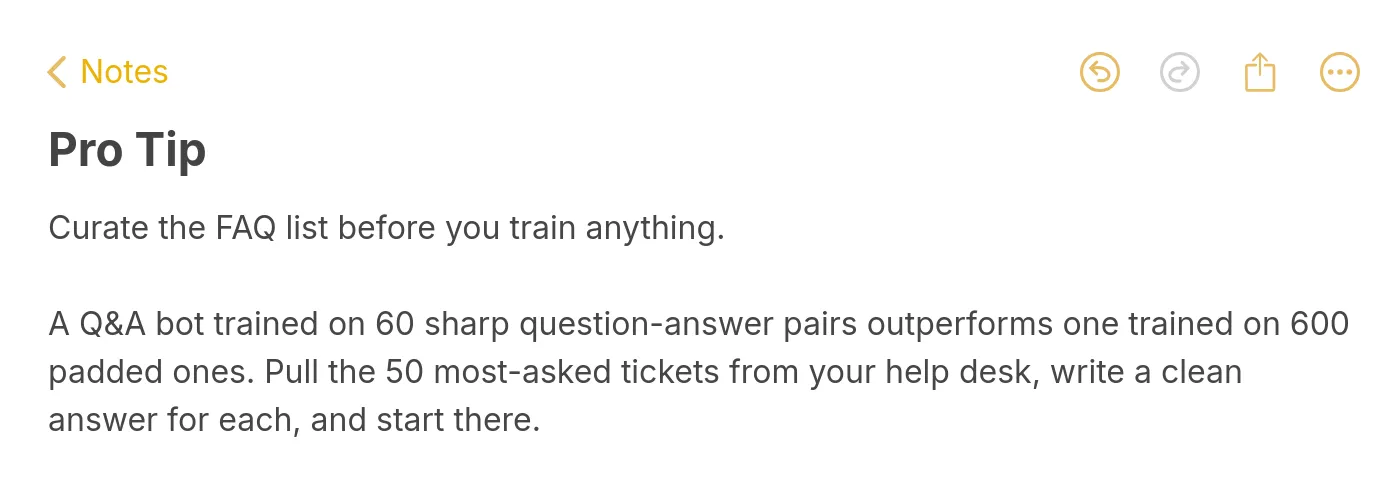
Pull your last 90 days of tickets, conversations, or contact-form submissions and group them by intent. Aim for 40 to 80 distinct questions, not 600. The single biggest predictor of bot quality is the cleanliness of this list, and the single biggest mistake teams make is trying to train on the entire help center on day one. Garbage in, garbage out is not a cliche here, it is the dominant failure mode.
For each question, write one canonical answer in the voice you want the bot to use. Three to five sentences is the sweet spot. Longer answers get truncated by the retriever, shorter ones lose context. If two questions deserve the same answer, merge them. If one question deserves three different answers depending on context, split it into three intents with disambiguating language.
The anti-pattern I see weekly: someone exports their entire 4,000-article help center as a PDF, drops it into a chatbot platform, and asks why the bot is making up integration partners that do not exist. The answer is that the retriever cannot find a clean signal in 4,000 noisy articles, so the LLM gap-fills with plausible nonsense. Curate first, scale later.
A useful framing is the 80/20 rule applied to support: list every question you have answered three or more times in the last quarter, and you will usually have your training set in under an afternoon. Add a "we do not know yet" answer for everything else and let the bot escalate gracefully instead of guessing. Our guide to knowledge base chatbot design covers the curation framework in more depth.
One last curation tip from running this exercise dozens of times: have the agent who actually wrote the original tickets review the canonical answers, not the manager. The agent will catch the phrasing customers use in real life and the manager will catch the phrasing the brand wishes customers used. Both are useful, but only the agent version trains a bot that recognizes how people actually ask.
Step 2: Pick your model approach (LLM vs intent vs hybrid)
You have three real architecture choices and the trade-offs matter. The first is RAG-on-LLM: a vector store of your Q&A pairs plus an LLM like GPT-4o or Claude that rewrites the retrieved snippets into an answer. This is the default in 2026 because it generalizes well to phrasings you did not anticipate and produces natural-sounding answers without hand-tuning every intent.
The second is intent-based: classic NLU systems that map user input to a defined intent and return a canned answer. Think Rasa, Dialogflow-style routing, or BERT-based classifiers. These are auditable, predictable, and cheap to run, but they fail hard the moment a user phrases something outside the trained intents. They make sense in regulated industries where every answer must be pre-approved.
The third is hybrid: an intent classifier that routes high-confidence matches to canned answers and falls back to RAG for everything else. This is what most enterprise deployments converge on after their first year. The canned answers cover regulated content (refunds, compliance, pricing) and the RAG layer catches the long tail of edge questions.
The cost dimension is real. RAG-on-LLM costs roughly 0.5 to 2 cents per conversation depending on model choice. Intent-based costs are essentially zero per request after training. For low-volume internal tools, RAG is fine. For consumer apps with millions of monthly conversations, you will want at least a hybrid layer to keep model spend predictable. Our roundup of AI agent builders compares the architectures across the major platforms.
One question worth answering before you commit: how much of your content is going to change in the next year. If your help center is stable, intent-based gives you cheaper, more predictable answers. If you ship product weekly and the docs change with every release, RAG saves you the pain of retraining intent classifiers every sprint. Match the architecture to your release cadence, not to whichever vendor you spoke to last.
Step 3: Choose a Q&A chatbot platform that fits your stack
Selection comes down to six criteria, in this order. First, native data ingestion: can the platform crawl your website, accept PDF uploads, and import Q&A pairs from a CSV without a custom integration? If you have to build a pipeline before you can train, your time-to-first-bot doubles.
Second, source citation. Does the bot show which document or Q&A pair the answer came from? This is not cosmetic, it is what makes the bot auditable when an answer goes wrong, and it is what AI search engines look for when deciding whether to surface your bot's answers in their own results.
Third, escalation hooks. The bot must be able to hand off to a human agent inside Intercom, Zendesk, your custom CRM, or a Slack channel without losing the conversation history. Bots that dead-end at "I cannot help with that" are a worse customer experience than no bot at all.
Fourth, embed flexibility. You want a script tag for your marketing site, an iframe for your app, and ideally a WhatsApp or messenger embed. Fifth, security and compliance: SOC 2, GDPR, optional EU data residency, and bring-your-own-key for the LLM if you handle regulated data. Sixth, transparent pricing that scales with conversations rather than per-seat.
For no-code teams, LiveChatAI handles all six out of the box and trains in minutes on websites, PDFs, Q&A pairs, and YouTube transcripts. For dev-first teams, building on LangChain plus a managed vector database gives you maximum control at the cost of maintenance overhead. If you are evaluating alternatives, our comparisons of Wonderchat alternatives and Chatfuel alternatives walk through the trade-offs platform by platform.
One non-obvious selection criterion: time-to-first-bot. Score every platform on how long it takes from signup to a working bot answering test queries. Anything over an afternoon means you will lose internal momentum during the rollout. The best platforms get you to a usable bot in 30 minutes, which is short enough to demo to leadership in the same meeting where you got the budget.
Step 4: Train your chatbot on your FAQ data sources
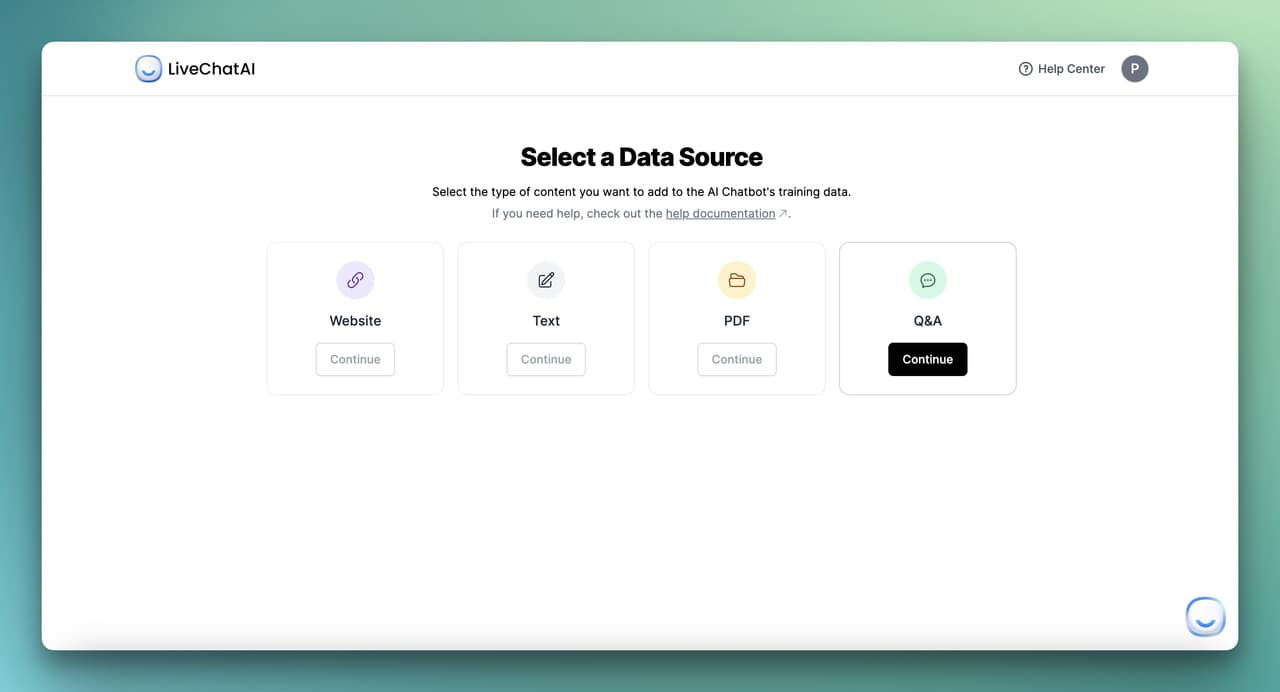
Most modern platforms support four ingestion routes and you should use all of them. The first is a website crawl: point the bot at your help.yourdomain.com or your marketing site and let it scrape every public page. This is the fastest way to get baseline coverage, and it works because your help center is already structured around questions.
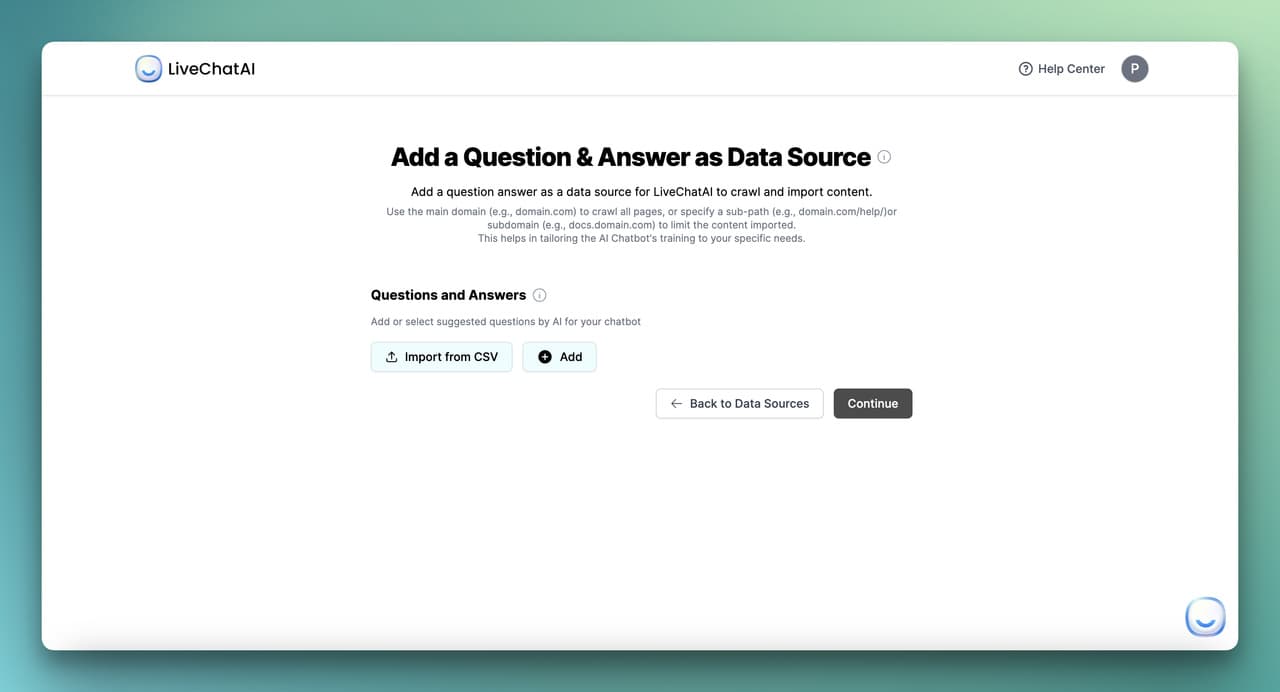
The second is PDF and document upload. Product manuals, policy documents, and onboarding playbooks rarely live on a public URL but they hold the answers to a third of your support tickets. Drag, drop, train. The third is direct Q&A pair entry: this is your highest-quality training data because every pair is a verified question with a verified answer in your voice.
The fourth, often overlooked, is YouTube transcript ingestion. If you have product walkthroughs, webinars, or customer office hours on YouTube, the spoken answers in those videos are training data your competitors do not have. Modern platforms transcribe, chunk, and embed video content automatically.
Inside LiveChatAI specifically, you select Q&A as a data source, paste pairs in or import a CSV, and click train. The retriever rebuilds in under a minute for sets under 1,000 pairs. Test queries immediately, look at which source the bot is citing, and refine the pair if the citation is wrong even when the answer happens to be right. The citation matters as much as the answer because that is what tells you whether the retriever is healthy.
One process tip from running this every week: do the website crawl first, then audit what the bot got from the crawl, then add Q&A pairs to fill the gaps. If you start with Q&A pairs, you will write 200 of them and discover the crawl already covered 60 percent. Sequence matters for your time budget, even when the end result is identical.
Step 5: Tune the system prompt, persona, and tone
The system prompt is where you tell the bot who it is, what it can do, and what it must refuse. A weak prompt produces a generic assistant that hallucinates politely. A strong prompt produces a focused agent that defers to the source documents and escalates anything outside scope.
A good Q&A system prompt has four sections. Identity ("You are the support assistant for [Company], a [one-line product description]"). Scope ("You answer questions about [list]. You do not answer questions about [list]"). Behavior ("Always cite the source document. If you are not at least 80 percent confident, say so and offer to escalate"). Refusal pattern ("If asked about pricing changes, refunds, or legal matters, say 'Let me get a human teammate on this' and trigger handoff").
Persona is a separate dial. Should the bot sound formal, casual, peppy, or terse? Match your existing brand voice rather than inventing a new one. The fastest way to get this right is to paste five real support replies from your best agent into the prompt as few-shot examples and tell the model to write in that voice.
The refusal pattern is the most underrated part. A bot that says "I'm not sure, but here's a guess" is worse than a bot that says "I don't have that information yet, let me connect you with a teammate." In our customers' deployments, switching to explicit refusal language drops the wrong-confidence rate by a third within the first week. That alone can move your CSAT a full point.
Ship the system prompt to a sandbox, throw 20 messages at it, and revise. Most teams iterate on the prompt for two or three rounds before launch and then lock it. Version-control the prompt the way you would version-control code, because a one-word change can shift the bot's behavior across thousands of conversations. Treat the system prompt as a deployable artifact, not a checkbox.
Step 6: Configure escalation and human handoff rules
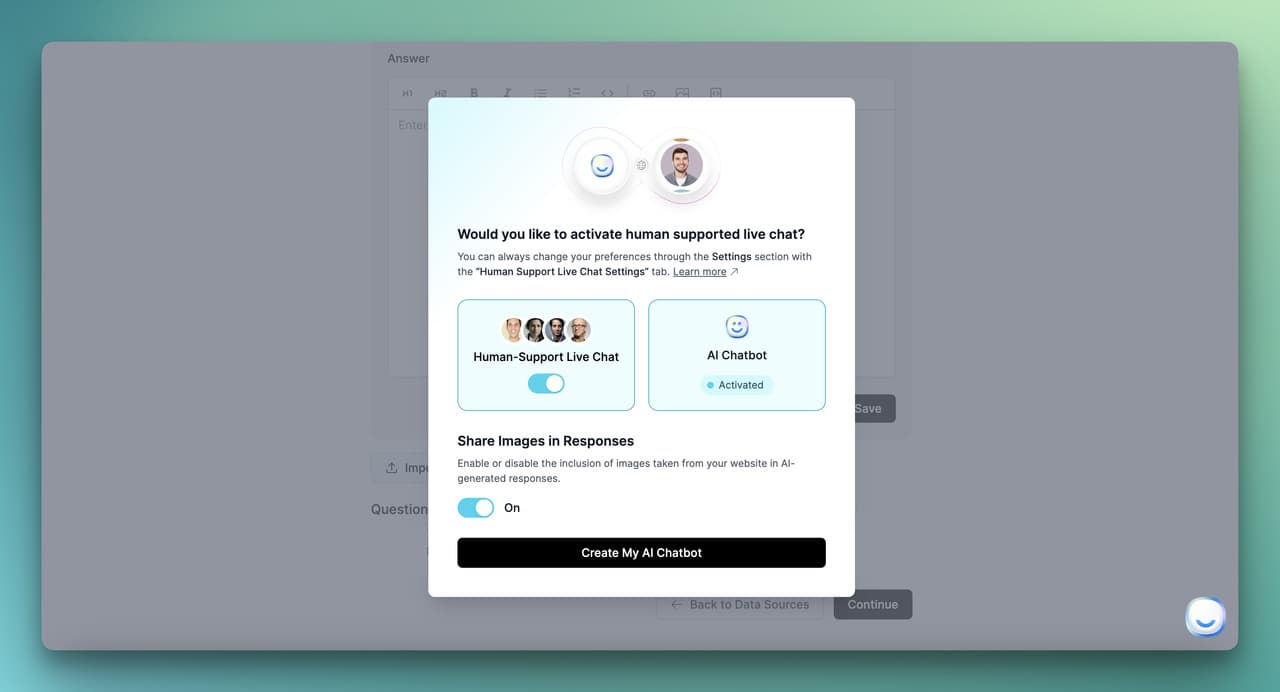
Decide which conversations the bot fully resolves, which it always escalates, and which it confirms with a human before sending. The fully-resolves bucket is where your deflection rate lives, so be intentional about it. Password resets, order tracking, business hours, return policies, integration documentation: these can resolve without a human in the loop, every time.
The always-escalates bucket protects you from the conversations where being wrong is expensive. Refund requests above a threshold, billing disputes, compliance questions, anything mentioning "lawyer" or "cancel my account," any signal of churn risk, and any conversation where the user types "agent" or "human" twice. Hard-code these as routing rules, do not leave them to the model's judgment.
The confirm-before-sending bucket is where humans review the bot's draft answer before it goes out. This is overkill for most use cases but essential in regulated industries: healthcare, finance, legal. Configure your platform so the bot drafts, the human reviews in 15 seconds, and the customer sees an answer that the bot wrote but a human signed off on.
The handoff itself must be clean. The full conversation history needs to land in your ticketing tool or live chat queue with the bot's last answer flagged so the human knows where the bot stopped. If your handoff loses context, your agents will be furious within a week and the bot will get blamed for problems it did not cause.
Test the handoff path before you announce the bot to customers. Send a message designed to escalate, watch the conversation arrive in the human queue, confirm the agent sees the full transcript, and time how long the user waits between handoff and first human response. Anything over two minutes during business hours and you will need to staff differently or temper the escalation rules.
Make sure the customer always knows when they are talking to a human versus the bot. The transition message should be explicit: "Connecting you with our team now, Sarah will be with you in a moment." Implicit handoffs where the conversation just goes quiet for 90 seconds are the single most common reason customers abandon a chat and call the phone number instead.
Step 7: Test with persona-based conversations and edge cases
Build 10 to 15 persona scripts before launch and run each one end to end. A persona is a half-page brief: "Sarah, returning customer, wants to cancel her subscription because she misread the renewal date and is annoyed." Then write five turns of dialogue and see how the bot handles each one.
The personas should cover four buckets. Happy path: customer asks a question the bot definitely knows the answer to. Edge case: customer phrases the question in an unusual way, uses a typo, or asks two questions at once. Out of scope: customer asks something the bot should refuse, like a competitor comparison or a personal opinion. Adversarial: customer tries to jailbreak the bot, demand a discount, or extract internal information.
For each persona, score the bot on three dimensions: did it answer correctly, did it cite a real source, and did it escalate when it should have. Anything below 90 percent on any dimension means the system prompt or training data needs another pass before launch. The cheap fix at this stage is a sentence in the prompt; the expensive fix after launch is a public failure.
If you operate in a regulated industry, this is also the moment for compliance and legal sign-off. Send the persona transcripts to your compliance team along with the system prompt and the data sources, and get written approval before deploying to customers. The 30 minutes of paperwork upfront prevents the six-month enforcement cleanup later.
One pattern that saves time during this phase: record the persona scripts as test cases and rerun them after every prompt change. If the system prompt changes in week three to fix a refusal pattern, you want to know within five minutes whether the change broke the happy-path scripts. Manual testing collapses fast at scale; scripted regression keeps you honest.
Step 8: Deploy, embed, and monitor week-one performance

Most platforms give you a script tag, an iframe option for app embeds, and a full-page chat URL you can link to from email. Drop the snippet on your help center first, not your homepage. The help center traffic already has support intent, so you get high-signal data on whether the bot is helping or hurting before you scale exposure.
Watch the first 200 conversations like a hawk. Read every transcript end to end. You are looking for three patterns: questions the bot should know but did not, answers that were technically correct but in the wrong tone, and escalations that should have resolved. Each pattern points to a specific fix: missing training data, system prompt tuning, or routing rule adjustment.
Set up two dashboards before you ship. The first tracks volume, deflection rate, escalation rate, and CSAT (thumbs up vs thumbs down on each answer). The second is a queue of conversations flagged with low confidence or thumbs-down, sorted by recency. Triage the queue twice a day for the first two weeks and the bot will improve faster than any of your offline tuning would have.
Once the bot is steady on the help center, expand to product pages, the app itself, and email signatures. Each new surface is a separate experiment, not a copy-paste. Customer intent on a pricing page is different from intent on a help article, and the bot may need a different opening message or escalation rule for each surface. Patience compounds. Speed kills.
The week-one review meeting is non-negotiable. Get the support lead, the product manager, and one engineer in a room and walk through 30 transcripts together. You will surface more useful changes in 60 minutes than in two weeks of solo dashboard-watching, because the three perspectives catch different failure modes. Make this meeting recurring for the first month and quarterly after that.
How GPT and RAG help your FAQ chatbot
Contextual understanding across the conversation
Modern LLMs read a multi-turn conversation as a single context window, which means the bot remembers that the user is asking about an order placed three messages ago when they say "where is it." Older intent-based bots treated every message as standalone, which forced users to repeat context constantly and felt robotic in the wrong way.
The practical effect for FAQ scenarios is that follow-up questions just work. A user asks about return policy, then asks "how do I start one," and the bot understands they mean a return rather than a chat session or a cancellation. That single improvement removes one of the most common reasons users abandon a chatbot conversation and call support instead.
The same context window lets the bot interpret pronouns, ellipses, and shorthand the way a human agent would. "Can you refund it" gets resolved against the order or product mentioned earlier in the chat. This is invisible when it works and frustrating when it does not, which is why context-aware models are now table stakes for any new FAQ bot.
Improved coherency across multi-turn chats
Coherency is what stops the bot from contradicting itself between turn one and turn five. An LLM that has the full conversation in context will not tell the user the policy is 30 days in one message and 60 days in the next, the way a stateless intent bot might. The bot stays on a single thread and the user trusts the answers more.
This matters operationally because long conversations are where customers reveal complex problems. The first message is "billing question," the third message is "I was double-charged on a switched plan with a partial refund pending." A coherent bot tracks all of that, sums the situation correctly, and either resolves it or escalates with full context. An incoherent bot loses the thread and the customer.
The trade-off is cost: longer context windows mean more tokens per request. In practice, capping the conversation history at the last 10 to 15 turns preserves coherency for 95 percent of FAQ conversations without inflating per-conversation cost. Most platforms handle this automatically, but it is worth checking how your provider trims context as conversations grow.
Continual learning from feedback signals
Every thumbs-up and thumbs-down on a bot answer is training data for the next version. Modern platforms use these signals to surface conversations where the bot was wrong, suggest new Q&A pairs to add, and flag answers where the retrieval pulled the wrong source document. Done well, the bot's performance compounds month over month rather than plateauing after launch.
The pattern that works is closing the loop weekly. Pull the lowest-rated 20 conversations of the week, read them in 15 minutes, and either add a new Q&A pair, refine an existing one, or tweak the system prompt. After three months of this, the bot covers ground you never would have predicted at launch and the deflection rate keeps climbing. Our breakdown of self-learning AI chatbots walks through the feedback loop architecture in detail.
What "continual learning" does not mean is the LLM secretly retraining on your conversations. The model weights stay frozen. What changes is the retrieval index and the prompt, both of which you control. That distinction matters for compliance: you are not creating a derivative model of your customer data, you are curating a knowledge base.
Multilingual support out of the box
An LLM-backed FAQ bot will answer in any language the model supports, even if you only trained it in English. The user types in French, the LLM translates the question, retrieves from your English knowledge base, and responds in French. The same data source serves 50 plus languages with no extra work.
That said, "no extra work" is not "perfect quality." For high-stakes markets, you should add language-specific Q&A pairs for the top 50 questions in each language. Idioms, regional product names, and culturally specific phrasing all benefit from native examples in the training set. The base multilingual capability gets you 80 percent of the value, and targeted localization gets you the last 20 percent.
The deployment angle matters too. If you serve users in the EU, Brazil, or Japan, latency to the LLM provider can become noticeable. Some platforms offer regional model endpoints to keep response times under two seconds. Test from each target geography before launch rather than assuming the experience is uniform globally.
Handling complex and ambiguous queries
The hardest user message is the one that contains two questions, a complaint, and a request for a discount in a single paragraph. Older bots picked one intent, answered it, and ignored the rest. LLM-backed bots can decompose the message, address each part, and route the discount request to a human while answering the factual questions inline.
The pattern that works is asking the model to plan before answering. A short reasoning step ("This message contains: a billing question, a feature question, and a request for a discount") followed by structured response generation produces noticeably better outcomes than freeform replies. Most modern platforms expose this as a setting; if yours does not, you can prompt for it explicitly.
For genuinely ambiguous queries ("does it work with my setup"), the right behavior is to ask one clarifying question rather than guess. A well-tuned bot should ask "Which CMS are you using?" instead of inventing an answer that fits half the audience. This is a system prompt change, not a model limitation, and it converts the most frustrating bot interactions into useful ones.
What are the common pitfalls when building FAQ chatbots?
Hallucinations from over-reliance on the LLM: When the retriever returns nothing relevant, an unprompted LLM will invent an answer that sounds right but is not. Fix this by setting a confidence threshold below which the bot must say "I don't have that information" and escalate. Never let the model gap-fill silently.
Stale data that nobody refreshes: The bot ships, the help center changes, and three months later the bot is quoting last quarter's pricing. Set a calendar reminder to re-crawl public sources monthly, and treat any product change as a trigger to retrain. The biggest support disasters I have seen all start with stale training data.
Missing source citation: If the bot cannot point to the document its answer came from, you have no way to debug wrong answers and AI search engines have nothing to extract. Citations are not optional in 2026, they are the audit trail that makes the bot trustworthy.
Ignoring escalation paths and dead-ending users: Every conversation must have a way out to a human. Bots that loop "I'm sorry, I cannot help with that" without offering handoff produce angry support tickets that take three times longer to resolve once a human gets them.
Vague refusals that confuse customers: "I cannot answer that" tells the user nothing. "I don't have current pricing for the enterprise plan, but I can connect you with our sales team" tells them what to do next. Specific refusals are the difference between trust and frustration.
No analytics, no feedback loop, no improvement: Bots that ship without dashboards quietly degrade. Without conversation review and weekly refinement, the bot's performance is whatever it was on day one minus drift. The bots that win are the ones whose owners read transcripts every week.
Generic brand voice that nobody recognizes: A bot that talks like a generic SaaS chatbot dilutes brand equity. Spend an hour pasting your best support replies into the system prompt as few-shot examples. The voice match is one of the cheapest, highest-impact tweaks you can make.
How to measure FAQ chatbot success
Deflection rate: The percentage of bot conversations that end without a human handoff. The honest baseline for a well-trained bot is 50 to 70 percent in month one and 70 to 85 percent by month six. Anything claiming above 90 percent is either a narrow internal tool or measuring deflection wrong.
Containment rate: Distinct from deflection, containment measures how many users got their actual answer from the bot, not just how many did not click "talk to human." Track this through thumbs-up rates and follow-up ticket creation. A high deflection rate with low containment means users gave up rather than got answered.
Resolution rate: The percentage of conversations where the user's stated problem was actually solved. This is harder to measure automatically, so most teams sample 50 conversations a week for manual review. The gap between containment and resolution is your hidden quality problem.
CSAT and thumbs up/down ratios: Add a thumbs rating on every bot answer and read every thumbs-down within 24 hours. A 4-to-1 thumbs ratio is healthy, 2-to-1 is concerning, 1-to-1 means the bot is doing more harm than good and needs immediate work.
Fallback rate: How often the bot says "I don't know" or escalates without trying. A high fallback rate with low CSAT means the training data has gaps. A high fallback rate with high CSAT means the bot is appropriately humble. Read the transcripts to tell the difference.
Time-to-answer: The latency from user message to bot response. Anything above three seconds feels slow. Most modern platforms hit one to two seconds for cached embeddings; if yours is slower, check the LLM provider region and the size of your retrieval index.
Cost-per-conversation: LLM tokens, platform fees, and any escalated agent time, divided by total conversations. The honest number for an LLM-backed FAQ bot is usually 1 to 5 cents per conversation versus 5 to 12 dollars for a fully human-handled ticket. The math is what justifies the project to finance.
Ship your FAQ chatbot in one focused week
Build your Q&A chatbot in a focused week, not a six-month project. Day one, pull the 50 most-asked questions from your tickets and write clean answers. Day two, pick a platform and load the data. Day three, tune the system prompt and define escalation rules. Day four, run persona scripts and patch the gaps. Day five, embed on your help center and start reading transcripts. Iterate weekly from there.
The teams that succeed treat the bot as a product, not a feature. Someone owns the deflection rate, someone reads the lowest-rated conversations, and someone refreshes the training data on a calendar. The teams that fail buy a chatbot, ship it once, and walk away. The technology is finally ready in 2026; the only thing standing between you and a 30 percent support cost reduction is the curation work and the weekly review habit.
Frequently asked questions
How can I test and refine my Q&A chatbot before deployment?
Build 10 to 15 persona-based scripts that cover happy paths, edge cases, out-of-scope requests, and adversarial prompts. Run each one end to end and score the bot on accuracy, source citation, and correct escalation. Anything below 90 percent on any dimension means another pass on the system prompt or training data before launch. Then beta-test with 50 internal users, read every transcript, and patch the gaps before any external traffic.
What metrics should I track to measure the success of my Q&A chatbot?
Track deflection rate, containment rate, CSAT (thumbs up vs thumbs down), fallback rate, time-to-answer, and cost-per-conversation as your core six. Deflection tells you volume impact, containment tells you actual quality, and CSAT tells you user perception. Read the lowest-rated 20 conversations every week and use them to add training pairs or tune the prompt. Bots that get reviewed weekly compound, bots that ship-and-forget degrade.
What are the common challenges in building a Q&A chatbot?
The recurring failure modes are hallucinations from over-reliance on the LLM, stale training data nobody refreshes, missing source citations, dead-end escalation paths, vague refusals that frustrate users, and no feedback loop for improvement. Each has a specific fix: confidence thresholds, monthly re-crawl, mandatory citations, hard-coded routing rules, scripted refusal language, and weekly transcript review. Address them upfront rather than after a public failure.
How do I prevent my FAQ chatbot from hallucinating?
Three layers stop hallucinations. First, retrieval-augmented generation: the bot must pull from your indexed documents instead of generating freeform answers. Second, a confidence threshold: if the retriever's match score is below a set value, the bot says "I don't have that information" and escalates. Third, system prompt instructions that tell the model to refuse rather than guess. Together these reduce hallucination rates from 15 percent to under 2 percent in our customers' deployments.
How often should I refresh the FAQ training data?
Re-crawl public sources like your help center monthly so the bot tracks documentation changes. Treat any product release, pricing change, or policy update as an immediate trigger to retrain rather than waiting for the schedule. For Q&A pairs, review the lowest-rated 20 conversations every week and add or refine pairs based on what the bot got wrong. The combination of monthly automated refresh and weekly manual curation keeps the bot accurate without becoming a full-time job.
Can a Q&A chatbot replace my entire support team?
No, and any vendor saying otherwise is overselling. A well-built FAQ bot deflects 60 to 80 percent of repeat questions, which lets a smaller team handle higher-quality work on the remaining 20 to 40 percent. Refund disputes, account migrations, churn risk, and anything emotionally charged still need humans. The right framing is that the bot replaces the boring tier-zero queue, not the team. Headcount usually stays flat while ticket volume per agent doubles.
Further reading on AI chatbots and FAQ automation:
FAQ Chatbots: Benefits, Types, Use Cases
Knowledge Base Chatbots: What Are They & How to Build?
11 AI Agent Builders I Tested in 2026: Best No-Code Platform
Self-Learning AI Chatbots in 2026: How They Work + Setup Guide
The 7 Best E-commerce Chatbots to Use for Your Online Store