







Your chatbot tone of voice determines whether customers trust your bot or abandon the conversation. Setting the right tone means mapping your brand personality to specific language patterns, testing across channels, and refining based on real interaction data. Get it right, and you'll see higher engagement, faster resolutions, and a bot that actually sounds like your company.
What you'll need:
• Your brand style guide or documented brand values
• Access to your chatbot platform's configuration panel
• Customer feedback data (surveys, CSAT scores, chat transcripts)
• Time estimate: 2-4 hours for initial setup, ongoing iteration
• Skill level: Beginner-friendly (no coding required)
Overview of Steps to Choose Your Chatbot Tone of Voice
Quick overview of the 8 steps:
1. Audit your brand personality: Extract core traits from your existing brand guidelines
2. Research your audience segments: Map demographics and preferences to tone styles
3. Align tone with brand values: Connect what you stand for to how your bot speaks
4. Adapt tone to conversation context: Switch registers based on support vs. sales vs. onboarding
5. Build a chatbot persona document: Create a reference sheet your whole team can use
6. Write tone-specific response templates: Draft greetings, error messages, escalations, and closings
7. Test and iterate with real users: Run A/B tests and gather post-conversation feedback
8. Maintain consistency across all channels: Sync tone rules across web chat, SMS, social, and voice
What Is Chatbot Tone of Voice?
A chatbot's tone of voice is the personality and communication style embedded in every message your bot sends. It shows up in word choice, sentence length, punctuation habits, and the overall "feel" of the conversation. Think of it as the difference between a bot that says "Your request has been processed" and one that says "Done! You're all set."
Tone isn't the same as voice. Your brand voice stays consistent (professional, playful, authoritative), but tone shifts depending on context. A support conversation about a billing error needs a calmer, more empathetic register than a product recommendation chat. The voice stays the same; the tone adapts.
For customer support teams running AI chatbots, tone is where brand identity meets user experience. When I've helped B2B SaaS teams configure their chatbot persona, the companies that documented specific tone rules saw measurably better CSAT scores than those who left it to defaults.
Why Does Tone Matter in Chatbot Interactions?
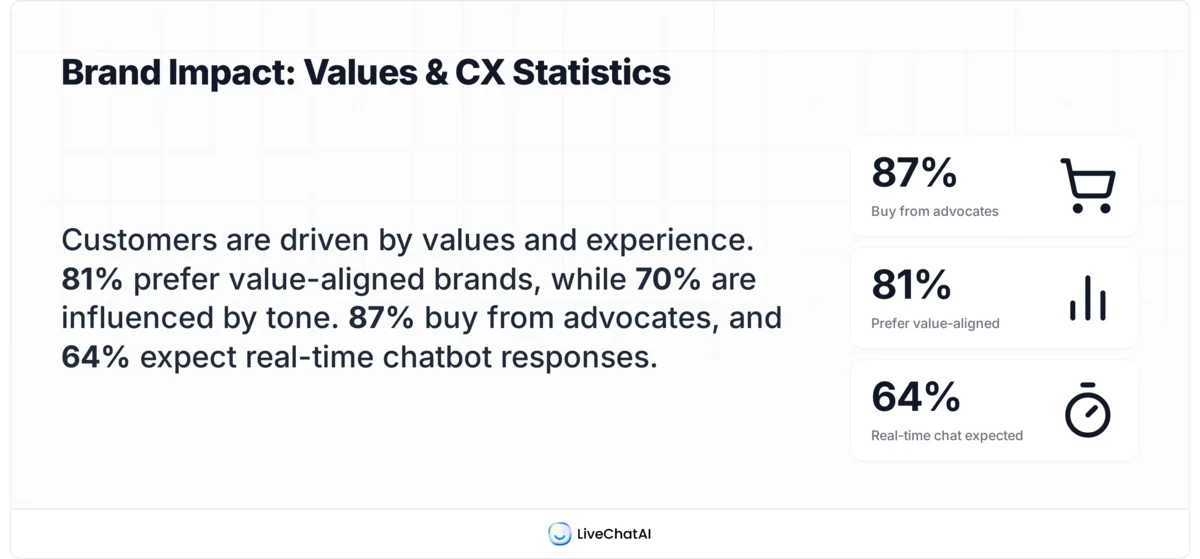
Tone shapes whether users stick around or leave. It's that straightforward. A bot with the wrong tone creates friction at scale, because unlike a human agent who adjusts naturally, a miscalibrated bot repeats the same tonal mistake thousands of times per day.
According to Azumo's 2026 AI chatbot report, 60% of consumers still worry chatbots can't understand their queries. That anxiety is a tone problem as much as a comprehension one. When a bot responds with cold, robotic phrasing, users assume it doesn't understand, even when the answer is technically correct.
Here's what tone directly affects:
- Trust building. A well-chosen tone bridges the gap between knowing you're talking to software and feeling comfortable sharing your problem.
- Brand consistency. Your chatbot is often the first point of contact with your company. If your marketing is conversational and friendly but your bot sounds like a legal disclaimer, you've broken the experience.
- Problem resolution speed. According to Parloa's 2026 AI trends analysis, 56% of customers say they're forced to repeat themselves because support channels don't share context. The right tone helps here too. When a bot acknowledges frustration before jumping to solutions, users cooperate faster.
- User engagement. People spend more time with bots that match their communication style. Younger users prefer casual phrasing. Enterprise buyers expect precision. Getting this wrong doesn't just hurt satisfaction; it costs you completed conversations.
Step 1: Audit Your Brand Personality
Before you can set a chatbot tone, you need to know what your brand actually sounds like. This step pulls concrete traits from your existing materials so you're building on documented identity, not assumptions.
Detailed instructions:
1. Pull up your brand style guide, mission statement, and the last 10-15 social media posts your team published. If you don't have a formal style guide, your social media voice is the closest proxy to your actual brand personality.
2. List 3-5 adjectives that describe how your brand communicates. Be specific: "professional but approachable" is better than just "professional." For example, when we configured LiveChatAI's tone, the traits were: helpful, direct, knowledgeable, and slightly informal.
3. Run a quick audit of your human agents' chat transcripts. Pull 20 conversations rated "excellent" by customers. Note recurring phrases, greeting styles, and how agents handle complaints. These patterns are your tone baseline.
4. Create a simple two-column table: "We sound like this" vs. "We don't sound like this." Fill it with real examples from your transcripts.
You'll know it's working when: You can hand the document to a new team member, and they can write a chatbot response that sounds "right" without asking for clarification.
Watch out for:
• Aspirational vs. actual tone: Teams often describe how they want to sound rather than how they actually do. Use real transcripts, not wishful thinking. I made this mistake with an early client and ended up with a bot that sounded nothing like their brand.
• Too many adjectives: If your personality list has more than 5 traits, it's too vague to be actionable. Three is ideal. Five is the max.
Pro tip: After auditing dozens of B2B chatbot setups, I've found that the fastest shortcut is reading your 1-star and 5-star support reviews side by side. The complaints tell you what tone failures look like, and the praise tells you what's already working. That contrast is worth more than any branding workshop.
Step 2: Research Your Audience Segments
Knowing your brand is half the equation. The other half is understanding who you're talking to and what tone they respond to best. Different audience segments have different expectations, and a one-size-fits-all tone almost always misses.
Detailed instructions:
1. Segment your users by the dimensions that actually affect communication preference: role (end user vs. decision maker), technical proficiency, age range, and urgency level. For a B2B SaaS product, the split is usually between technical users who want terse, precise answers and non-technical stakeholders who need more context.
2. Review your CSAT and NPS data broken down by segment. Look for patterns: do enterprise clients rate support lower? Do self-serve users abandon conversations early? These signals point to tone mismatches.
3. Survey a small sample (50-100 users) with a two-question form: "How would you describe our chatbot's communication style?" and "What would make chatbot conversations more helpful?" Keep it short. Anything longer than 2 questions kills completion rates.
4. Map each segment to a tone register. For example:
| Segment | Preferred Tone | Example Phrasing |
|---|---|---|
| Enterprise IT admins | Concise, technical | "API rate limit exceeded. Increase your plan quota in Settings > API." |
| SMB founders | Friendly, guiding | "Looks like you've hit your API limit. Want me to walk you through upgrading?" |
| E-commerce end users | Warm, reassuring | "No worries! Let me check on your order right now." |
You'll know it's working when your tone map covers at least your top 3 audience segments, and each has distinct phrasing examples your bot can use.
Watch out for:
• Assuming age = tone preference: Younger users don't always want casual language. A 25-year-old developer may prefer clinical precision over emoji-heavy responses. Test, don't assume.
• Ignoring cultural context: If you serve a global audience, direct phrasing that works in the US can feel rude in Japan or overly blunt in Germany. Chatbot features like language detection can help route users to culturally adapted responses.
Pro tip: The highest-signal data point I've found isn't surveys; it's abandoned conversations. Export your chatbot's unresolved sessions, read the last 3-4 messages before users dropped off, and look for tone triggers. In one SaaS deployment, we discovered that 40% of drop-offs happened right after the bot used the phrase "Unfortunately, I can't." Rewriting that single response to "Here's what I can do instead" recovered a measurable share of those conversations.
Step 3: Align Your Tone with Brand Values
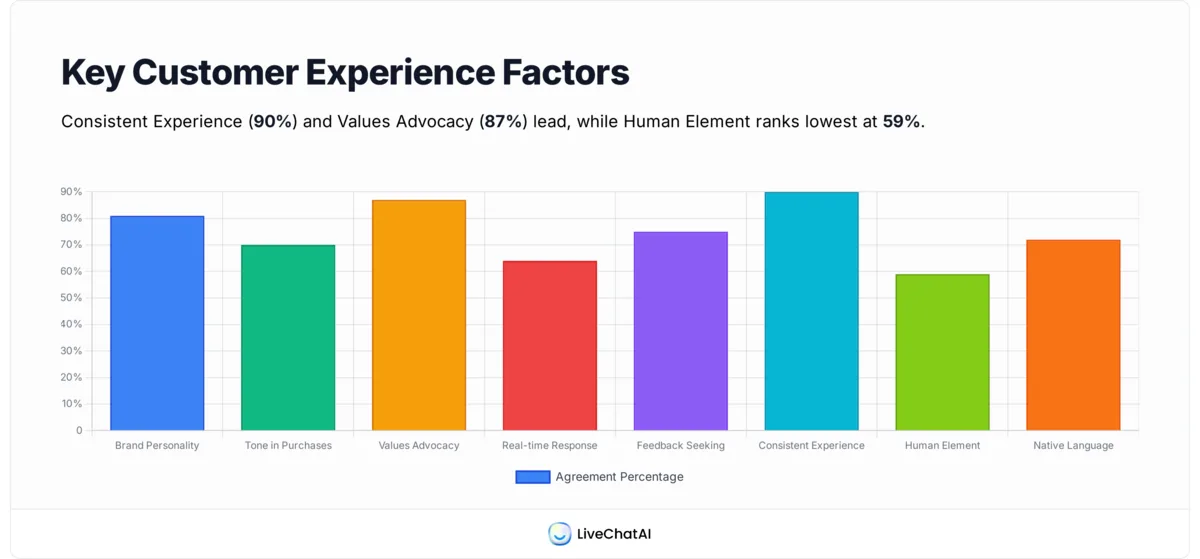
Your chatbot's tone should reinforce the values your company actually lives by, not just the ones on your About page. This step connects abstract values to concrete language choices.
Follow these steps:
1. Pick your top 3 brand values. If your company says it values transparency, innovation, and customer-first thinking, write down what each one sounds like in a chat message. Transparency might mean: "I don't have that answer, but I can connect you with someone who does" rather than vague deflection.
2. For each value, create a "Do / Don't" pair:
| Value | Tone DO | Tone DON'T |
|---|---|---|
| Transparency | "I'm not sure about that. Let me check." | "Let me look into that for you!" (when the bot can't actually look into it) |
| Speed | "Here's your tracking number: XYZ123" | "I'd be happy to help you find your tracking information..." |
| Empathy | "That sounds frustrating. Let's fix it." | "I understand your concern." (generic, overused) |
3. Test for authenticity. If your company's actual support experience is slow and bureaucratic, a chatbot that sounds breezy and instant will create a jarring disconnect. Match the bot's promises to your operational reality.
Watch out for:
• Value-washing: Don't claim "customer-first" tone if your bot's first response is always a deflection to the FAQ page. Customers notice the gap immediately.
• Overcomplicating it: You don't need a value mapped to every single response. Focus on the moments that matter most: greetings, error handling, and escalation handoffs.
Pro tip: The most underrated values alignment technique I've seen is reading your company's Glassdoor reviews. How your employees describe the culture often mirrors how your chatbot should sound. If employees say "straightforward and no-BS," your bot shouldn't use corporate fluff. This shortcut has saved me hours of brand workshops with at least three different clients.
Step 4: Adapt Tone to Conversation Context
A single tone doesn't work across every conversation type. Support tickets, product tours, checkout assistance, and complaint handling each need different registers. This step builds context-aware tone switching into your chatbot.
Apply these:
1. List your chatbot's top 5 conversation types by volume. For most B2B SaaS products, these are: onboarding questions, billing/account issues, feature how-tos, bug reports, and upgrade inquiries.
2. Assign each conversation type a tone register on a scale from formal to casual, and from empathetic to efficient:
| Conversation Type | Formality | Empathy Level | Response Length |
|---|---|---|---|
| Bug report | Moderate | High | Concise, then detailed if needed |
| Billing dispute | Moderate–high | Very high | Thorough |
| Feature question | Low–moderate | Moderate | Concise |
| Onboarding | Low | Moderate | Step-by-step |
| Upgrade inquiry | Low | Low | Direct with options |
3. Write 2-3 sample responses for each type that demonstrate the correct register. These become your training examples.
4. If your chatbot platform supports intent detection, map intents to tone profiles so the bot switches automatically. By creating AI-powered support agents, you can train the model on these examples directly.
You'll know it's working when: A user reporting a critical bug gets a noticeably different tone than someone asking how to export a CSV, and both feel appropriate.
Watch out for:
• Tone whiplash: If a user starts with a billing complaint and then asks a feature question in the same session, the bot shouldn't snap from "I'm so sorry" to "Here's a quick tip!" abruptly. Build transition phrases that bridge context shifts.
• Over-empathizing on routine requests: Saying "I completely understand how frustrating this must be" when someone just asks about business hours feels condescending. Save empathy for moments that actually warrant it.
Tip: I've learned the hard way that the highest-stakes tone moment isn't the greeting or the resolution. It's the handoff to a human agent. If the bot sounds warm and capable, but the handoff message is "Transferring you now," users feel dumped. Write that transition carefully: "I want to make sure you get the best help on this. I'm connecting you with [Agent Name] who specializes in billing. They'll have your full conversation history."
Step 5: Build a Chatbot Persona Document
A persona document turns all your tone decisions into a single reference that anyone on your team, from copywriters to developers, can use. Without it, tone drift happens within weeks.
Detailed instructions:
1. Name your chatbot persona. This isn't about giving it a cute name for users (though you can). It's about creating an internal shorthand. "Maya" is easier to reference in a Slack thread than "the chatbot with the professional-but-friendly B2B tone."
2. Fill out this persona template:
• Name: [Internal reference name]
• Personality traits: [3-5 adjectives from Step 1]
• Communication style: [Short sentences vs. detailed? Uses contractions? Emoji policy?]
• Vocabulary rules: [Words to always use, words to never use]
• Tone register by context: [From Step 4's table]
• Example phrases: [5-10 "golden" responses that nail the tone]
• Anti-examples: [5-10 responses that violate the tone]
3. Share the document with your support, product, and marketing teams. Get sign-off from at least one person in each group. If marketing thinks the bot sounds too stiff, or support thinks it sounds too casual, resolve it now.
4. Store the persona document alongside your chatbot's configuration. In platforms like LiveChatAI, you can feed persona guidelines directly into the AI's system prompt, so the model uses your tone rules as a baseline for every response it generates.
When two different people on your team, writing chatbot responses independently, produce messages that sound like they came from the same bot, you'll know it works well.
Watch out for:
• Making the document too long: If it's over 2 pages, nobody will read it. One page of examples beats five pages of theory every time.
• Skipping the anti-examples: People learn faster from "don't do this" than from "do this." Include at least 5 anti-examples showing responses that violate your tone.
Step 6: Write Tone-Specific Response Templates
Templates are where theory meets reality. You'll draft the actual messages your bot sends in its most common and most critical scenarios, ensuring every word reflects the persona you've built.
Detailed instructions:
1. Identify your 10 highest-volume chatbot interactions. Check your analytics for the most triggered intents or most-asked questions. These are your template priorities.
2. For each interaction, write three versions:
• Standard: The default response when context is neutral
• Empathetic: Used when the user has expressed frustration or the topic is sensitive (billing, errors, outages)
• Celebratory: Used for positive moments (successful setup, milestone reached, upgrade confirmed)
3. Pay special attention to these four critical message types:
Greetings: "Hi! I'm here to help with anything related to [Product]. What can I do for you?" is better than "Hello. How may I assist you today?" The first sounds human. The second sounds like a phone tree.
Error acknowledgment: "That didn't work on my end. Let me try a different approach." is better than "An error has occurred. Please try again later." Never blame the user. Never sound helpless.
Escalation: "This needs a specialist's eyes. I'm connecting you with our [team] — they'll pick up right where we left off." Never make the user feel like you're passing them off.
Closing: "Glad that's sorted! Anything else before I let you go?" is better than "Is there anything else I can help you with?" The first has personality. The second is a script.
4. Run each template through your persona document's checklist. Does it match the vocabulary rules? Does it fit the right register? Would it pass the "two-person test" from Step 5?
You'll know it's working when: You can read 10 random bot responses from a live session and they all sound like the same persona wrote them.
Watch out for:
• Over-templating: If every response sounds pre-written, users notice. Leave room for your AI to generate natural variations within the tone boundaries you've set. With modern AI customer service tools, the model can produce on-brand responses without rigid scripts.
• Ignoring negative paths: Teams write great happy-path templates but forget what the bot says when it can't help, when it misunderstands, or when the user is angry. Those moments define your tone more than any greeting.
Pro tip: The most effective template I've ever written was a "confusion acknowledgment" message: "I'm not quite following — could you rephrase that? Sometimes I need things said a slightly different way." Honesty about limitations, delivered in the right tone, builds more trust than faking comprehension.
Step 7: Test and Iterate with Real Users
No amount of internal review replaces real user feedback. This step puts your tone into production, measures what works, and fixes what doesn't.
Detailed instructions:
1. Set up A/B tests for your highest-volume response templates. Test one variable at a time: greeting style, empathy level, response length, or formality. Run each test for at least 500 conversations to get statistically meaningful results.
2. Add a one-question post-conversation survey. The best question I've found: "Did this conversation feel helpful?" with a thumbs up/down. Don't ask about "tone" directly. Users can't articulate tone preferences, but they can tell you if the interaction felt right.
3. Track these metrics per tone variant:
• Resolution rate: Did the user's issue get solved without human escalation?
• Conversation length: Shorter isn't always better; sometimes longer means more engaged
• Escalation rate: Lower is better, but watch for users who should have been escalated
• Post-conversation CSAT: The thumbs up/down from your survey
4. Review transcripts from your lowest-rated conversations weekly. Look for tone failures: was the bot too formal for a frustrated user? Too casual for a billing question? Each failed conversation is a data point for refinement.
5. If you're using an AI chatbot that generates responses (not just scripted flows), test how different system prompt adjustments affect output. Small changes to the prompt can shift tone significantly. With tools like feedback collection through AI chatbots, you can automate much of this process.
You'll know it's working when: Your CSAT scores trend upward over 4-6 weeks, and your escalation rate drops without a corresponding rise in unresolved issues.
Watch out for:
• Testing too many variables simultaneously: If you change the greeting, empathy phrases, and closing message at the same time, you won't know which change drove the result. One variable per test cycle.
• Ignoring edge cases: Your average conversation might test fine, but check your angry-user conversations specifically. That's where tone failures cause the most damage.
Pro tip: The single most valuable iteration technique I've used across multiple SaaS chatbots: record a 15-minute session where you read bot transcripts aloud. Literally speak the responses out loud. You'll catch awkward phrasing, robotic patterns, and tonal mismatches that you'd miss reading silently. I caught and fixed 5 tone issues in one session this way, including a response that opened with "Certainly!" three times in a row during a billing dispute.
Step 8: Maintain Consistency Across All Channels
Your chatbot probably doesn't live on just one channel. Website chat, SMS, social media DMs, and in-app messaging all need the same tone foundation, adapted for each platform's constraints and user expectations.
Detailed instructions:
1. Audit every channel where your chatbot operates. For each channel, document: character limits, formatting options (can you bold text? use links?), typical user mindset, and response time expectations.
2. Create channel-specific adaptations of your core templates:
| Channel | Tone Adaptation | Constraints |
|---|---|---|
| Website live chat | Full persona, moderate length | No hard character limit, rich formatting available |
| SMS / WhatsApp | Shorter, more direct, contractions | 160-character soft limit, no formatting |
| Social media DMs | Slightly more casual, platform-native | Varies by platform, public visibility risk |
| In-app messaging | Contextual, product-aware | Can reference specific features and screens |
| Voice / IVR | Natural speech patterns, clear pacing | No visual cues, must work audibly |
3. Build a cross-channel review cadence. Monthly, pull 5 random conversations from each channel and score them against your persona document. Flag any drift.
4. Store all tone rules in one centralized location that feeds all channels. If you update a greeting style, it should propagate everywhere. According to Azumo's research, businesses report $8 in returns for every $1 invested in chatbots, but that ROI depends on consistent execution across touchpoints, not just one channel performing well.
You'll know it's consistent when a customer who interacts with your bot on your website, then later on Instagram DMs, feels like they're talking to the same entity both times.
Watch out for:
• Copy-pasting web chat responses to SMS: A 150-word response that works in web chat becomes three long text messages that feel like spam. Rewrite, don't repurpose.
• Ignoring voice channels: According to the 2026 State of Voice report, 55% of consumers now use voice to interact with AI. If your chatbot has a voice component, tone needs to account for spoken cadence, not just written style.
Pro tip: The biggest consistency killer I've seen isn't different channels; it's different teams owning different channels. Marketing writes the social bot, support writes the website bot, and product writes the in-app bot. They all use different vocabulary. The fix is simple but requires discipline: one persona document, one approval process, quarterly cross-channel audits.
Where to Implement a Distinctive Chatbot Tone of Voice
Knowing how to build your tone is one thing. Knowing where it makes the most difference is another. Based on working with customer support teams across SaaS and e-commerce, here are the five highest-impact implementation points.
- Website live chat. This is your front line. The bot greets visitors, qualifies leads, and handles first-level support. Tone here sets the expectation for every interaction that follows. I've found that the greeting messages on live chat alone accounts for a disproportionate share of user satisfaction. Warm, specific greetings ("Hey! Looking for help with pricing or a feature question?") outperform generic ones every time.
- Social media messaging. Users on Instagram, Facebook Messenger, and X DMs expect faster, shorter, more casual interactions. Your bot should match the platform's native tone without losing your brand identity. The key is adjusting formality, not personality.
- SMS and text support. Brevity matters here more than anywhere else. Every word costs screen space. A text-based support bot that sends paragraph-length responses feels broken on mobile. Keep messages under 300 characters, use contractions, and get to the point fast.
- E-commerce checkout flows. Chatbot tone during checkout directly impacts cart abandonment. The tone should be confidence-building ("Your payment is secure. Processing now...") without being pushy. I've seen checkout bots with an overly salesy tone actually increase abandonment.
- In-app support widgets. These have the advantage of context. The bot knows what screen the user is on, what they were doing, and what went wrong. Use that context in the tone: "I see you're on the integrations page. Need help connecting a specific tool?" That kind of awareness makes the bot feel intelligent, not scripted.
Best Practices for Crafting Chatbot Tone of Voice
These practices come from patterns I've seen repeated across successful chatbot deployments. They apply regardless of industry, platform, or chatbot type.
1. Lead with solutions, not apologies. "Here's how to fix that" beats "I'm sorry you're experiencing this issue." Acknowledge the problem in one sentence, then pivot to the fix. Users want resolution, not sympathy from software.
2. Use the customer's name when you have it. Personalization is one of the simplest tone upgrades. "Hi Harry, I can help with that" feels different from "Hello, I can help with that." But don't overdo it. Using the name more than twice per conversation starts to feel like a sales script.
3. Acknowledge before you answer. When someone reports a problem, a brief "Got it" or "I see what happened" before the solution signals that the bot processed their input. Jumping straight to a fix makes users wonder if they were heard.
4. Offer choices instead of dead ends. Never let a conversation reach "I can't help with that. Goodbye." Always give options: "I can't do that directly, but here's what I can do: [option A] or [option B]. Or I can connect you with our team." Offering paths forward is a proven and creative way to keep customers engaged.
5. Keep sentences short in high-emotion contexts. When a user is frustrated, long explanations increase frustration. Short sentences signal control and competence: "I found the issue. Your payment was refunded. You'll see it in 3-5 business days."
6. Match energy without escalating. If a user is excited ("This new feature is great!"), match it ("Right? We're excited about it too!"). If they're calm, stay calm. But never match anger with defensiveness. The chatbot's job in heated moments is to de-escalate through steady, warm directness.
Examples of Effective Chatbot Tone in Action
Theory means little without concrete examples. Here are real-world tone patterns that I've seen work across multiple chatbot use cases in B2B and e-commerce settings.
Greetings That Set the Right Tone
• "Hi! I'm here to help with [Product]. What's going on?" (Casual, direct, assumes a need)
• "Welcome back, Taylor. Picking up where we left off, or something new?" (Personalized, context-aware)
• "Hey there. I can answer questions about features, pricing, or help troubleshoot. What do you need?" (Structured, efficient)
Handling Frustration
• "That's not right. Let me look into this and get back to you in under 2 minutes." (Validates, commits to a timeframe)
• "I hear you. This shouldn't have happened. Here's what I'm doing to fix it right now: [specific action]." (Ownership + action)
• "Totally understand the frustration. I've flagged this for our team, and you'll get an update by email within the hour." (Escalation without abandonment)
Presenting Solutions
• "Found it. Here are your options: [Option A] takes 5 minutes. [Option B] is faster but requires admin access. Which works for you?"
• "Good news — this is a quick fix. Go to Settings > Billing > Update Payment. That should clear the error."
• "I've got two paths for you. Want the quick answer or the full walkthrough?"
Each of these examples follows a pattern: acknowledge the user's state, provide clear information, and offer a next step. That's the formula behind effective chatbot tone, regardless of how formal or casual your brand leans.
Common Mistakes to Avoid When Setting Chatbot Tone
After working with dozens of chatbot deployments, these are the mistakes I see most frequently, and they're all fixable.
Robotic repetition. When the bot uses the same phrase ("I'd be happy to help with that!") in response to every message, users notice by the third exchange. Vary your acknowledgment phrases. Build a library of 10-15 alternatives and rotate them.
Fake personality. Adding jokes, slang, or pop culture references that don't match your brand creates cringe, not connection. A corporate accounting software chatbot shouldn't use "LOL" or "That's lit." Stay in your lane.
Cultural blind spots. Direct phrasing like "Just do X" can feel rude in high-context cultures. Sarcasm doesn't translate across languages. If you serve international markets, run your templates past native speakers from your top 3 markets. According to MIT's 2026 research, AI chatbots often show bias, giving less accurate or more dismissive answers to some user groups. Your tone should actively counteract this by being consistently respectful across all audiences.
Emotional mismatch. A cheerful tone during a service outage is worse than no tone at all. Map your bot's emotion detection to appropriate registers. Frustrated users need calm acknowledgment, not enthusiasm.
Tone amnesia between sessions. If a user had a terrible experience yesterday and contacts the bot today, starting with "Hey! Great to see you!" feels tone-deaf. Where possible, carry context between sessions. At minimum, don't default to cheerful when the user's last interaction was unresolved. Platforms that support context-aware chat support handle this well.
What Chatbot Tone of Voice Results to Expect
Setting your chatbot tone of voice isn't a one-day project with overnight results. Here's a realistic timeline based on what I've seen across multiple implementations.
Week 1-2: You'll have your persona document, core templates, and first round of tone-adapted responses deployed. At this stage, you're establishing baseline metrics: current CSAT, escalation rate, and conversation completion rate.
Week 3-6: A/B testing data starts becoming meaningful. You'll see early patterns in which tone variants perform better. Most teams find that 2-3 of their original templates need significant rewrites. Expect a 5-15% improvement in CSAT scores as the most egregious tone issues get fixed.
Month 2-3: The compounding effect kicks in. Your bot's responses are consistently on-brand, edge cases are handled, and your team has a working feedback loop. Resolution rates should climb 10-20%, and escalation rates should drop by a similar margin.
Month 4+: This is maintenance mode. Monthly reviews, quarterly cross-channel audits, and ongoing A/B testing keep the tone sharp. The biggest risk at this stage isn't degradation; it's complacency. Keep reading transcripts. Keep iterating.
The metric I'd watch most closely: unresolved conversations. If your tone is right, users stay in the chat longer, engage more productively, and reach resolutions without needing human agents. That's the clearest signal that tone is doing its job.
Conclusion
Your chatbot's tone of voice isn't a cosmetic detail. It's an operational lever that affects resolution rates, customer satisfaction, and brand perception at scale. The eight steps here give you a repeatable framework: audit your brand, research your audience, align with values, adapt to context, document your persona, write templates, test relentlessly, and maintain consistency.
The best place to start is Step 1: pull up your last 20 highest-rated support conversations and extract the tone patterns that already work. You don't need to invent a tone from scratch; you need to document what's already succeeding and make it consistent.
If you're looking for a platform that lets you train your chatbot's tone directly from your brand content, LiveChatAI's AI agent for customer support learns from your knowledge base and applies customizable tone settings across every conversation.
Frequently Asked Questions
What is a good tone for a chatbot?
A good chatbot tone matches your brand personality while adapting to conversation context. For most B2B SaaS companies, that means professional but not stiff, helpful but not overeager. The tone should feel like talking to a competent colleague, not a customer service script. Test with real users and measure CSAT to confirm your tone works in practice, not just in theory.
How do you define tone of voice in chatbots?
Chatbot tone of voice is the personality expressed through language choices, sentence structure, formality level, and emotional register in every message your bot sends. It's distinct from voice (which stays constant) in that tone shifts with context. A support complaint gets a calmer, more empathetic tone than a feature question, even though both use the same underlying brand voice.
Why is tone important in chatbot interactions?
Tone directly affects whether users trust, engage with, and return to your chatbot. A mismatched tone causes users to escalate to human agents, abandon conversations, or form negative brand impressions. Since chatbots handle thousands of interactions daily, a single tone mistake scales across every conversation. Getting tone right reduces support costs, improves resolution rates, and strengthens brand perception simultaneously.
How long does it take to implement chatbot tone of voice?
The initial setup, including persona creation, template writing, and first deployment, takes 2-4 hours for a basic implementation. Full optimization with A/B testing, audience segmentation, and cross-channel consistency requires 4-6 weeks of iterative refinement. Most teams see measurable improvement in CSAT scores within 3-4 weeks of starting the process.
How do you align chatbot tone with brand personality?
Start by auditing your existing brand materials: style guides, top-rated support transcripts, and social media posts. Extract 3-5 personality traits and translate each into specific language rules (contractions: yes/no, emoji: yes/no, sentence length preference, vocabulary list). Then build a persona document with "do/don't" examples for each trait and test it against real conversations.
What impact does chatbot tone have on user satisfaction?
Teams that systematically optimize chatbot tone typically see CSAT improvements of 5-15% within the first month and 15-25% over three months. The impact is highest in high-emotion scenarios: billing disputes, service outages, and complaint handling. Tone also affects indirect metrics like escalation rate (drops 10-20% with good tone) and conversation completion rate (improves as users engage longer with a well-toned bot).
For further reading:
• 12 Live Chat Triggers to Maximize Engagement
• 200 Live Chat Script Examples for AI Chatbots
• How to Reduce Support Tickets with AI