






A multilingual AI chatbot lets you automate customer support in multiple languages from a single platform. The fastest way to build one is with a no-code tool like LiveChatAI, which supports 95 languages natively and trains on your own content. Most teams can go live in under 30 minutes and cut support ticket volume by up to 70%.
What you'll need:
• A chatbot platform with built-in multilingual support (LiveChatAI, Google Dialogflow, or Amazon Lex)
• Your existing knowledge base, FAQs, or help docs in at least one language
• A list of target languages based on your customer demographics
• Time estimate: 30 minutes for basic setup, 2-4 hours for full optimization
• Skill level: Beginner-friendly (no coding required with no-code platforms)
Quick overview of the process:
1. Identify your target languages and audience segments
2. Choose a chatbot platform with native multilingual capabilities
3. Train your chatbot with multilingual content sources
4. Configure language detection and routing settings
5. Test across languages with native speakers
6. Deploy and monitor language-specific performance metrics
What Is a Multilingual AI Chatbot?
A multilingual AI chatbot is software that understands, processes, and responds to customer messages in more than one language. It uses natural language processing and machine learning algorithms to detect which language a visitor writes in and reply in that same language automatically.

Unlike older rule-based bots that needed separate conversation trees for each language, modern AI chatbots handle translation natively. They don't just swap words between languages. They grasp context, idioms, and regional phrasing, then generate responses that sound natural to native speakers.
These chatbots show up across industries in different ways:
• E-commerce: Answer product questions, process returns, and suggest items in the buyer's preferred language
• Healthcare: Book appointments, answer insurance queries, and share treatment info across language barriers
• Banking: Handle account inquiries, process transactions, and explain fees in local languages
• SaaS: Onboard international users, troubleshoot technical issues, and guide product tours without a bilingual team
Why Do Businesses Need Multilingual AI Chatbots in 2026?
Customer support teams are fielding requests from more countries and time zones than ever. Hiring native speakers for every language your customers use isn't realistic for most companies. That's where a multilingual chatbot fills the gap.
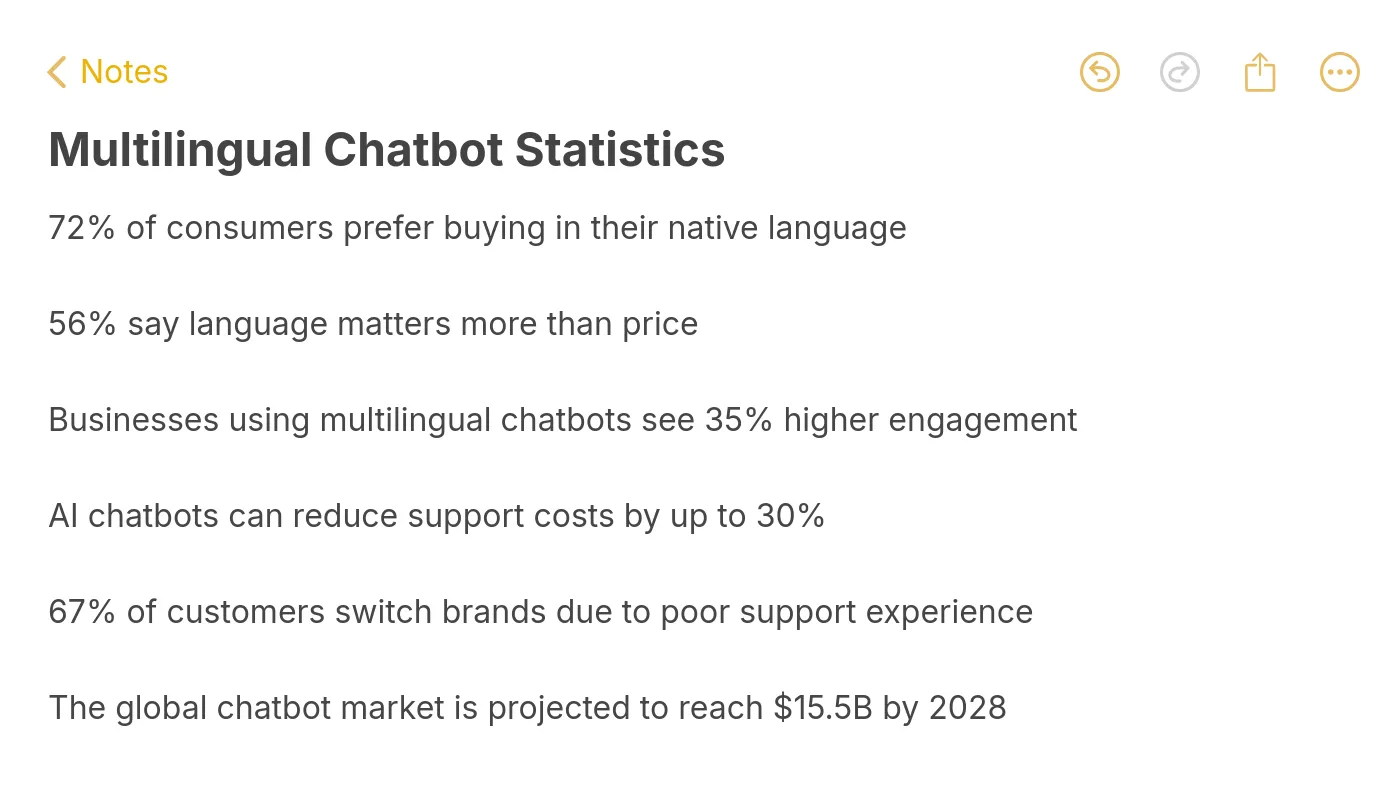
According to ChatSpark, 40% of users avoid websites that aren't available in their native language. That's not a small segment you can ignore. It's nearly half your potential audience bouncing before they even start a conversation.
The business case goes beyond retention. Companies offering support in local languages see a 75% increase in repeat purchases, according to the same ChatSpark analysis. Here's what multilingual chatbots actually solve:
• 24/7 coverage without staffing costs: A bot handles overnight and weekend queries in Portuguese, German, or Japanese without shift scheduling headaches
• Consistent responses: Every customer gets the same accurate answer, regardless of language, eliminating the quality variance between agents
• Faster resolution: No waiting for a bilingual agent to come online. The bot responds instantly in the customer's language
• Scalability: Adding a new market doesn't mean hiring a new support team. You add a language to your chatbot configuration
According to Grand View Research, the global chatbot market is projected to reach $27 billion by 2030 at 23% annual growth. Much of that growth comes from businesses expanding internationally and needing multilingual customer support that scales without proportional headcount increases.
Step 1: Identify Your Target Languages and Audience Segments
What this step accomplishes:
Before you build anything, you need to know which languages matter most for your business. Picking the wrong languages wastes setup time and training data. Getting this right means your chatbot serves the customers who actually need it.
How to do it:
1. Open Google Analytics 4 and navigate to Reports > User > Demographics > Overview
2. Check the Country and Language breakdowns for the last 90 days
3. Export your customer support ticket data and tag tickets by language or customer country
4. Cross-reference with your CRM data: which regions have the highest customer lifetime value?
5. Rank languages by a combined score of traffic volume, ticket volume, and revenue contribution
Don't try to launch with 20 languages. Start with your top 3-5 based on actual data, not assumptions. A SaaS company selling across Europe might find that German, French, and Spanish cover 80% of non-English support requests.
Also consider regional dialects. Brazilian Portuguese differs from European Portuguese. Latin American Spanish has vocabulary differences from Castilian Spanish. Your chatbot platform should handle these variations, and LiveChatAI's language engine supports 95 languages including regional variants.
You'll know it's working when: You have a prioritized list of 3-5 languages ranked by business impact, with data backing each choice. If you can't justify a language with traffic or revenue numbers, drop it from the initial launch.
Common mistakes to avoid
• Choosing languages based on gut feel: "We should support Mandarin because China is a big market" sounds logical, but if your analytics show zero traffic from China, you're building for an audience you don't have. Let data decide.
• Launching all languages simultaneously: Rolling out 15 languages at once means you can't properly test any of them. Start with 3-5, get them right, then expand. Jackpots.ch managed a pandemic-driven surge across four languages without expanding their team, according to a ChatSpark case study, because they focused on the languages that mattered most.
Pro tip: Check your competitors' language support before finalizing your list. If none of them offer support in Turkish or Polish but you have significant traffic from those regions, that's a gap you can own.
Step 2: Choose a Chatbot Platform With Native Multilingual Support
What this step accomplishes:
Your platform choice determines everything downstream: how many languages you can support, how natural the conversations feel, and how much maintenance you'll need. The wrong platform locks you into manual translation workflows that don't scale.
How to do it:
Evaluate platforms against these specific criteria:
| Criteria | What to Look For | Red Flag |
|---|---|---|
| Language count | 50+ languages with native NLP, not just machine translation | Platform lists languages but relies solely on Google Translate API |
| Language detection | Automatic detection from first message | Requires user to manually select language from dropdown |
| Training method | Learns from your content (docs, FAQs, website pages) | Requires you to write separate scripts per language |
| Mid-conversation switching | Handles language changes within same chat session | Starts over or breaks when user switches language |
| Integration depth | Connects to your CRM, help desk, and website natively | Requires custom API work for basic integrations |
LiveChatAI handles all of these out of the box. You train it with your English content, and it responds accurately in 95 languages without separate training sets for each one. The platform auto-detects the visitor's language from their first message and responds accordingly.
Other options worth evaluating include Google Dialogflow (strong NLP engine, requires technical setup), Amazon Lex (good for AWS-heavy stacks), and Microsoft Bot Framework (integrates well with Teams and Azure). Each requires more developer involvement than a no-code platform like LiveChatAI.
You'll know it's working when: You've selected a platform, created an account, and confirmed it supports your target languages with automatic detection, not just a dropdown selector.
Common mistakes to avoid:
• Confusing translation with understanding: Some platforms bolt on Google Translate as a layer over an English-only bot. The result is grammatically awkward responses that miss context. Native multilingual NLP processes each language directly, which produces responses that sound natural to native speakers.
• Ignoring integration requirements: A chatbot that can't connect to your help desk or CRM creates data silos. Before committing, verify the platform integrates with your existing stack (Slack, Zendesk alternatives, Shopify, WordPress, etc.).
Pro tip: Request a trial specifically to test non-English conversations. Most platforms demo well in English. The real test is asking complex questions in Thai, Arabic, or Portuguese and seeing if the responses actually make sense.
Step 3: Train Your Chatbot With Multilingual Content Sources
What this step accomplishes:
Training gives your chatbot the knowledge it needs to answer questions accurately. The quality of your training data directly determines the quality of responses your customers receive. Poor training data produces a bot that sounds generic. Good training data produces one that sounds like your best support agent.
How to do it:
1. Gather your existing knowledge base content: FAQs, help docs, product guides, and support articles
2. In LiveChatAI, navigate to AI Chatbot > Data Sources
3. Add your website URL. The crawler pulls content from your site pages and learns from them automatically
4. Upload any PDF documentation, product manuals, or training materials you have
5. Add specific Q&A pairs for questions your support team gets frequently
6. If you have content already translated into target languages, upload those versions too, as it improves accuracy for language-specific terminology
With LiveChatAI, you don't need to create separate training data for each language. The AI understands your English content and generates accurate responses in other languages. But if you have existing translations of your key documents, adding them improves domain-specific accuracy, especially for technical terminology your industry uses.
A 2026 survey of 152 enterprise teams by Crowdin found that 95% already use AI translation, with nearly half doing so frequently. The shift is real: teams are moving from manual translation workflows to AI-native approaches.
You'll know it's working when: Your chatbot's data source panel shows all uploaded content as "trained" or "indexed." Test by asking a question in English that's covered in your docs. You should get an accurate, specific answer, not a generic fallback.
Common mistakes to avoid:
• Training with outdated content: If your help docs are two years old and reference features that no longer exist, your chatbot will confidently give wrong answers. Audit your content for accuracy before feeding it to the bot.
• Skipping domain-specific terminology: Industry jargon, product names, and feature-specific terms often trip up translation layers. Add a glossary of key terms and their approved translations in each target language if your platform supports it.
Pro tip: Start with your top 20 most-asked support questions. Identify them from your ticket system or real-world chatbot use cases, write clear answers, and add them as Q&A pairs. This gives your chatbot a strong foundation before it even starts learning from broader content.
Step 4: Configure Language Detection and Routing Settings
What this step accomplishes:
Language detection determines how your chatbot identifies which language a visitor is using and how it routes conversations when the bot can't resolve an issue. Getting this wrong means customers get responses in the wrong language, or worse, get stuck in a loop where nobody helps them.
How to do it:
1. In your chatbot settings, enable automatic language detection (on LiveChatAI, this is active by default)
2. Set your default fallback language to English (or whichever language your team speaks best)
3. Configure human handoff rules: when the bot hits its confidence threshold, route to a live agent who speaks the detected language
4. If you use conversational interfaces on multiple pages, set language preferences per page or region if needed
5. Enable conversation transcripts so your team can review multilingual interactions later
For teams using LiveChatAI, the language detection runs on the first message. If a visitor writes "Wie kann ich mein Passwort zurucksetzen?" the bot instantly recognizes German and responds in German. No setup required for this. The 95-language support works automatically once the chatbot is trained.
If your team can't support all languages via live agents, set up a routing hierarchy. For example: French queries go to your Paris team, Spanish to your Mexico City team, and everything else routes to your English-speaking support queue with the chatbot's translated summary attached.
You'll know it's working when: You can open a chat widget, type a question in any of your target languages, and get a correct response in that same language within 2-3 seconds. Test language switching mid-conversation. Write your first message in Spanish, then follow up in English. The bot should handle the switch without confusion.
Common mistakes to avoid:
• Not setting up human handoff: A chatbot that can't escalate to a human is a dead end. According to Dante AI, 75% of customers prefer AI agents over humans for routine support, but complex issues still need a person. Configure handoff triggers based on sentiment, repeated questions, or explicit escalation requests.
• Forgetting the greeting message: If your chatbot greets everyone in English but your visitor speaks French, the first impression is already wrong. Set your greeting to auto-detect browser language or match the page language.
Pro tip: Create a "language test" QA checklist with 5 common questions translated into each target language. Run through them after every configuration change.
Step 5: Test Across Languages With Native Speakers
What this step accomplishes:
Automated testing catches technical bugs. Native speaker testing catches everything else: awkward phrasing, cultural missteps, incorrect terminology, and responses that are technically correct but sound robotic or rude in a specific language.
How to do it:
1. Recruit 1-2 native speakers per target language (colleagues, freelancers, or user testing services like UserTesting.com)
2. Give each tester a script of 10-15 common customer scenarios: product questions, complaints, return requests, technical issues
3. Have them converse naturally with the chatbot, not just follow the script. Encourage slang, abbreviations, and regional expressions
4. Ask testers to rate each response on a 1-5 scale for: accuracy, naturalness, helpfulness, and cultural appropriateness
5. Document every response that scores below 4 and create specific Q&A corrections for those scenarios
Omilia, a conversational AI company, improved their customer service performance by 22% after optimizing with annotated multilingual voice data, according to a Defined.ai case study. Testing with real language data makes a measurable difference.
Pay special attention to languages with formal/informal registers. German has "du" (informal) vs. "Sie" (formal). Japanese has multiple politeness levels. Your chatbot's tone should match what customers expect from a professional support interaction in their language.
You'll know it's working when: Native speakers rate 80%+ of responses as 4 or 5 out of 5 across all target languages. Any response scoring below 3 should be flagged, corrected with a specific Q&A pair, and retested.
Common mistakes to avoid:
• Testing only with scripted queries: Real customers don't follow scripts. They use slang, make typos, switch languages mid-sentence, and ask questions in ways you didn't anticipate. Your testers should try to break the bot, not just confirm it works with prepared inputs.
• Skipping edge cases: What happens when someone writes in Romanized Japanese (romaji) instead of Japanese characters? What about code-mixed messages like "Can you help me with mi cuenta?" Test these hybrid scenarios because they happen constantly in multilingual markets.
Pro tip: Record the test sessions (with permission) and share the worst failures with your team. Nothing motivates improvement faster than watching a bot tell a German customer "Ihr Hund ist unter dem Tisch" (your dog is under the table) when they asked about invoice status. These specific failures become your highest-priority chatbot testing fixes.
Step 6: Deploy and Monitor Language-Specific Performance Metrics
What this step accomplishes:
Launching your chatbot is the starting point, not the finish line. Monitoring lets you catch problems early, identify which languages need more training data, and prove ROI to stakeholders with hard numbers.
How to do it:
1. Deploy the chatbot widget on your website. On LiveChatAI, copy the embed code from AI Chatbot > Embed & Share and add it to your site's footer or chat container
2. Set up tracking for these metrics per language:
| Metric | Target | Why It Matters |
|---|---|---|
| Resolution rate | 70%+ without human handoff | Measures chatbot self-sufficiency |
| CSAT per language | 4.0+ out of 5 | Flags languages needing quality improvement |
| Fallback rate | Below 15% | High rates mean training gaps for that language |
| Average response time | Under 3 seconds | Slow responses indicate processing issues |
| Handoff rate | Below 30% | High rates suggest the bot needs more training data |
3. Review conversation logs weekly for the first month. Look for patterns: repeated unanswered questions, incorrect language detection, or responses that native speakers flagged as unnatural
4. Feed corrected responses back into the training data. This creates a feedback loop where the bot improves from real customer interactions
According to Master of Code, 87% of consumers rate their bot interactions positively when the chatbot handles their language well. Your per-language CSAT scores will tell you whether you're hitting that bar.
You'll know it's working when: Your dashboard shows resolution rates above 70% across all supported languages, and CSAT scores stay above 4.0. If one language drops significantly below others, that's your signal to add more training data or Q&A pairs for that language.
Common mistakes to avoid:
• Monitoring only aggregate metrics: A 75% overall resolution rate might hide the fact that your French bot resolves at 90% while your Japanese bot resolves at 40%. Always break metrics down by language.
• Ignoring conversation logs: Numbers tell you what's happening. Conversation logs tell you why. If your Spanish fallback rate spikes, reading the actual conversations reveals whether it's a vocabulary gap, a cultural phrasing issue, or a product-specific terminology problem.
Pro tip: Set up weekly automated reports comparing metrics across languages. The bot's weakest language is always your biggest opportunity.
What Results to Expect After Launching Your Multilingual Chatbot
Here's a realistic timeline based on what teams typically experience:
Week 1-2: Expect a 40-50% resolution rate as the bot encounters questions outside its training data. This is normal. Focus on reviewing conversation logs daily and adding Q&A corrections.
Week 3-4: Resolution rates climb to 60-70% as your training data improves from real interactions. You'll notice specific languages performing better than others. Focus improvement efforts on the lagging ones.
Month 2-3: With consistent optimization, most teams reach 70-80% resolution rates across their primary languages. At this point, you'll see measurable drops in support ticket volume and average response time.
Month 6+: Mature multilingual chatbots routinely handle 80%+ of routine inquiries. According to a Ringly.io compilation of 2026 statistics, AI chatbots can manage up to 80% of routine questions. Your metrics should approach that benchmark within six months of active optimization.
The key metrics to track long-term:
• Ticket deflection rate: How many conversations the bot resolves without human involvement
• Per-language CSAT: Customer satisfaction broken down by language, your primary quality indicator
• Cost per conversation: Compare AI-handled conversations vs. human agent conversations to calculate ROI
• New language adoption: Track demand signals for languages you haven't added yet
Key Benefits of Multilingual AI Chatbots for Growing Businesses
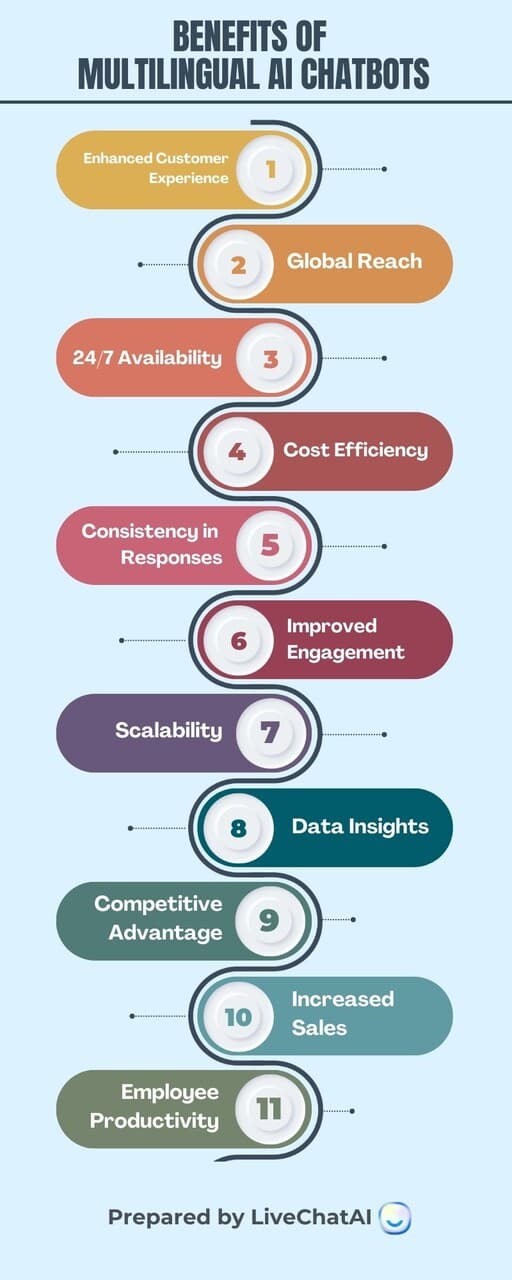
The benefits split into two categories: immediate operational wins and longer-term strategic advantages.
Operational benefits you'll see fast:
• Reduced support costs: You don't need to hire native speakers for every language. A single AI-powered chatbot covers what would otherwise require 5-10 bilingual agents
• Instant response times: No more waiting for a German-speaking agent to come online during EU business hours. The bot responds in under 3 seconds, any time
• Consistent quality: Every customer gets the same accurate answer whether they ask in Korean, Arabic, or Portuguese
Strategic advantages that build over time:
• Market expansion without proportional hiring: Enter new markets by adding languages to your chatbot instead of building local support teams
• Data insights across regions: Your chatbot collects customer questions and pain points in each language, giving you market intelligence you didn't have before
• Competitive differentiation: According to a ScienceDirect study, localization boosts purchases by 87%. If your competitors only offer English support, multilingual capability becomes a real differentiator
You can also increase sales with AI chatbots by providing product recommendations and answering pre-purchase questions in the buyer's language. Removing the language barrier at the point of purchase directly impacts conversion rates.
Common Challenges in Multilingual Chatbot Development (and How to Fix Them)

Challenge 1: Handling language nuances and idioms
Direct translation misses cultural context. The French expression "poser un lapin" literally means "to place a rabbit" but actually means "to stand someone up." A chatbot translating word-by-word will produce nonsense.
Fix: Use platforms with native NLP processing for each language rather than translation layers. Add custom Q&A pairs for common idioms and regional expressions your customers use. Review conversation logs monthly to catch new idiomatic expressions the bot mishandled.
Challenge 2: Maintaining accuracy across languages
Your English chatbot might score 90% accuracy, but Spanish sits at 65% because your training data lacked Spanish-specific product terminology.
Fix: Track accuracy and CSAT per language separately. When a language underperforms, analyze the failing conversations to identify gaps. Add targeted Q&A pairs for the specific topics causing errors. Collect feedback with AI chatbots to surface quality issues your metrics don't capture.
Challenge 3: Cultural sensitivity across regions
Tone, formality, and communication style vary by culture. A casual tone that works for American customers might feel disrespectful to Japanese customers expecting formal language.
Fix: Configure tone settings per language where your platform allows it. For languages with formal/informal registers (German, Japanese, Korean), default to the formal register for customer support. Have native speakers review your chatbot's tone during testing.
Challenge 4: Data privacy compliance across regions
Different regions have different data protection laws. GDPR in Europe, LGPD in Brazil, PIPA in South Korea. Your chatbot needs to handle user data according to local regulations.
Fix: Choose a platform that offers data residency options and complies with major privacy frameworks. Over 91% of enterprises already have AI governance frameworks in place or underway, according to Crowdin's 2026 survey. Make sure your chatbot vendor's practices align with yours.
Tools and Platforms for Building Multilingual AI Chatbots
| Platform | Languages | Best For | Setup Complexity |
|---|---|---|---|
| LiveChatAI | 95 | No-code teams needing fast deployment with native multilingual support | Low (no coding required) |
| Google Dialogflow | 30+ | Teams with developer resources wanting deep NLP customization | Medium-High |
| Amazon Lex | 25+ | AWS-native stacks needing voice and text bot capabilities | Medium-High |
| Microsoft Bot Framework | 40+ | Microsoft/Teams-heavy environments | High |
| Wit.ai (Meta) | 130+ | Developers building custom NLP applications from scratch | High |
For most B2B SaaS teams, the choice comes down to speed vs. customization. If you need a multilingual chatbot live this week and your team doesn't include NLP engineers, LiveChatAI is the practical choice. You train it with your existing content, and it handles essential chatbot features like language detection, conversation routing, and human handoff out of the box.
If you need granular control over NLP models, custom entity extraction, or integration with voice assistants, Dialogflow or Amazon Lex offers that depth. But expect weeks of development instead of hours.
Wrapping Up
Building a multilingual AI chatbot isn't the multi-month project it used to be. With platforms like LiveChatAI, you can go from zero to a working multilingual chatbot in an afternoon. The real work starts after deployment: monitoring per-language metrics, fixing accuracy gaps, and continuously improving from real conversations.
Start with Step 1. Pull your analytics data, identify your top 3-5 languages, and train your LiveChatAI chatbot with your existing content. That single action gets you further than weeks of planning.
For the best e-commerce chatbots and more implementation guidance, explore our related guides. And if you're looking at examples of conversational AI across industries, we've documented real use cases that show what's possible.
Frequently Asked Questions
How do multilingual chatbots work?
They use a combination of language detection algorithms and large language models. When a customer sends a message, the bot identifies the language, processes the query against its trained knowledge base, and generates a response in the detected language. Modern platforms like LiveChatAI do this automatically across 95 languages without requiring separate models or training data per language. The AI understands your content in one language and can answer questions about it in any supported language.
Why do businesses need multilingual chatbots?
Because 40% of users leave websites that aren't in their native language, and companies offering local-language support see 75% higher repeat purchase rates. For businesses with international customers, a multilingual chatbot provides 24/7 support across time zones without hiring native-speaking agents for each language. It's the difference between scaling support linearly (more languages = more hires) and scaling logarithmically (more languages = same team).
What tools are best for building multilingual AI chatbots?
For no-code teams: LiveChatAI supports 95 languages with automatic detection and trains on your existing content. For developer-led projects: Google Dialogflow offers deep NLP customization across 30+ languages. For AWS-heavy stacks: Amazon Lex integrates natively with other AWS services. The right tool depends on your team's technical capacity and how quickly you need to launch.
What are common challenges in implementing multilingual chatbots?
The four biggest issues are language nuance handling (idioms and slang that don't translate literally), accuracy gaps between languages (usually caused by uneven training data), cultural sensitivity (tone and formality expectations vary by region), and data privacy compliance (GDPR, LGPD, and other regional regulations). All four are solvable with proper testing, per-language monitoring, and a platform that processes languages natively rather than through a translation layer.
Can a multilingual AI chatbot handle language switching within a conversation?
Yes. Modern multilingual chatbots detect language changes mid-conversation and adjust automatically. If a customer starts in Spanish and switches to English, the bot continues the same conversation thread in English without losing context. LiveChatAI handles this natively. For platforms that don't support mid-conversation switching, the workaround is to start a new session, but this creates a poor customer experience.
For further reading, you might be interested in the following:
• How to Create an AI Assistant