






To write AI chatbot scripts that actually convert, define one primary goal per bot, map 5-10 customer intents, sketch a dialogue flowchart before drafting copy, write conversational openers, build response templates, add personalization variables, design a graceful fallback, and test every script monthly against real transcripts.
What is an AI chatbot script?
An AI chatbot script is the conversation logic a bot follows when it talks to a user. It pairs trigger phrases (what the user says or clicks) with response templates (what the bot replies), branching paths for follow-ups, fallback messages for unrecognized input, and handoff rules for when a human needs to step in. The script is the brain. The large language model behind the bot is just the voice.
We ship chatbot scripts every week for LiveChatAI customers, and the pattern that holds up across SaaS, e-commerce, and B2B service businesses is the same: the script does about 80% of the work. The model picks up the last 20% — phrasing variations, follow-up questions, edge cases. If the script is sloppy, even the best LLM will sound robotic, miss intents, and frustrate the user into asking for a human.
A script is not a long document. The strongest one I've ever shipped fit on two screens of a Notion page: 8 intents, 12 response templates, 3 fallback messages, 1 escalation rule. Compared to that, a "script" that's a 40-page Word doc is usually a sign nobody knows what the bot is supposed to do.
Why well-written chatbot scripts matter in 2026
Chatbots are no longer a nice-to-have on a contact page. According to Orbilon Tech, about 987 million people use AI chatbots worldwide, and companies that deploy them report a return of $8 for every $1 spent. That ROI does not come from the model. It comes from the script doing the right thing at the right moment.
The line I see fail most often in our customers' deployments is the second message a bot sends. The greeting is usually fine. The trouble starts the moment the user types something the script didn't anticipate. According to Route Mobile, 82% of customers would rather use a chatbot than wait for a human, but that preference flips the moment the bot fails twice in a row. A well-written script earns the user's patience by handling the second, third, and fourth turn — not just the first.
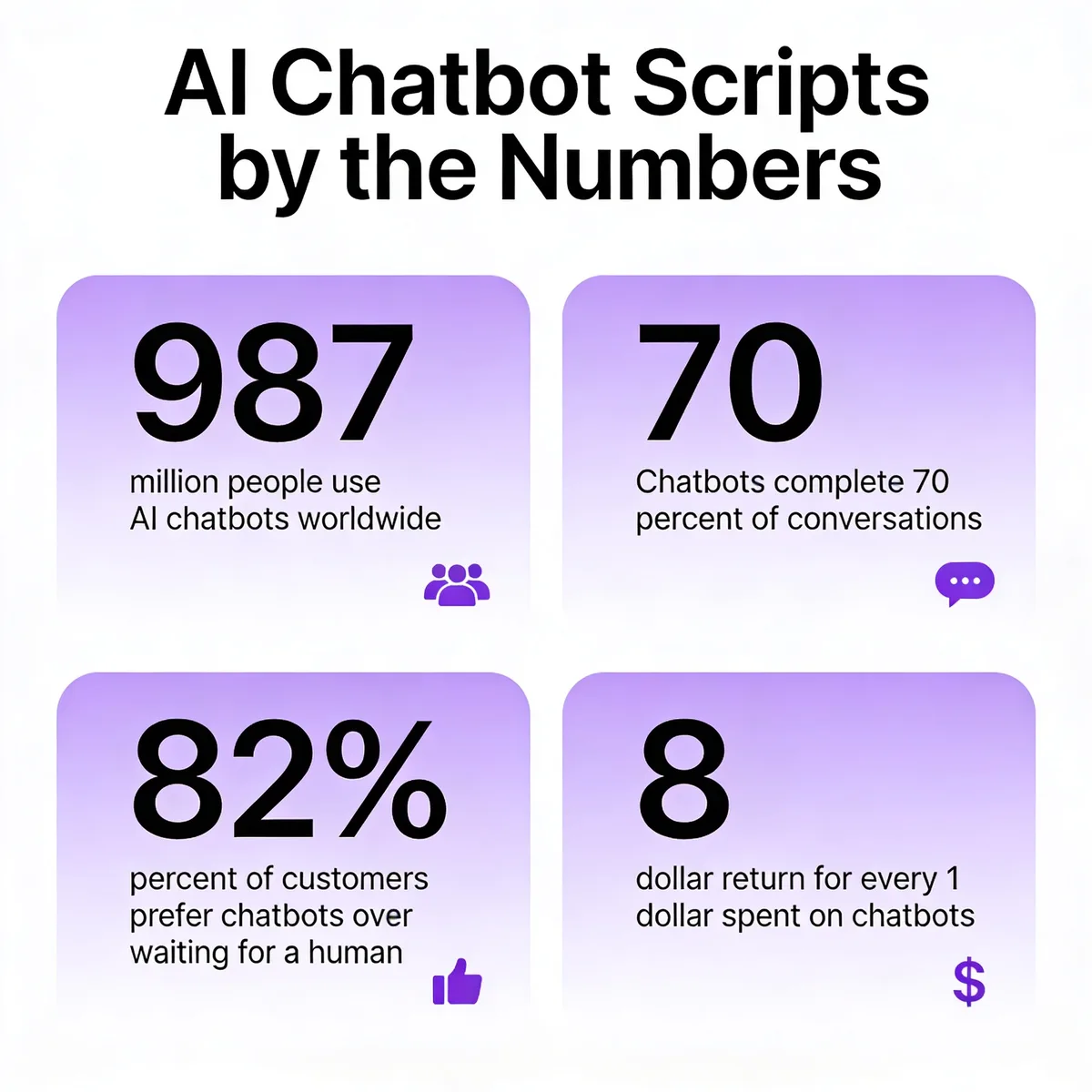
There is also a real business case. According to DemandSage, bots now complete 70% of conversations end-to-end and save businesses about 2.5 billion working hours a year. Those are not soft numbers. If you write the script well, you cut support cost, recover abandoned carts, and qualify leads while your team sleeps. If you write it badly, you generate a slow stream of angry tweets about your "useless chatbot."
Key elements of a high-converting chatbot script
Before I get into the build, here are the seven elements I check for in every script we review. A bot can survive missing one. Missing three usually means a rewrite.
• A single, named goal: One job per bot. Support deflection, lead qualification, booking — pick one. Bots that try to do everything answer nothing well.
• Clear opening intent capture: The first message should give the user three to five concrete options or ask one short, open question. Never lead with "How can I help you?" alone unless the bot is truly open-domain.
• Conversational language: Contractions. Short sentences. A reading level around grade 7. Read every line out loud — if it sounds like a press release, rewrite it.
• Personalization where it earns trust: First name, last order, account tier. Use the data the user already gave you. Skip anything that would feel like surveillance.
• An escalation cue the user can trigger: "Talk to a person" should work at every turn, not only when the bot gives up. Hiding the human button is the fastest way to tank CSAT.
• A graceful fallback voice: "I'm not sure, but here's what I can do" beats "I didn't understand that" every time. Fallbacks are where bots lose users.
• Brand-voice match: A script for a B2B legal tool should not sound like a script for a Gen Z snack brand. The voice has to match the rest of your site, your emails, your packaging.
How to write AI chatbot scripts in 8 steps
This is the workflow we use internally at LiveChatAI and walk customers through in onboarding. Each step assumes you've nailed the previous one. Skipping ahead is the most common reason scripts fail in production — particularly skipping the flowchart in favor of writing copy first.
Step 1: Define your chatbot's primary goal
Pick one job. Not two. One. The single biggest mistake I see in customer scripts is what I call the "Swiss Army bot" — a single chatbot trying to handle support tickets, qualify enterprise leads, recover abandoned carts, and recommend products in the same flow. That bot does none of those well, because every decision the script makes downstream depends on knowing the user's intent upfront, and a five-goal bot can't read intent reliably from a four-word greeting.
Write your goal as a single sentence with a measurable outcome. "Deflect 40% of order-status tickets" is a goal. "Improve customer experience" is not. For LiveChatAI's own help bot, our goal is: "Resolve product setup questions without paging the team during business hours." That sentence alone shapes which intents we script, which we ignore, and where we escalate.
Once the goal is locked, write three things the bot will not do. The non-goals matter as much as the goal. Ours include "do not qualify enterprise leads" (that's the website form), "do not process refunds" (Stripe handles that), and "do not chit-chat outside the product topic." A bot that knows what it won't touch escalates faster, sounds more competent, and keeps the script tight.
Watch out for: a goal so broad that you can't tell whether the bot succeeded. If you can't write the success metric on a sticky note, the goal is still too vague. Tighten until you can. Vague goals also make every downstream choice — intent set, fallback wording, escalation rules — twice as hard, because there's no anchor to argue against.
Pro tip: If your team insists on a multi-goal bot, build two or three single-goal bots and route between them with an opening question. We've seen deflection rates jump from 22% to 58% just from splitting one "do-everything" bot into a separate sales bot and support bot, with one routing line between them.
Step 2: Map the customer journey and key intents
With one goal in hand, list every question a real user asks at that stage of the journey. Not the questions you wish they asked. The questions they actually type. I pull these from three sources: the last 200 support tickets that match the goal, the live chat transcripts from the last 30 days, and the search queries on your help center. That's usually enough to surface 80% of real intents.
Group the questions into 5-10 intents. For a SaaS support bot, ours usually look like this: setup, billing, account access, integration help, feature questions, bug reports, plan changes, cancellation. Each intent gets one short label and one example utterance — the exact phrasing a user types. "How do I cancel?" maps to the cancellation intent. "Cancel my subscription" maps there too. "I want to leave" also maps there. The model can handle the variations, but only if you've named the intent clearly.
Then mark each intent with a tag: self-serve (bot answers fully), guided (bot collects info, then hands off), or escalate (route to human immediately). For most B2B SaaS bots, the split is roughly 60% self-serve, 30% guided, 10% escalate. If your split skews heavily toward escalate, your bot is doing too little. If it skews heavily toward self-serve and your CSAT is low, you're probably faking confidence on intents the bot can't actually resolve.
Watch out for: intents that feel similar but route differently. "Where is my order?" and "Cancel my order" sound alike to the model but need very different responses. Split them early. Reading chatbot use cases across other industries can surface intents you haven't thought of yet.
Pro tip: Run your intent list past a frontline support rep before scripting a single line of copy. Reps spot missing intents in five minutes that took me two days to find from transcripts alone.
Step 3: Sketch a dialogue flowchart before writing copy
This is the step everybody wants to skip and the step that wrecks the script when they do. Before you write a single word of bot copy, draw the flow. A flowchart, a Miro board, a napkin — the medium doesn't matter. What matters is that you can see, at a glance, every decision branch and every dead end.
For each intent, sketch three things: the trigger (what the user says), the bot's response, and the next branch (what the user can do or say next). Branches almost always fall into four buckets: confirm, refine, escalate, and exit. A user can confirm the bot understood, refine the request, escalate to a human, or exit the conversation. If your flow has more than four branches off any single bot message, you're asking the user to make too many choices.
Map the fallback path on the flowchart too. Where does an unrecognized input go? Where does a "talk to a person" command go? Where does a frustrated re-prompt go? In our standard template, we route any third failed match to a soft handoff: "Looks like I'm not getting this right. Want to chat with someone from the team?" That single line, mapped explicitly in the flowchart, prevents the dead-end loops that drive users to social media to complain. Chatbot decision trees are a good companion read here — the underlying logic is the same.
Watch out for: flowcharts that only show happy paths. The bot will spend most of its time in the unhappy paths — confused users, partial info, half-finished tasks. Spend at least half your flowchart time on those.
Pro tip: Color-code branches by outcome on the flowchart. Green for resolved, yellow for guided handoff, red for full escalation. When the chart turns red in too many spots, that intent is not bot-ready and belongs with a human for now.
Step 4: Write conversational opening lines and welcome messages
The opener carries more weight than any other line in the script. It sets the tone, signals whether the user is talking to a bot or a person, and primes the user to phrase their question in a way the bot can handle. We've A/B tested openers across dozens of LiveChatAI customer deployments, and three patterns consistently outperform.
The first is the option-led opener: "Hey, I'm Ava, the LiveChatAI assistant. I can help with setup, billing, or integrations — which one fits?" This works because it tells the user what the bot can do, narrows the input space, and quietly signals it's a bot. Honesty about being a bot increases trust, not the other way around.
The second is the contextual opener: "Welcome back, Sara. Last time we set up your Shopify integration — anything broken there, or want to add another?" This one only fires for returning users and uses one piece of personalization. It feels like a real assistant remembers you, which is exactly what you want.
The third is the scoped open question: "What are you trying to get done today?" This works only if your intent recognition is strong enough to handle messy input. For most bots, the option-led opener is the safer first version. You can graduate to the open question once your script is mature. For more patterns, our roundup of chatbot welcome messages has a dozen openers organized by industry.
Watch out for: openers longer than two sentences. The user has not read your website. They will not read a paragraph from a chat bubble. Cut every opener to a maximum of 25 words.
Pro tip: Match the opener to traffic source. A user who clicked a "Pricing" CTA gets "Looking at pricing? Happy to walk you through plans or run a quick fit-check." A user who landed on the help center gets "Need a hand with setup or billing?" Same bot, different first line — and the conversion lift is usually 15-25%.
Step 5: Craft response templates for top intents
Now you write the bot's actual answers. The pattern I use, taught to me by a customer-success lead I worked with for years, is: acknowledge, answer, next step. Three beats. No more, no less. The acknowledge line shows the bot understood. The answer line resolves the question. The next-step line keeps the conversation moving toward your goal.
Here's how that pattern looks for an order-status intent: "Got it, you want order status. Your order #1284 shipped Tuesday and should arrive by Friday — here's the tracking link. Need anything else, or are you all set?" Three beats. The acknowledge ("Got it, you want order status") is six words. The answer is the meat. The next-step is a quiet close. The user can confirm, refine, or escalate from here.
For each top intent, write three response variants so the bot doesn't repeat itself verbatim across conversations. Variation costs you nothing and lifts perceived quality by a lot. Then write one "refine" response for when the bot has the intent right but is missing a slot (order number, account email, plan tier). "Got it — I just need your order number to pull that up. It's the 7-digit number from your confirmation email."
Keep each response under 50 words unless you're delivering instructions. For long answers, break into two messages with a 1-second pause between, so the user reads the first line before the second appears. If you want a longer reference for support-flavored copy, our live chat script examples post has 200 ready-to-edit templates.
Watch out for: templates that bury the answer at the end. Lead with the resolution. The next-step prompt comes last, not first.
Pro tip: Steal phrasing directly from your top-rated support agents. Pull the last 30 five-star transcripts, copy the agent's actual lines, and adapt them into bot templates. Customers reading those replies cannot tell the bot from the human — because the bot is, in effect, speaking with the human's voice.
Step 6: Add personalization variables and dynamic data
Personalization is where a chatbot stops sounding like a form and starts sounding like an assistant. The variables that move the needle in our deployments are: first name, account tier, last order or invoice, integration status, and (occasionally) location. That's it. Everything else is either redundant or vaguely creepy.
For each response template, mark the variable slots in braces: "Hey {first_name}, your {last_order_id} shipped {ship_date} — here's the tracking link." Then for each variable, define a fallback for when the data is missing. If the user is anonymous, "Hey {first_name}" should fall back to "Hey there" — never to the literal string "Hey {first_name}". Missing-variable bugs are the single most embarrassing thing your bot can do. Test for them aggressively.
The boundary between helpful and creepy is sharper than most teams think. First name in the greeting feels helpful. First name plus hometown plus last purchase, all in one message, feels like a stalker. The rule I follow: use one personalization variable per message, no more. Save the second for two turns later, when the conversation has earned it. Chatbot persona work pairs naturally with personalization decisions, because a clear persona tells you which variables are on-brand.
Dynamic data — order status, account balance, ticket history — pulls from your backend through your bot platform's API or integration layer. Test the data path end-to-end before you ship the script. I've watched flawless copy fail in production because the order API returned "shipped" in lowercase and the template expected "Shipped" with a capital S.
Watch out for: stale data. If your bot tells the user their order shipped two days ago when it actually shipped this morning, you've eroded trust faster than any rude phrasing could. Cache invalidation is a script problem too.
Pro tip: Build a "permission ladder" for personalization. Tier 1: greeting only. Tier 2: greeting + account data. Tier 3: greeting + account data + behavior history. Move a user up a tier only after they've explicitly continued the conversation. New users get Tier 1.
Step 7: Design fallback and escalation language
The fallback is where most chatbots die. The bot doesn't understand, says "I didn't get that, can you rephrase?", the user rephrases, the bot still doesn't get it, the user types louder, the bot keeps failing, the user rage-quits. I have watched this exact sequence in dozens of recordings. The fix is not better intent recognition. The fix is better fallback writing.
The fallback pattern that works is: acknowledge confusion, offer a concrete next move, surface the human option. Here's a template we ship by default: "Looks like I'm not following — that might be on me. Want me to connect you with someone from support, or should we try once more with different wording?" Three things happen at once. The bot owns the miss (not the user). It proposes a real next step. The human option is right there, not buried.
Escalation language deserves the same care. A bad handoff sounds like a transfer at a call center: "Please hold while I transfer you." A good handoff sounds like a coworker introducing you to someone: "Sara from support is jumping in — she has your full conversation already and will pick up where I left off." That one sentence prevents the user from re-explaining the entire problem, which is the single biggest source of post-handoff frustration.
Decide the escalation triggers up front. Standard rules I use: three failed intent matches in a row, explicit user request ("talk to a human", "agent", "person"), detected frustration (curse words, repeated punctuation, all caps), and any high-stakes intent (cancellation, billing dispute, account access). The bot should not try to "win back" any of these.
Examples of bad vs good fallbacks:
• Bad: "I didn't understand your request. Please try again."
• Good: "That one's outside what I can handle — let me grab someone who can. Cool with that?"
• Bad: "Error: intent not matched."
• Good: "I want to make sure I get this right — could you tell me what you're trying to do in one sentence? Or I can pull in a human if it's easier."
Watch out for: fallbacks that loop. After two failed attempts, the third response must escalate or offer a different path. Never let the user attempt a fourth match — they're already gone by then.
Pro tip: Log every fallback trigger with the exact user input that caused it. Review the log weekly. The phrases that hit fallback most often are either missing intents you need to add, or signs the bot is being asked to do work that belongs to a human. Either way, the log tells you what to fix next.
Step 8: Test, iterate, and refresh scripts monthly
A chatbot script is a living document. The product changes, the customer base changes, the search queries that bring users to your site change. A script that worked beautifully in January is usually showing seams by April. We run a monthly review on every customer bot, and the discipline of that cadence is what keeps deflection rates from drifting downward.
Start with persona-based testing before launch. Write three personas — a confused new user, a savvy power user, an angry user about to cancel — and run each one through every intent. Note any flow that breaks character, dead-ends, or misroutes. Fix the script, then run the personas again. Two passes usually catch 80% of issues. The remaining 20% will only surface in real traffic.
Once live, set up A/B tests on the opener and the top three intents. Test one variable at a time: a different opening question, a different option order, a different fallback line. Run each test for at least 500 conversations or two weeks, whichever comes first. Sample size matters more than test duration for short conversations.
Monthly, sit down with the analytics for an hour. The three metrics I track: resolution rate (did the bot finish the conversation without handoff), CSAT (post-chat survey score), and intent miss rate (how often did the bot fall back). Sort intents by miss rate, descending. The top three are your rewrite list for next month. Then sunset any intent that hasn't fired in 90 days — it's noise in the script.
Watch out for: shipping scripts to production without a test pass. I've seen teams roll out a 40-intent script on a Friday and find on Monday that intent #23 was routing to the wrong handoff queue all weekend. Always smoke-test on staging.
Pro tip: Build a one-page "script changelog" that lives next to the bot. Date every change, name the person who made it, and link to the analytics that justified it. When a stakeholder asks "why does the bot say X", you have the answer in 10 seconds. This habit alone has saved me hours of back-and-forth every quarter.
AI chatbot script examples by use case
Below are five short, real-flavor examples. Each one is intentionally bare — the goal is to show the structure, not the polish. Adapt the wording to your brand voice before shipping.
Customer support script example
User: "My account is locked, what do I do?"
Bot: "That's frustrating — let's sort it out. Locked accounts usually come from too many failed logins. Can you confirm the email on the account? I'll check the status and either reopen it or pull in support if it needs a manual reset."
User: "sara@example.com"
Bot: "Got it. I see three failed logins in the last 10 minutes, then an auto-lock. I just sent a reset link to sara@example.com — should land in under a minute. If it doesn't show up, check your spam folder and let me know. Want me to stay on the line while you try?"
Why it works: the bot acknowledges, diagnoses, takes the action, and offers continued support. The user never has to repeat the email. The escalation path ("let me know if it doesn't show up") is implicit and friendly.
E-commerce / Shopify script example
User: "Do you ship to Germany?"
Bot: "Yes — we ship to Germany via DHL. Standard delivery is 4-6 business days and runs €9.50, free over €75. If you want, I can pull up our most-shipped items to Germany or take you straight to the cart. Which one helps more right now?"
User: "Take me to cart"
Bot: "On it. Here's your cart with German shipping pre-selected. The total updates automatically. Anything else before you check out — gift wrap, a discount code, a different shipping option?"
Why it works: the bot answers the literal question, adds two pieces of relevant context (price, free-shipping threshold), and offers two concrete next steps instead of leaving the user to figure it out.
Lead qualification script example
Bot: "Welcome — I can show you a demo, share pricing, or run a 60-second fit check. Which would help?"
User: "Fit check"
Bot: "Great. Three quick questions. First — what's the team size that would use the tool? Roughly is fine."
User: "About 40"
Bot: "Got it, 40 fits our Growth plan. Second — are you looking to roll out in the next 30 days, 60-90 days, or just researching?"
User: "30 days"
Bot: "Solid timeline. Last one — what's the main outcome you're hoping for? Reducing support tickets, qualifying inbound, or something else?"
User: "Reducing tickets"
Bot: "Then you'd probably want to talk to our customer-success team — they'll show you the support-deflection setup specifically. Want me to book 20 minutes this week?"
Appointment booking script example
User: "I want to book a haircut for Saturday."
Bot: "Got it — haircut for Saturday. We have openings at 10:00, 1:30, and 4:15. Which one works?"
User: "1:30"
Bot: "Saturday at 1:30. Last bit — which stylist? Mia, Jordan, or first available?"
User: "First available"
Bot: "Booked. You're with Jordan on Saturday at 1:30. I just sent the confirmation to your email and added a calendar invite. If you need to reschedule, reply 'change' anytime."
Why it works: every turn collects exactly one piece of information. No multi-question dumps. The confirmation closes the loop and tells the user how to undo if needed.
Welcome message script example
Bot: "Hey, I'm the LiveChatAI assistant. New here, or coming back to wrap something up? I can show you what the tool does, run a quick pricing fit, or pick up where you left off."
User: "New here"
Bot: "Cool — welcome. Quick question to point you right: are you on the support side trying to reduce ticket volume, or the sales side trying to qualify inbound?"
Why it works: the bot identifies itself, segments traffic by visitor type, and asks a single question that routes to the right downstream flow. No marketing copy, no fluff.
Common mistakes to avoid when writing chatbot scripts
The mistakes below show up in roughly 80% of the scripts we audit. Fix these first.
• Scripts that are too long: Bots that send 60-word paragraphs lose users by the third turn. Cut every line to one idea. If a response needs three ideas, split into three messages.
• No real fallback path: "I didn't understand" three times in a row is not a fallback — it's a loop. Build the soft handoff explicitly and route to it on the third miss.
• Tone that's too formal: Phrases like "We appreciate your inquiry" or "Kindly provide" make the bot sound like a 2010-era IVR. Conversational beats correct.
• No personality at all: The opposite mistake. A bot that says "OK." and "Got it." with zero warmth feels machine-cold. A small consistent voice (one running joke, one signature phrase) lifts CSAT measurably.
• No human escape hatch: If "talk to a person" doesn't work at every turn, the script has failed before launch.
• Ignored re-prompt loops: When users repeat themselves with slight variations, that's a signal the bot is missing the intent. Track those phrases and add them to the intent training set weekly.
• No brand voice match: Your bot is part of your brand. If your homepage is playful and your bot is buttoned-up corporate, the dissonance breaks the experience. Match the voice you already use elsewhere.
Tools to help you write better chatbot scripts
You don't need a big stack to ship a good script. The five categories below cover the work end-to-end. Pick one tool per category and you're set.
• Dialog flow builders: Visual tools where you can drag-and-drop intents, branches, and responses. LiveChatAI's no-code builder works for most SaaS and e-commerce use cases — you train the bot on your existing content and the script logic comes with it. Other categories of tools exist for highly custom enterprise flows.
• A/B testing platforms: Run live splits on opener variants, fallback wording, and option order. Most modern bot platforms include this natively. If yours doesn't, route conversations to two versions via a simple traffic-split rule.
• Conversation analytics: Reporting that surfaces resolution rate, miss rate, handoff rate, and CSAT by intent. The point isn't the dashboard. It's having a weekly habit of reading it.
• LLM playgrounds: OpenAI Playground, Anthropic Console, or the playground inside your bot platform. Use these to test response variants before pasting them into the script. Cheaper than testing in production.
• Transcript review tools: Anything that lets you read 20-50 real conversations in a sitting. Most teams underuse this — there is no substitute for sitting with real transcripts for an hour. If a fancy tool isn't available, export to CSV and read in a spreadsheet. The insights are the same.
For deeper reading on what these tools actually deliver in production, our roundup of chatbot features breaks down the capabilities that matter most by use case.
Ship one chatbot script this week, not ten
The teams that get chatbot scripts right do less, not more. They pick one goal, write one solid script, ship it, and improve it monthly. The teams that struggle try to launch a 40-intent megabot in a single sprint, then spend the next quarter patching the seams. Pick one intent that hurts you most today — order status, billing, lead qualification — and write the script for that intent only. Aim for live traffic inside two weeks. The next intent will be easier because you'll know what good looks like in your voice. Five intents in, you'll have a real bot. None of this requires fancy tooling. It requires writing, testing, and the willingness to read the transcripts.
Frequently asked questions
How long should a chatbot script be?
The script document itself should fit on 2-4 screens. Individual bot messages should be 25-50 words for general turns and up to 75 words only when delivering instructions. The full conversation, from open to resolution, should usually wrap in 6-10 turns. If your average conversation runs past 12 turns, the bot is doing work that probably belongs with a human.
How often should I update my chatbot scripts?
Monthly is the cadence I use for every script we run. The first review usually finds 3-5 changes worth making. By month four or five, you'll be making one or two small tweaks per review. Big rewrites happen when the product changes, when seasonality shifts the question mix, or when intent miss rates climb above 15%.
Can AI write chatbot scripts for me?
AI can draft response variants, suggest fallback phrasing, and convert raw transcripts into intent labels. What it can't do well yet is make the strategic calls — which goal the bot serves, which intents to escalate, what your brand voice sounds like, where the data lives. Use AI for the typing, not the thinking. The best scripts I've seen are co-written: a human picks the structure, AI fills in variants, a human edits the variants down.
What's the difference between scripted and AI-driven chatbots?
A scripted bot follows a fixed flow — if the user types X, the bot replies Y. It can't handle anything outside the script. An AI-driven bot uses a language model to interpret intent and generate responses, so it can handle phrasing it's never seen before. In practice, the best modern bots are hybrids: AI handles intent recognition and phrasing variation, but a script controls which actions are allowed and where the bot must escalate. That hybrid is what most LiveChatAI customers actually run.
How do I test a chatbot script before going live?
Three layers of testing. First, persona-based manual testing — write 3-5 user personas and run each through the full flow. Second, internal team beta — open the bot to your team for a week, harvest the gaps. Third, controlled traffic rollout — route 10% of real visitors to the bot for two weeks, watch the analytics daily, then scale up. Skipping any of these layers usually means finding bugs in production.
How can I make my chatbot sound more human?
Three changes carry most of the lift. First, use contractions ("you'll", "we've", "it's") — bots without contractions sound robotic. Second, vary message length within a conversation; back-to-back uniform-length messages read as machine-generated. Third, acknowledge before answering. The "Got it, you want X" beat at the start of a response is the single most powerful "human" signal you can add. A clear conversational interfaces approach helps the whole experience feel less form-like and more like a real chat.
Further reading on AI chatbot scripts and conversation design:
200 Live Chat Script Examples for AI Chatbots
Chatbot Persona: What It Is, How to Create One & Examples
21 Chatbot Examples (2026): E-commerce, B2B & More
Chatbot Decision Trees in 2026: Types, Examples & 6-Step Build Guide