







An AI chatbot for retail is a conversational assistant trained on your catalog, policies, and order data that answers shoppers across your website, WhatsApp, Instagram, and apps — 24/7. In 2026, the strongest deployments deflect 70-83% of tickets, lift conversion 10-30% through personalization, and pay back within three months for mid-market retailers.
I've spent the past two years writing about chatbot rollouts at LiveChatAI — watching mid-market retailers go from drowning in Black Friday tickets to running a single bot that handles WhatsApp, web chat, and Instagram in nine languages. The patterns that work are surprisingly consistent. Below are 12 of them, with the five brand examples that prove they work, the best practices that separate a useful bot from a frustrating one, and a step-by-step build inside LiveChatAI.
What is a Retail Chatbot?
A retail chatbot is an AI-powered software assistant built for stores and brands to handle shopper conversations end to end — recommending products, tracking orders, processing returns, answering FAQs, and routing the hard stuff to a human. It runs on your website, social DMs, messaging apps, and mobile apps, replacing form-based support with chat that feels like texting a knowledgeable employee.
The retail category isn't just experimenting with this stuff — it's leading. According to WotNot, retail and eCommerce account for 27.95% of all chatbot deployments worldwide, the largest share of any vertical. The reason is simple: retail has the highest ratio of repeatable questions (where's my order, do you ship to Canada, what's your return policy) to total conversation volume, and that's exactly the workload AI is best suited to absorb.
Two flavors dominate the market:
• Rule-based chatbots: Decision-tree bots that follow scripted "if X, then Y" branches. Fast to deploy and predictable, but they break the moment a customer phrases a question outside the script. Good for narrow workflows like booking a slot or returning an item.
• AI-powered chatbots: Bots that use large language models (LLMs) and natural language processing to read intent, pull answers from your own knowledge base, and improve from every conversation. They handle messy questions, multi-turn dialogue, and product discovery — the realistic mix of work a retail shopper throws at them.
Most 2026 deployments combine both: a rule layer for transactional flows (returns, order lookup) and an AI layer for everything open-ended. If you want a wider look across verticals, our 2026 chatbot examples roundup shows how the same hybrid pattern shows up in B2B and healthcare too.
How to Use Retail Chatbots — 12 Ways That Work in 2026
Below is the short version, then a deep dive on each. Use the overview if you're scanning, or jump to whichever use case matches the gap in your current support stack.
Quick overview of all 12 ways:
1. Boosting sales with product recommendations — Personalize the shopper's path from first click to checkout.
2. Enhancing customer experience across channels — Instant, contextual replies on the channel each customer prefers.
3. Automating routine customer service tasks — Deflect the repetitive 80% so your agents own the meaningful 20%.
4. Providing 24/7 service across time zones — Never make a shopper wait for business hours again.
5. Reducing employee burnout — Hand the soul-draining tickets to AI; keep humans on real problems.
6. Guided shopping with virtual assistants — Replace static category pages with a stylist-style conversation.
7. In-store assistance for brick-and-mortar — Stock checks, aisle directions, and product info on customers' phones.
8. Handling returns and exchanges — Self-service refunds and pickups without an agent in the loop.
9. Seasonal campaigns and promotions — Surge-proof your support and personalize Black Friday outreach.
10. Gathering insights from customer interactions — Turn chat logs into a continuous feedback engine.
11. Integration with CRM systems — Auto-update shopper profiles and trigger sales alerts.
12. Managing appointments and reservations — Book fittings, consultations, and pickups inside the chat.
1. Boosting Sales With Personalized Product Recommendations
This is the use case that pays back the investment fastest. The chatbot watches what a shopper browses, what's in their cart, and what they've bought before, then suggests the next item in a conversational flow. Done right, it replaces the "you might also like" carousel that nobody clicks with a real exchange.
How to implement:
1. Connect the bot to your product catalog via Shopify, BigCommerce, or a CSV feed so it knows current SKUs, prices, and stock levels.
2. Train it on past purchase data from the last 12 months — enough to learn category affinities without overfitting to outdated trends.
3. Set the recommendation trigger to fire after a shopper views 2+ products in one session, or after they add the first item to cart (not before — earlier triggers feel pushy).
4. Cap suggestions at 3 items per turn. More than that and conversion drops sharply because the shopper freezes.
5. A/B test conversational vs carousel format. In our customer base, conversational ("Based on the dress in your cart, this clutch goes well — want me to add it?") outperforms a card carousel by roughly 2x on click-through.
According to Careertrainer's 2025 retail AI report, retailers using AI for personalization see a 10-30% lift in conversion rates. The wide range is real: the low end shows up when bots only suggest by category, and the high end shows up when they use full session context. Expect to see meaningful numbers within 30-45 days of launch on stores doing at least 10K monthly sessions.
2. Enhancing Customer Experience With Instant, Contextual Replies
Shoppers don't compare your CX to other retailers anymore — they compare it to texting a friend. A chatbot that remembers the last conversation, knows the shopper's order history, and replies in under three seconds is the new floor, not a competitive advantage.
How to implement:
1. Enable persistent conversation memory so the bot can pick up where the shopper left off, even across devices.
2. Pre-fill known context (name, recent order, loyalty tier) so the shopper never has to introduce themselves.
3. Use a single brand voice across channels — the bot on Instagram, your site, and WhatsApp should sound like one person, not three teams.
4. Set response time SLAs at 2-3 seconds for AI replies and under 60 seconds for human handover during business hours.
According to Capital One Shopping's 2025 research, 62% of consumers now prefer chatbots over humans because they reply faster. That's a notable shift from the "chatbots are frustrating" sentiment of 2020, and it tracks with the quality jump LLMs brought to the underlying tech. For a deeper look at unifying channels, our omnichannel chatbot guide covers the architecture choices that make this work.
3. Automating Routine Customer Service Tasks
If your agents are answering the same "where's my order" question 200 times a day, you're paying salary to do work a bot can absorb. Routine ticket deflection is usually the first ROI win retailers see — and the easiest to measure.
How to implement:
1. Audit your last 1,000 tickets and tag them by intent. You'll typically find 60-80% fall into 10-15 repeatable categories.
2. Build automated flows for the top 10 — order status, returns, shipping policy, store hours, password reset, product specs, size guides, refund timing, account changes, and payment issues.
3. Connect order lookup to your OMS (Shopify, Magento, custom) so the bot can answer "where's my order" with a real tracking number, not a generic "please check your email."
4. Set escalation triggers for sentiment red flags ("frustrated," "speak to human," "complaint"), high-value orders, or repeat contact within 24 hours.
According to Careertrainer's retail AI study, AI-driven chatbots can handle up to 80% of routine customer inquiries, freeing up agents for complex issues and driving meaningful payroll savings. In practice, the deflection curve is steepest in the first six weeks — once you've covered the top intents, additional automation has diminishing returns.
4. Providing 24/7 Service Across Time Zones
Half of online retail purchases happen outside 9-to-5 hours, and a growing share comes from international shoppers in time zones your team doesn't cover. A chatbot is the only honest way to give those customers parity with the daytime crowd.
How to implement:
1. Set the bot as the default first-touch for all conversations outside business hours.
2. Configure intent-based escalation — urgent intents (fraud claim, lost package over $200, payment failure) queue for the first available agent next morning, with a confirmation message to the shopper.
3. Localize the conversation by detecting language from browser headers or asking on first message — don't rely on a default English fallback for non-English speakers.
4. Track after-hours resolution rate separately from your daytime metrics. It should be within 10 percentage points of your daytime number; if it isn't, the bot needs more training data on after-hours intents.
This is also where the bot's training depth matters most. Bots trained on a thin FAQ struggle at night because there's no human safety net; bots trained on the full help center, product catalog, and historical chat transcripts perform almost as well at 3 a.m. as at 3 p.m.
5. Reducing Employee Burnout
Support agents quit because of the volume of low-value tickets, not the difficulty of the hard ones. When the bot owns the boring tier, agents get to use the skills they were hired for — and turnover drops.
How to implement:
1. Pair every agent with a personal dashboard showing what the bot deflected on their behalf that day. It's a tangible "you got X hours back" signal.
2. Use the time savings to invest in agent training on the harder tickets — complex returns, VIP escalations, complaint recovery. Reframe the role from "ticket processor" to "customer specialist."
3. Build an internal escalation playbook so agents know exactly which bot conversations to pick up and what context the bot has already gathered.
4. Survey agents quarterly on which automations help most and which create new friction. The bot's training should be a continuous conversation, not a one-time setup.
The brutal truth: if you deploy a chatbot purely to cut headcount, agents will resist it (and rightly so). If you deploy it to make their job better, they'll help train it. We've seen retailers cut ticket volume by 60% while keeping the same team size and watching CSAT climb — because the remaining tickets were the meaningful ones.
6. Guided Shopping With Virtual Assistants
Static category pages with 800 SKUs are a usability disaster. A guided shopping bot turns the choose-a-product problem into a conversation — "What's the occasion?" "Indoor or outdoor?" "Budget?" — and narrows 800 options to 3 in under a minute.
How to implement:
1. Pick one category to start — usually the one with the highest return rate (a sign of poor pre-purchase guidance). Fashion, furniture, and beauty are classic fits.
2. Build a 4-7 question flow that maps to your existing product filters but in plain language ("warm tone or cool tone" instead of "Pantone hex range").
3. Surface 3-5 recommendations at the end with a one-line explanation of why each was picked. Shoppers buy when they understand the reasoning.
4. Add a "show me more" exit so people who want to keep browsing don't feel trapped in the quiz.
5. Track the funnel: quiz starts, quiz completions, recommendation clicks, add-to-cart, purchase. The drop-off point tells you which question is too narrow or too vague.
Make Up For Ever's Shade Finder (covered below in the examples) is the gold standard here — and the format works for any product where shoppers struggle to self-diagnose. For shopping-bot inspiration across categories, our best AI shopping chatbots roundup compares 13 options head to head.
7. In-Store Assistance for Brick-and-Mortar Retailers
Physical retail doesn't get to opt out of the chatbot wave. A growing number of stores deploy bots accessible via QR codes on shelves or in-store WiFi captive portals, giving shoppers a private way to ask "do you have this in size 9" or "where's the cookware aisle" without hunting for a staff member.
How to implement:
1. Put QR codes at decision points — fitting rooms, end caps, aisle markers, checkout queues. Each QR can preload context ("you're in the kids' section, ask about sizes").
2. Connect to real-time inventory from your POS so stock answers are accurate to the store, not the chain. Nothing kills trust faster than "yes we have it in stock" followed by an empty shelf.
3. Offer a "find an associate" handoff for shoppers who want a human — the bot triages the request to the right department.
4. Layer on store-specific promos the bot can surface when relevant ("we're running a buy-2-get-1 on the brand you're looking at").
This use case grew sharply in late 2025 as retailers looked for ways to lift in-store conversion without adding floor staff. It's also a useful CX equalizer — shoppers who feel ignored by associates are exactly the ones who'll quietly walk out and buy from a competitor.
8. Handling Returns and Exchanges
Returns are expensive — both the shipping cost and the agent time. A chatbot can run the entire flow end-to-end: identifying the order, validating eligibility, generating a label, scheduling pickup, and issuing the refund — without a human touch for the 70%+ of returns that follow policy cleanly.
How to implement:
1. Connect the bot to your returns platform (Loop, Returnly, ReturnLogic, or your custom RMA system) so it can actually generate labels, not just describe the policy.
2. Build a policy-check flow that validates eligibility before promising anything — return window, item condition, original payment method, exclusions like final-sale items.
3. Offer alternatives before the refund — exchange for a different size, store credit at 110% of original value, or a partial refund to keep the item. Retailers using this pattern recover 15-25% of would-be refunds as kept revenue.
4. Escalate edge cases automatically — damaged items needing photo review, claims over a value threshold, or shoppers who've returned more than 30% of orders this year.
Returns are also a fairness test for your bot. Shoppers asking for refunds are often already irritated; if the bot adds friction (forms, copy-pasted policy, dead-end branches), CSAT craters. Done well, this is one of the highest-CSAT use cases in retail chat — shoppers love when a return takes 90 seconds.
9. Seasonal Campaigns and Promotions
Black Friday, Cyber Monday, holiday shipping cutoffs, back-to-school — retail has predictable demand spikes that crush support queues. Bots both absorb the surge and turn it into a personalized marketing channel.
How to implement:
1. Pre-load seasonal FAQs two weeks before the event — extended hours, shipping cutoffs, gift wrap availability, sale terms, price-match policy.
2. Trigger proactive messages on key pages — for example, a chat invite on the cart page during Black Friday with "Spend $20 more for free shipping."
3. Segment promos by loyalty tier using the customer profile the bot has built up. VIPs see early access, lapsed shoppers see a win-back offer, new visitors see a first-purchase incentive.
4. Have a graceful overflow plan. If volume spikes 10x, what does the bot tell shoppers about human wait times? Honesty about queue length builds more trust than fake reassurance.
The Capital One Shopping data point earlier in this post points to where this is going: AI-driven traffic to U.S. retail websites jumped 4,700% year-over-year, with much of that surge tied to seasonal shopping behavior. Bots that handle the surge gracefully turn what used to be a service crisis into a conversion opportunity.
10. Gathering Insights From Customer Interactions
Every chat is a data point. Aggregated across thousands of conversations, those data points reveal what your customers actually want — language and all — better than any survey.
How to implement:
1. Tag conversations by intent automatically so you can see, week over week, what people are asking about most.
2. Run sentiment analysis on transcripts to flag conversations that ended in frustration even if the shopper didn't complain explicitly.
3. Trigger post-resolution micro-surveys — "Was this helpful? 👍 👎" — at the end of bot-resolved conversations. Keep them under 5 seconds to complete.
4. Build a weekly insights review with merch, product, and support stakeholders. The chatbot's transcript is a free voice-of-customer feed; treat it like one.
According to Tars, retailers using chatbots specifically for feedback collection see response rates up to 3x higher than email surveys. The reason is timing — the chatbot asks while the experience is fresh, before the shopper has tabbed away. That's a structural advantage email will never have.
11. Integration With CRM Systems
A chatbot disconnected from your CRM is a glorified FAQ widget. Wired into HubSpot, Salesforce, Klaviyo, or Attentive, it becomes part of the customer record — every conversation enriches the profile and triggers the right downstream action.
How to implement:
1. Map bot data fields to CRM properties — last conversation date, intent, sentiment, products discussed, escalation flag.
2. Set up bi-directional sync so the bot can pull the CRM's view of the shopper (lifetime value, segment, last order) and contribute back to it.
3. Trigger sales alerts on high-intent signals — a shopper asking for a bulk discount, asking about enterprise pricing, or repeatedly viewing a high-ticket item.
4. Sync to your email/SMS platform so abandoned-cart, win-back, and loyalty flows know what the shopper said in chat. Nothing tells a shopper "we don't know you" louder than getting an email about a product they already returned.
For platform-specific implementation, our BigCommerce AI chatbot setup guide walks through the OAuth and webhook configuration for one of the most common retail stacks.
12. Managing Appointments and Reservations
Service-heavy retail — beauty salons, optical chains, furniture consultations, fitting rooms, click-and-collect — runs on appointments. Bots remove the phone-tag friction from booking.
How to implement:
1. Connect to your booking system (Calendly, Acuity, Booker, Mindbody, or your in-house calendar) so the bot sees real availability.
2. Build a 3-step booking flow — service type, preferred date, confirmation. Adding a fourth step drops completion sharply.
3. Send a 24-hour reminder via the same channel the shopper booked through — WhatsApp confirmation if they booked on WhatsApp, web push if they booked on site.
4. Offer easy rescheduling from the reminder itself. Shoppers who can't reach you to reschedule often just no-show, which costs you more than a moved slot.
This use case is also a stealth retention tool: every booking confirmation is a chance to upsell ("add a brow tint to your appointment for $15") or cross-sell ("our spring collection just dropped — want a preview?"). Treat the reminder message as marketing real estate, not a system notification.
Best Practices for Retail Chatbots in 2026
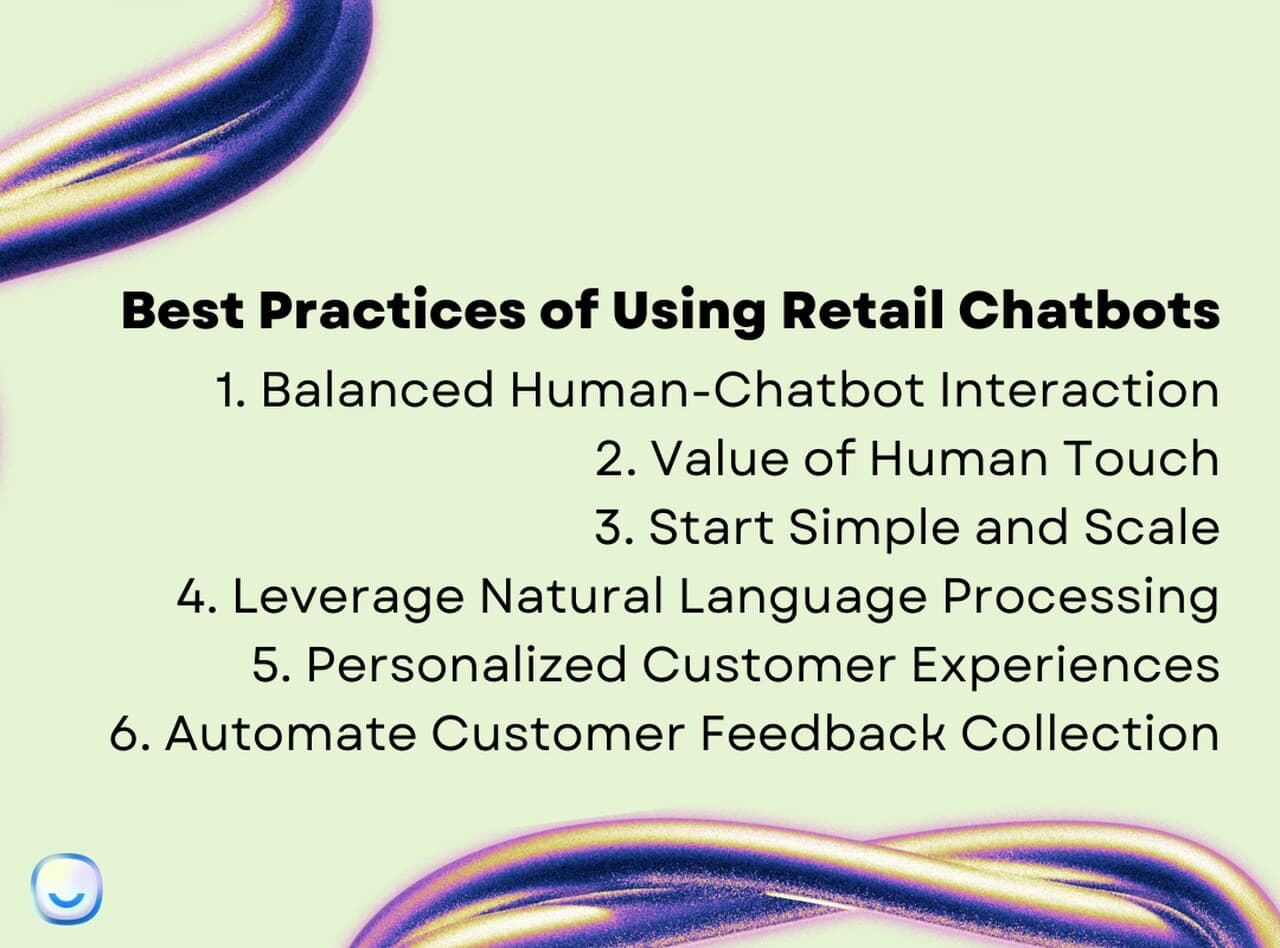
The deployments that work share a small set of habits. The ones that fail usually skipped at least three of them.
1. Design the human handover before you design the bot. The fastest way to lose customer trust is a bot that refuses to escalate. Define explicit triggers — sentiment red flags, repeat contacts, high-order-value, account changes, complaints — and route those instantly. The bot's job is to handle volume, not to be a wall.
2. Treat the bot as a colleague, not a replacement. The personal touch of human interaction still matters for sensitive issues — disputes, complaints, anything involving real money. Position the bot as the team's first-line co-worker so customers see escalation as continuity, not friction.
3. Start narrow, scale wide. Don't try to automate everything in week one. Start with the top 10 intents (which usually cover 60-70% of volume), prove the deflection numbers, then expand. Retailers who try the boil-the-ocean approach usually launch six months late with a bot that does everything badly.
4. Train on real conversation data, not just FAQs. Modern NLP shines when it learns from actual customer language — including the typos, slang, and incomplete questions. Feed it your help center, product descriptions, past chat transcripts, and email tickets. The richer the training corpus, the more natural the replies.
5. Personalize using what the customer has actually done. Generic "Hi there!" greetings waste the data you already have. If the shopper is logged in, the bot should greet them by name, reference their last order, and skip the verification flow. This single move usually lifts CSAT by 10-15 points.
6. Make feedback collection part of the conversation. Don't bolt on a separate survey. End bot-resolved conversations with a one-tap "did this help?" and use the answers to retrain weekly. The bot improves itself if you let it.
7. Audit conversations weekly for the first 90 days. Most chatbot failures aren't technical — they're answers the team didn't realize were wrong. Pull a random sample of 50 conversations every Monday and grade them. Fix the misfires that same day.
According to Warmly, retailers running mature deployments report that 83% of chatbot interactions are successfully resolved without human intervention. The number is achievable, but only with the practices above — drop the audit cadence and resolution rate slides fast.
Real-World Retail Chatbot Examples
Theory is one thing; deployments are another. Here are five well-known retail chatbots and what each does that's worth copying.

Amazon: Order Tracking and Delivery Updates
Amazon's chatbot is the benchmark for transactional bots. It handles order tracking without making the shopper log in, sends real-time delivery updates in-app, and lets customers reroute packages or change delivery speed mid-shipment. The interaction model — "give me my information faster than the website can" — is what most shoppers now expect from any retailer.
What's worth copying: the bot is opinionated about what it can do. It doesn't pretend to be a stylist or a personal shopper. It owns the post-purchase relationship and does that one job extremely well. Most retailers would be better off launching a focused bot like Amazon's than a sprawling do-everything assistant.
Duolingo: Multilingual Conversational Practice
Duolingo's chatbots let learners practice text conversations in dozens of languages, with real-time grammar and vocabulary corrections. The product lesson for retailers: multilingual support isn't just translation — it's tone, idiom, and cultural fit.
If you ship to non-English markets, a chatbot is the only realistic way to deliver native-language CX without hiring an agent team in every region. Modern LLM-based bots handle 50+ languages out of the box; the real work is making sure your product names, sizing conventions, and shipping terms translate cleanly.

HP Instant Ink: Subscription Service via Messenger
The HP Instant Ink chatbot lives on Facebook Messenger and handles the entire subscription lifecycle — signup, plan changes, printer troubleshooting, and reorders. Customers can complete the whole purchase inside Messenger without ever opening hp.com.
What's notable: the bot is built around a recurring product, where the lifetime value of perfecting the conversation is far higher than for a one-time sale. For retailers with subscription components (replenishment, memberships, refills), this pattern is a model — the bot owns the relationship between orders, not just the orders themselves.
Casper InsomnoBot: Brand-Building Through Conversation
Casper's InsomnoBot was a chatbot for insomniacs — available 11 p.m. to 5 a.m., it engaged users in light conversations about late-night snacks, 90s boy bands, and whatever else came up. Promotional messages were subtle and infrequent.
The takeaway isn't "build a quirky bot." It's that the chatbot was a brand asset, not a support tool. Casper used it to make a mattress company feel personable and present in a moment (sleeplessness) when their product was literally the answer. Most retailers underuse this — they ship a bot that answers questions and stop there, when the same channel could carry brand voice 24/7.
Make Up For Ever Shade Finder: Personalized Discovery
The Shade Finder on Facebook Messenger walks shoppers through a short quiz — skin type, preferred finish, coverage level — and recommends the right foundation shade with application tips. It removed the single biggest friction point in online beauty shopping (you can't try the product) by turning it into a guided conversation.
This is the cleanest example of guided shopping done well. The bot's success isn't measured in messages handled — it's measured in foundation returns avoided. For retailers in any category where the customer has to make a judgment call before buying (size, fit, shade, configuration), this is the playbook.
Two other retailers worth watching: H&M's interactive chatbot curates a personalized shopping experience based on style preferences, and Sephora's reservation assistant lets shoppers book in-store makeovers from chat. Both reinforce that retail bots succeed when they automate something the website is bad at — discovery, scheduling, post-purchase service — rather than duplicating what the website already does well.
Choosing the Right AI Chatbot Software for Retail
The market is crowded and noisy. Most platforms can demo well; far fewer hold up at scale. When you're evaluating vendors, weight these factors heaviest:
• Channel coverage: Does it support your top three channels natively — website, WhatsApp, Instagram, Messenger, Shopify Inbox — without third-party glue? Each integration you have to maintain yourself is a future support burden.
• Knowledge base ingestion: Can it train on your website, PDFs, Q&A docs, and a CSV in one workflow, or does it require manual intent design? Self-training bots cut setup time from weeks to hours.
• Handover quality: Watch a live demo of the bot-to-human escalation. Slow, clunky handovers signal a product that was built bot-first and bolted on human support later.
• Multilingual support: If you sell internationally, this is non-negotiable. Look for native LLM-driven multilingual reply (not Google Translate piped in).
• Integration depth: Shopify, BigCommerce, WooCommerce, Salesforce, HubSpot, Klaviyo, Zapier. The more native, the less custom plumbing.
• Pricing model: Per-message, per-resolution, or flat. Per-resolution aligns vendor incentives with yours; per-message punishes high-engagement bots.
• Data residency and compliance: GDPR, CCPA, SOC 2. If you handle EU shoppers, ask where the conversation data lives.
For a broader look at the eCommerce-specific options, our 7 best eCommerce chatbots comparison breaks down pricing and feature trade-offs. If WhatsApp is your priority channel, the WhatsApp Shopify AI chatbot guide covers the integration mechanics in detail.
Measuring ROI and Performance of Retail Chatbots
If you can't measure the bot, you can't justify its budget at the next planning cycle. These are the metrics that matter — and the order to track them in.
• Containment rate (or self-resolution rate): The percentage of conversations the bot resolves without human handover. Healthy ranges: 50-70% for new deployments, 75-85% for mature ones. Below 40% means your training data is too shallow.
• Customer satisfaction (CSAT) on bot conversations: Should be within 5 points of human-agent CSAT. If the gap is wider, the bot is "solving" tickets the customer didn't feel were solved.
• Average handle time (AHT) for escalated tickets: Should drop versus pre-bot baseline — the bot's job is to hand off pre-qualified context, so agents start each ticket already 30 seconds in.
• Conversion lift on bot-touched sessions: Tag sessions where the bot was opened and compare conversion to a control. Aim for a 10-30% lift on guided shopping flows.
• Cost per resolution: Total platform cost ÷ resolved conversations. Compare against your fully-loaded agent cost per ticket. Most retailers see 80-95% reduction at scale.
• Time to first response: The single biggest CX lever. Should be under 5 seconds for bot responses, under 60 seconds for agent handover during business hours.
According to a case study from Bytesicht, a major retail chain that deployed an AI-powered chatbot saw customer satisfaction climb 45% alongside meaningful support-cost savings. The CSAT lift came from response speed and resolution accuracy — not from anything fancy in the conversation design.
Track these weekly for the first 90 days and monthly after. Build a one-page dashboard so anyone in the org can see how the bot is performing without asking for a custom report.
Common Retail Chatbot Challenges and How to Overcome Them
Every retail chatbot project hits at least three of these. Knowing them in advance saves you a quarter of rework.
1. The bot hallucinates product info. LLM-based bots will confidently invent specs if the training data is thin. Fix it by grounding the bot exclusively in your own catalog and policies — and turning off "general knowledge" fallback in the platform settings. If the answer isn't in your data, the bot should say so.
2. Customers get stuck in loops. Watch your conversation logs for the same shopper asking the same question three times. That's a sign the bot's confidence threshold for escalation is set too high. Lower it — let the bot escalate sooner rather than frustrate longer.
3. Integration breaks at scale. A bot that works on 100 daily conversations may stall at 10,000. Stress-test the OMS, CRM, and inventory connections before your first big seasonal push. Black Friday is not the time to discover your order-lookup webhook times out at 50 requests per second.
4. Agents resist the bot. If your support team sees the bot as a threat, they'll quietly sabotage it (ignoring escalation queues, mistraining intents, complaining to customers). Bring them into the rollout from day one. Show how it reduces their drudge work. Compensate based on customer outcomes, not ticket volume.
5. Privacy and compliance surprises. Conversations contain order data, addresses, payment hints. Make sure your platform encrypts at rest, has a retention policy you can configure, and supports right-to-be-forgotten requests. Audit annually.
6. The bot answers questions the brand doesn't want it to. Out of the box, LLM bots will sometimes engage with competitive comparisons, complaints about other brands, or off-topic chat. Build a topic guardrail list and test it weekly — adversarial customers will find the edges.
Future Trends for AI Chatbots in Retail
The chatbot of 2026 looks different from the chatbot of 2023, and the 2028 version will look different again. Three shifts are worth planning around now.
• Agentic AI taking real actions. The next generation of bots doesn't just answer questions — it completes tasks across systems. Reorder this item to my last address, change my subscription frequency, swap the size on this pending shipment. The hand-off from "conversation" to "action" is collapsing.
• AI-driven shopping traffic exploding. According to Capital One Shopping, AI-driven traffic to U.S. retail websites grew 4,700% year-over-year — most of it from shoppers using ChatGPT, Perplexity, and Google AI Overviews as discovery engines. Your chatbot is no longer just a support tool; it's becoming a brand surface that AI engines may quote, cite, or invoke. Optimize accordingly.
• Voice commerce coming back. The first wave of voice (Alexa, Google Home) underdelivered because the underlying NLP wasn't ready. With LLMs, voice ordering, in-store voice queries, and call-center voice bots are usable for the first time. Retailers piloting voice chatbots in fitting rooms, drive-throughs, and customer service are seeing serious adoption in the early 2026 cohort.
• Hyper-personalization across sessions. Bots that remember not just the last conversation but the last six months of behavior — what you returned, what you browsed but didn't buy, what you complained about — are starting to feel uncannily helpful. Expect this to be table stakes by 2027.
• Seasonal traffic absorption as a competitive moat. Black Friday and Cyber Monday already test the breaking point of human support teams. Retailers with mature chatbots will absorb 10x traffic spikes gracefully; retailers without them will lose customers to wait times.
As Sambit Dutta of Deloitte put it, the decisive competitive edge will come from "the strategic deployment of processes that are not only 'always on' but also autonomous and self-correcting — all at a scalable level, driven by AI." That's the bet retailers are making in 2026 — and the ones who skip it will spend 2027 catching up.
How to Create a Retail Chatbot With LiveChatAI
If you want to ship a working retail chatbot this week, here's the five-step build inside LiveChatAI. The platform is purpose-built for the use cases above — automated ticket deflection, multi-channel deployment, CRM-style customer memory — and the free plan is enough to test the waters before committing.
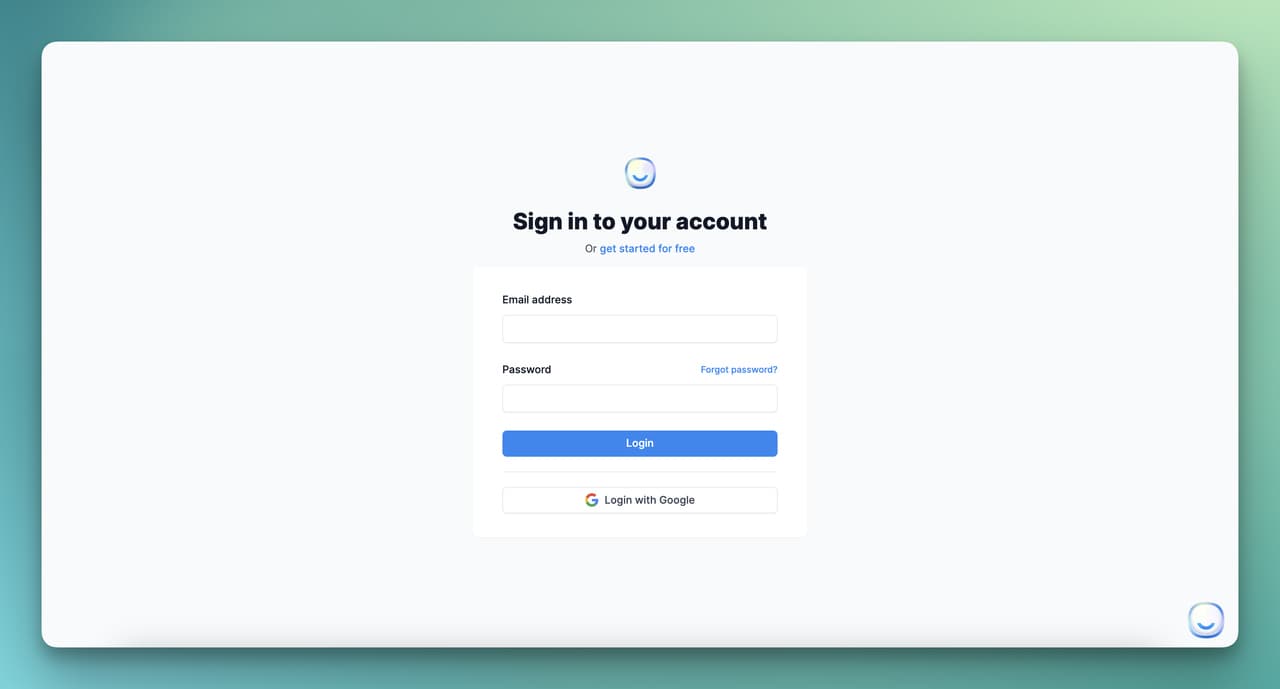
Step 1: Set Up Your LiveChatAI Account
Start by creating an account on LiveChatAI. You'll land in the dashboard with a fresh workspace and no data sources connected yet.
Step 2: Select Your Data Source
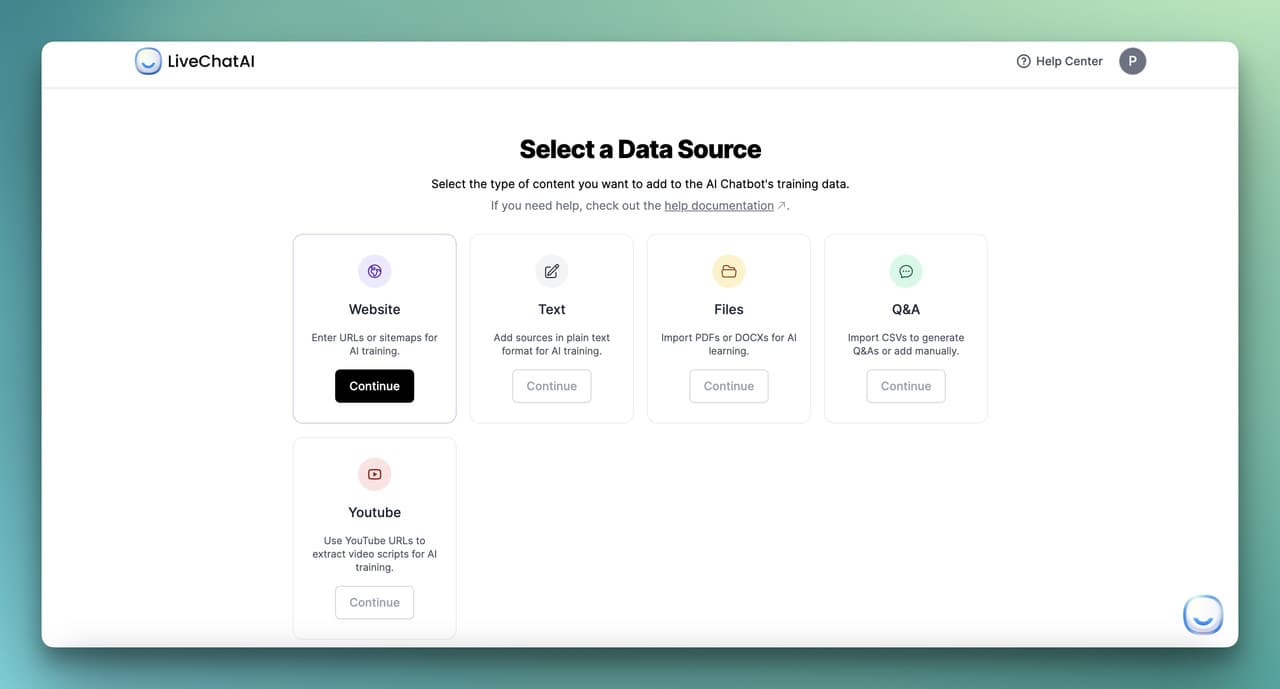
Pick where the bot's knowledge comes from. For a retail deployment, you'll usually mix several:
• Website: Add your store URL or sitemap. The crawler ingests product pages, FAQs, shipping info, and help articles.
• Text: Paste product descriptions, return policies, or sample conversations.
• PDF: Upload product catalogs, store handbooks, or training manuals.
• Q&A (CSV): Upload a spreadsheet of common questions and approved answers. Best for transactional flows where the answer must be exact.
• YouTube: If you have product demo videos, the URL pulls in the transcript so the bot can reference them.
Most retailers start with website + Q&A and add PDFs as needed.
Step 3: Customize the Training Content
After ingestion, review what the bot learned. You can add, edit, or delete pages — useful for trimming low-quality content (blog archives, legal pages) that would dilute answer quality.
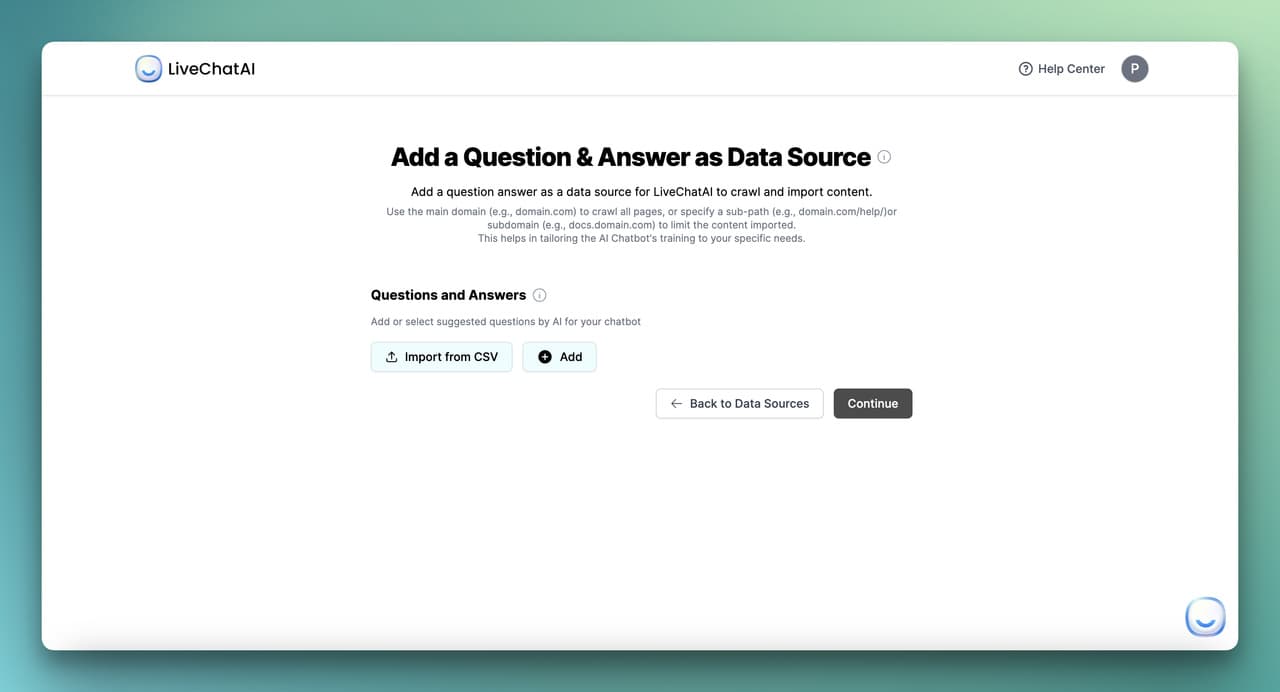
Finalize by clicking Import. The bot is now grounded in your data and can answer based on what you've fed it — nothing else.
Step 4: Configure Human Support Integration
Toggle on human handover so the bot knows when to pass a conversation to a live agent. Configure trigger keywords ("speak to a person," "manager," "complaint"), sentiment-based escalation, and business-hours routing.
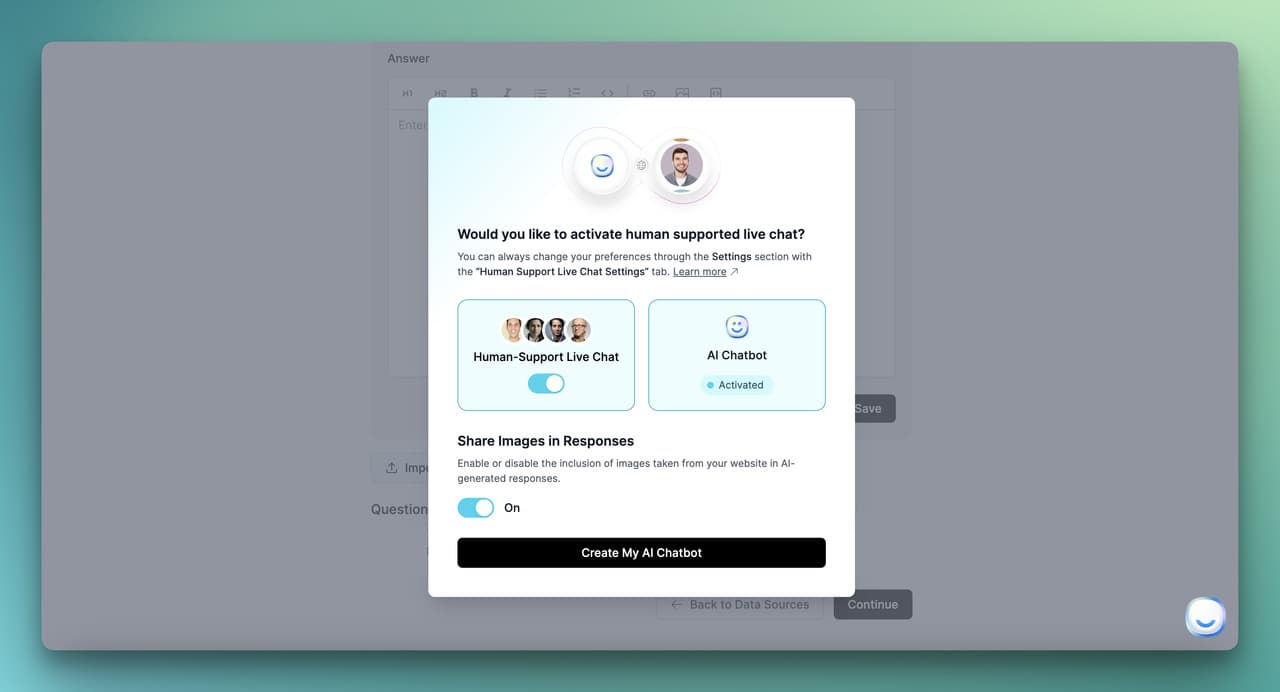
This is the step most teams skim, then regret. Spend the extra 20 minutes here — well-configured handover is the difference between a bot customers trust and one they fight.
Step 5: Final Customizations on the Dashboard

• Preview and settings: See how the bot looks to shoppers and adjust name, language, and default greeting.
• Branding: Match widget colors, logo, and tone to your store. Custom voices outperform generic ones on engagement.
• Integrations: Embed on your site, connect to WhatsApp, Slack, Messenger, or full-page chat. Multiple channels can run off the same training data.
• Inbox: Monitor live conversations, jump in when needed, and review past chats for training improvements.
• Automations: Connect Make.com, custom webhooks, or the open API to trigger downstream actions — sync to CRM, push orders to OMS, alert sales on high-value leads.
• Data source management: Add or refresh sources as your catalog and policies change. Most retailers re-sync monthly.
To go live immediately, grab the embed script from the "Embed & Integrate" section and drop it before the closing </body> tag on your site. The bot starts answering within minutes.
Building Your Retail Chatbot Stack From Here
If you're starting from zero, do these three things this quarter and you'll have a working retail chatbot delivering measurable ROI by next quarter.
1. Audit your last 1,000 tickets and identify the top 10 intents. That list becomes your bot's first sprint.
2. Pick one channel to launch on — usually your website, because the traffic is highest and the integration is simplest. Add WhatsApp or Instagram in month two.
3. Set a 90-day review cadence with containment rate, CSAT, and cost-per-resolution on a single dashboard. If the numbers aren't moving, the training data needs more depth, not a different platform.
If you want to test the approach before committing budget, set up a free LiveChatAI account and connect it to your store. The free tier is enough to deflect your top intents and see the numbers for yourself — usually within a week.
For more on adjacent topics, our eCommerce live chat guide covers the human-agent side of the equation, and our 18 chatbot business ideas roundup shows how retailers in adjacent niches are deploying the same tech.
Frequently Asked Questions
How can I use AI in my retail store?
An AI chatbot for retail can absorb 70-80% of routine customer questions (order status, returns, store hours, sizing), guide shoppers through purchases with personalized recommendations, and book in-store appointments — across your website, WhatsApp, Instagram, and apps. Start by automating your top 10 ticket intents and 24/7 coverage; expand to guided shopping and CRM integration once the basics are stable. Most mid-market retailers see payback within 90 days.
What is the best AI chatbot for shopping?
It depends on your stack. For Shopify and BigCommerce stores wanting fast time-to-value with native multi-channel support, LiveChatAI covers the use cases in this guide on a free starter plan. For sprawling enterprise rollouts with custom CRM and OMS work, you'll need to evaluate based on integration depth, pricing model (per-message vs per-resolution), and multilingual capability. Our AI chatbot for eCommerce page covers how LiveChatAI handles the retail-specific workflows.
What is an example of a retail chatbot?
Amazon's order-tracking bot, Make Up For Ever's Shade Finder, and HP Instant Ink's Messenger subscription assistant are three of the best-known. Each owns one job and does it extremely well — Amazon's owns post-purchase, Make Up For Ever's owns guided discovery, HP's owns subscription management. The pattern across all three: focused scope, deep integration with backend systems, and a clear escalation path to humans. Our real-world chatbot use cases roundup pulls together 25 more across retail and adjacent industries.
Which chatbot software is best for retail?
The honest answer: the one that ships. A "best" platform you spend nine months evaluating loses to a "good enough" platform that's live in two weeks and improving weekly. Prioritize platforms that ingest your existing data without manual intent design, support your top 2-3 channels natively, and let you preview the bot before paying. If you need agentic capabilities — bots that take actions across booking, CRM, and order systems — our AI Actions feature page shows the integrations available.
How do retail chatbots integrate with existing CRM systems?
Modern platforms ship with native integrations to Shopify, HubSpot, Salesforce, Klaviyo, and Attentive — bi-directional sync of contact data, conversation history, and trigger events. The bot enriches the CRM profile (last conversation, sentiment, products discussed) and reads from it (lifetime value, segment, last order) to personalize replies. For custom CRMs, most platforms offer Zapier connectors or a REST API. Map your fields once, then let the data flow automatically.
What ROI can retailers expect from AI chatbots in 2026?
Typical mid-market retailers see 60-80% ticket deflection within 60-90 days, 10-30% conversion lift on guided shopping flows, and a 45-60% reduction in cost per resolved ticket. Payback periods of 60-90 days are common for retailers handling 1,000+ tickets per month. The variables: how clean your training data is, how aggressively you configure escalation, and how quickly your team audits and improves the bot in the first quarter. Retailers who treat it as "set and forget" see half the upside.
What about security and customer data?
Pick a platform with SOC 2 Type II certification, GDPR/CCPA compliance, encryption at rest and in transit, and configurable data retention. Verify where conversation data is stored (US vs EU residency matters for European shoppers). Build a retention policy — most retailers don't need to keep transcripts beyond 12 months. Audit access logs quarterly. And never store payment data in chat — use a payment widget that hands tokens, not card numbers, back to the bot.