



Live chat best practices in 2026 combine sub-30-second response times, hybrid AI-plus-human staffing, sharp etiquette, and tight KPI tracking. Teams that ship these 20 practices cut wait times, lift CSAT above 90%, and stop losing customers to faster competitors on the same SERP.
Why Live Chat Best Practices Matter in 2026
Live chat used to be a nice-to-have widget tucked in the bottom-right of a website. In 2026, it's the front door of customer support for most SaaS and ecommerce teams I work with. The bar has moved too. Customers expect a real answer in seconds, the chat to remember who they are, and the AI to hand them off to a human when it matters. This guide pulls together the 20 live chat best practices my team and I lean on when we audit support setups on LiveChatAI and Popupsmart, refreshed with 2026 benchmarks, scripts, and tooling notes.
Chat has quietly become the highest-rated support channel in B2B SaaS. According to Kayako, 73% of customers report the highest satisfaction with live chat over any other support channel — higher than email, phone, or self-service. That number has held steady for three years running, even as AI deflection has grown.
The flip side is unforgiving. According to Better Proposals, 61% of customers are willing to go to a competitor after only one bad customer service experience. One slow reply, one canned answer that misses the point, one bot loop, and they're gone. For a SaaS company paying $300 CAC, that's the worst possible time to drop the ball.
The interesting shift in 2026 is the demand mix. According to SQ Magazine, around 41% of customers prefer real-time live chat support over email or phone, and 85% of customer service teams plan to increase investment in chat tooling this year. Reading those two together: demand is real, budgets are real, and the gap between teams running chat well and teams running it as a checkbox has never been wider.
What follows is the playbook I share with support ops leads when they ask where to start. Two of our customers at LiveChatAI used the same list last quarter — one cut ticket volume 38%, the other lifted CSAT from 78 to 91 in eight weeks.
20 Live Chat Best Practices to Implement
I've grouped the 20 practices into five categories that match how most support teams actually think about chat operations: where to put it, how to talk in it, what to plug it into, who runs it, and how to measure it. The infographic below is the cheat-sheet version.
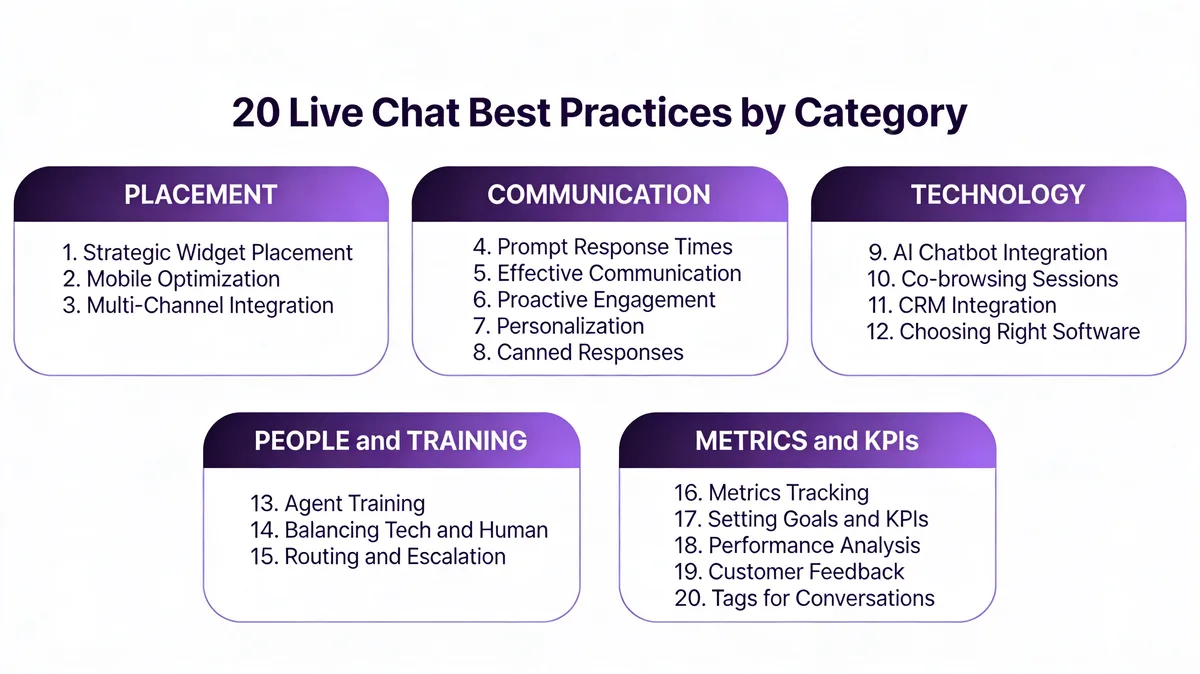
Here's the at-a-glance map before we go deep on each one.
| # | Best Practice | Category | Why It Matters in 2026 |
|---|---|---|---|
| 1 | Strategic Placement of Live Chat | Placement | Visibility on high-intent pages drives 3-5x more chats |
| 2 | Prompt Response Times | Placement | 76% of customers expect instant assistance |
| 3 | Effective Communication | Communication | Clear writing is the #1 driver of CSAT in chat |
| 4 | Use of Co-browsing Sessions | Technology | Cuts resolution time on complex tickets by 30-50% |
| 5 | Metrics Tracking | Metrics | You can't improve what you don't measure |
| 6 | Integration of AI Chatbots | Technology | Deflects 60-80% of repetitive tickets |
| 7 | Proactive Engagement | Communication | Triggers lift chat-to-conversion by 2-3x |
| 8 | Requesting Customer Feedback | Metrics | Closes the feedback loop on every chat |
| 9 | Use of Tags for Conversation Management | People | Surfaces product issues hidden in chat volume |
| 10 | CRM Integration | Technology | Personalization without manual lookups |
| 11 | Agent Training | People | Consistent quality across shifts and channels |
| 12 | Creation of Canned Responses | Communication | Cuts handle time without sounding robotic |
| 13 | Balancing Technology and Human Interaction | People | Hybrid models outperform pure-AI or pure-human |
| 14 | Multi-Channel Integration | Technology | Customers move between channels mid-conversation |
| 15 | Setting Goals and KPIs | Metrics | Ties chat operations to business outcomes |
| 16 | Performance Analysis | Metrics | Finds the 20% of issues causing 80% of tickets |
| 17 | Routing, Transfer, and Escalation | People | Right agent on the right chat at the right time |
| 18 | Mobile Optimization | Placement | 81% of chats are mobile in 2026 |
| 19 | Personalization of Chats | Communication | Named, contextual chats lift CSAT 15-25% |
| 20 | Choosing the Right Software Provider | Technology | The wrong tool taxes every other practice |
1. Strategic Placement of Live Chat: Show Up Where Intent Is Highest
Placement is the first lever because it gates everything else. A live chat widget that only loads on your contact page will get 5-10% of the chats a widget loaded on pricing, product, and checkout pages can capture. The goal isn't to plaster chat everywhere; it's to put it where buying or troubleshooting intent peaks.
How to implement:
1. Audit your top 20 pages by traffic and intent. Pull Google Analytics or Plausible data, then tag each page as informational, commercial, or transactional. Chat belongs on commercial and transactional pages first.
2. Load the widget on pricing, product/feature, checkout, contact, and FAQ pages. These five page types account for 70-85% of high-intent traffic on most B2B SaaS sites.
3. Keep it off blog post sleeves. Blog readers rarely want chat. A persistent widget on every blog post just adds visual noise and confuses your conversion analytics.
4. Use bottom-right placement. 92% of users intuitively look there. Don't be clever with bottom-left or floating tabs — every percentage point of usability friction costs you chats.
When I audited a SaaS client's chat setup last quarter, they had the widget on every page including a 1,200-post blog. Removing it from blog pages and adding it to two pricing-comparison pages they'd forgotten about lifted weekly chats by 41% with zero added staffing.
2. Prompt Response Times: Answer Inside 30 Seconds or Lose the Lead
The single biggest predictor of chat CSAT is first-response time. According to Better Proposals, as much as 76% of customers expect instant assistance and personalized interactions. "Instant" in 2026 means under 30 seconds for the first reply. Anything slower and the customer has already opened a competitor tab.
How to implement:
1. Set an internal first-response SLA at 30 seconds. The industry average is 22-45 seconds — beat it and you stand out.
2. Stagger agent shifts to cover your peak traffic windows. Most B2B SaaS chat volume clusters between 9am-12pm and 2pm-5pm in the customer's timezone. Map your traffic to the timezones of your top three customer countries.
3. Use an AI first-touch responder. An AI greeter that opens the conversation, asks "What can we help with today?", and either resolves the question or routes to a human inside 5-8 seconds buys your human agents a 30-second buffer.
4. Show a clear queue position when humans are busy. "You're #2 in line, expected wait 90 seconds" reduces abandonment 40-60% vs an indefinite spinner.
5. Auto-set status to "Away" when agents are inactive 5+ minutes. Nothing kills CSAT faster than waiting two minutes for an "online" agent who's actually at lunch.
For a Shopify Plus brand we worked with, dropping median first-response time from 84 seconds to 28 seconds lifted chat-driven conversion rate from 11% to 19% over six weeks. The only change was adding an AI greeter and tightening the away-status threshold.
3. Effective Communication: Write for the Scan, Not the Read
Chat reads differently than email. Sentences need to land on first read, structure needs to support fast scanning, and tone needs to match the customer's mood without ever drifting into corporate-speak. Most agents over-explain in chat because they're nervous about being misunderstood — and that over-explanation is exactly what triggers misunderstanding.
How to implement:
1. Cap messages at 2-3 sentences. Break longer answers into multiple messages so the customer can read in flow. A wall of text in chat reads as 30 seconds of silence followed by an essay.
2. Lead with the answer, then the why. "Yes, you can cancel anytime from Settings > Billing. Here's the exact path:" outperforms a three-paragraph buildup.
3. Mirror the customer's tone. Casual customer with emoji? Loosen up. Frustrated paying customer? Drop the exclamation marks and acknowledge the problem before pitching a fix.
4. Avoid filler ("absolutely!", "I totally understand", "let me help you with that"). These cost you 4-6 seconds per message and add nothing.
5. End with a clear next step or question. Every message either resolves the question or moves the conversation forward — never both, never neither.
For deeper guidance on the rules that move CSAT in chat, our live chat etiquette rules covers the 15 patterns we see at the top of every high-performing support team's playbook.
4. Use of Co-browsing Sessions: Cut Resolution Time on Visual Issues
Co-browsing lets an agent see the customer's screen (with permission) and either highlight elements or take temporary control. It's the fastest way to resolve "the button doesn't work" or "I can't find the setting" tickets, where text descriptions break down. Most SaaS support teams under-use co-browsing because they assume it's expensive enterprise tech — it isn't anymore.
How to implement:
1. Reserve co-browse for tier-2 issues only. Don't open a co-browse for password resets or simple FAQ questions. Trigger it when the conversation hits 4+ messages without progress.
2. Always ask permission with clear language. "Mind if I see your screen for 30 seconds to find that setting?" — never "I'm starting a co-browse session" with no consent step.
3. Set session timeouts at 10 minutes max. Long co-browse sessions cost CSAT because customers get nervous. If it's not solved in 10 minutes, escalate to a screen-share call.
4. Train agents on annotation, not full control. Highlighting and pointing solves 80% of issues without taking control. Taking control feels intrusive — use it sparingly.
5. Log every co-browse with a session note. "Customer couldn't find the export button on the dashboard" feeds the product team's UX backlog directly.
When we rolled out co-browse for a workflow-automation client's chat team, average handle time on tier-2 tickets dropped from 14 minutes to 8 minutes within three weeks. The CSAT lift was smaller (4 points) but the agent-capacity lift was significant — roughly one extra agent's worth of throughput from a team of seven.
5. Metrics Tracking: Instrument Everything, Then Act on the Top Three
Most support teams track 30+ chat metrics and act on none of them. The trap is dashboard theater: pretty charts, no decisions. Pick three to five metrics that map to real outcomes (CSAT, first-response time, resolution rate, deflection rate, conversion-to-revenue) and review them weekly with the team. Combine this with Strategy #16 (Performance Analysis) for the qualitative side.
How to implement:
1. Pick your North Star metric first. For most B2B SaaS support teams it's CSAT. For ecommerce, it's chat-to-conversion rate. For self-service products, it's deflection rate.
2. Build a weekly dashboard with 5 metrics max. CSAT, first-response time, resolution rate, AI deflection rate, total chat volume. Anything else is a deep-dive metric, not a dashboard metric.
3. Tag every chat by outcome. Resolved, escalated, abandoned, sale, refund. This is your raw fuel for any later analysis.
4. Run a 15-minute weekly metrics review. Three questions: what moved, why, what we'll change. No more, no less.
5. Share the dashboard publicly inside the company. When product, sales, and marketing see chat metrics, they treat the data more seriously and often surface root-cause fixes the support team can't make alone.
The teams I've seen scale chat well treat metrics as a small, sharp toolkit. The teams that get stuck treat metrics as decoration. There's no middle ground here.
6. Integration of AI Chatbots: Deflect the Repetitive 60-80%, Escalate the Rest
This is the practice that's changed most since the original version of this article. AI chatbots in 2026 aren't the rule-based decision trees of 2021 — they're retrieval-augmented LLMs trained on your help docs, past tickets, and product data. According to Comm100's 2026 benchmark, AI chatbot satisfaction jumped +9.1% year-over-year, the first time AI-only chats outscored human-only chats on certain ticket types.
How to implement:
1. Audit your last 1,000 tickets and classify by type. "Password reset", "billing question", "feature how-to", "bug report". The top 5-10 types usually cover 70%+ of volume and are the right starting set for AI deflection.
2. Train the bot on your help center, not generic prompts. A bot trained on your actual product knowledge resolves 3-5x more accurately than one running on generic prompts. Tools like LiveChatAI ingest your help docs, knowledge base, and past chat transcripts directly.
3. Set a strict escalation trigger. Three failed bot turns, customer types "human" or "agent", or the bot's confidence drops below 70% — escalate immediately to a human with full conversation context.
4. Show the customer they're talking to a bot. Hiding it costs you trust when the bot fails. "Hi, I'm the AI assistant — I can help with most questions and pull in a human if needed" sets the right expectation.
5. Review bot transcripts weekly for hallucinations and gaps. Every failure is a help doc to write or a prompt to tune.
A SaaS client running an AI-first chat layer with LiveChatAI hit 64% full-AI resolution within two months, freeing their three human agents to focus on tier-2 and revenue-adjacent chats. CSAT on AI chats sat at 86%, just 4 points below human chats on the same ticket types.
7. Proactive Engagement: Trigger Chats at the Right Moment, Not All the Time
Proactive chat triggers are messages that open automatically based on user behavior — time on page, scroll depth, exit intent, repeat visits. Done right, they 2-3x your chat volume from high-intent visitors. Done wrong, they're the digital version of a pushy salesperson and they tank your bounce rate.
How to implement:
1. Trigger on behavior, not timing alone. "30 seconds on the pricing page AND scrolled past the comparison table" beats "30 seconds on any page" by a factor of 5 in qualified chats.
2. Cap proactive triggers at one per session. Multiple triggers per session feel like harassment and double your unsubscribe-from-chat rate.
3. Match the trigger to the page intent. Pricing page trigger: "Questions about which plan fits?" Checkout page trigger: "Need help finishing your order?" Generic "Hi, can I help?" triggers convert at a third of the rate.
4. Exclude returning customers from sales-style triggers. If they're already logged in, switch to support-focused proactive messages: "Need help with your account?"
5. A/B test trigger copy monthly. Small wording changes (question vs statement, named offer vs generic) move trigger CTR 20-40%.
Our deep dive on 12 live chat triggers walks through the exact behavioral conditions that earn their place in the playbook, with example copy for each.
8. Requesting Customer Feedback: Close the Loop on Every Chat
Most teams treat post-chat surveys as a checkbox. The 30-40% of customers who actually answer them are your single most reliable signal on what's working and what isn't. Treat the post-chat survey as a primary KPI source, not a courtesy form.
How to implement:
1. Keep the survey to one question plus an open box. "How would you rate this chat? (1-5)" + "Anything we could've done better?" — that's it. Long surveys halve response rates.
2. Send it inside the chat window, not via email. In-chat surveys get 3-5x the response rate of follow-up emails because the context is still fresh.
3. Auto-flag every 1-2 rating for manager review within 24 hours. Recover-saves on bad chats prevent churn. A genuine apology and a fix lifts NPS on the same customer by 20-30 points.
4. Quote the open-box feedback in team standups. Real customer words land harder than aggregate scores ever do.
5. Close the loop publicly when you fix something. "We heard from chat customers that the export was confusing — here's the new flow we shipped." This earns trust and signals that feedback matters.
The recovery move alone is worth the effort. A B2B SaaS client we audited recovered 18 of 23 dissatisfied customers (78%) over a quarter just by adding a 24-hour manager-review SLA on 1-2 ratings.
9. Use of Tags for Conversation Management: Make Volume Searchable
Tags turn unstructured chat volume into structured data. Without them, every chat is a one-off — with them, you can answer "what are our top 10 issues?" in 30 seconds and feed product, marketing, and ops teams real signal.
How to implement:
1. Standardize a tag taxonomy before launch. 15-25 tags max, grouped by category (Product Area, Issue Type, Customer Segment). More than 25 and agents stop using them consistently.
2. Auto-tag with AI on chat close. Most modern chat platforms can suggest tags based on conversation content. Agents confirm or correct, which takes 5 seconds vs 30 for manual tagging.
3. Require at least one tag per chat. Untagged chats are invisible chats. Enforce it in the chat-close workflow.
4. Review the tag distribution monthly. Top 5 tags by volume usually point to product fixes or help-doc gaps worth prioritizing.
5. Share tag reports cross-functionally. Engineering wants the bug-tag report, marketing wants the feature-question report, finance wants the billing-issue report. Same data, three audiences.
One team I worked with discovered that 14% of their chat volume was a single misconfigured webhook in their onboarding flow. Three weeks after the product team fixed it, that 14% vanished — pure capacity reclaimed.
10. CRM Integration: Personalization Without Manual Lookups
CRM integration means your chat widget knows who's chatting before the conversation starts. Plan tier, last invoice, support history, product usage — all of it visible in the agent's sidebar without a single tab switch. This is the foundation for personalization (Strategy #19) and routing (Strategy #17).
How to implement:
1. Pass the user ID and email from your app to the chat widget on load. Most chat tools have a JavaScript identify() call. Wire it up once in your app's auth layer.
2. Sync 5-10 customer attributes, not 50. Plan tier, signup date, MRR, last login, lifecycle stage. Anything more clutters the agent view.
3. Display a customer health summary in the agent sidebar. "Pro plan, $99/mo, 14 months tenure, last NPS 9" — agents need to know in 3 seconds who they're talking to.
4. Two-way sync chat outcomes back to the CRM. Chat-driven upsells, downgrades, and churn signals belong in the CRM record, not just the chat log.
5. Test for PII leaks. Sync only what agents need. Credit card numbers, full addresses, and SSNs should never touch the chat widget.
For a B2B SaaS team running HubSpot, wiring chat to CRM cut average handle time by 90 seconds per chat — that's the time agents used to spend asking "what's your account email?" and then looking up the record manually.
11. Agent Training: Build Skill Depth Beyond the Macro Library
The fastest way to spot a poorly trained chat team is to read three random transcripts. If every agent sounds different, has different formatting conventions, or escalates inconsistently, training is the gap. Good training builds a shared playbook so quality stays consistent across shifts and tenure.
How to implement:
1. Build a 30-60-90 onboarding plan with clear milestones. Week 1: shadowing + product training. Week 2-4: supervised chats with senior review. Week 5+: independent with weekly transcript review.
2. Run weekly transcript reviews in pairs. Each agent picks one chat they're proud of and one they'd redo. Peer review compounds faster than top-down feedback.
3. Build a living style guide. Tone, formatting, escalation rules, do-not-say phrases. Update it monthly based on real chats.
4. Test product knowledge quarterly. Short, low-stakes quizzes on new features keep agents fluent on the product. Customers spot a confused agent in three messages.
5. Reward quality, not just quantity. Chat-per-hour metrics push agents toward short, surface-level answers. CSAT and first-contact resolution push them toward depth. Pick the right incentive.
For deeper coverage of the skills that separate competent chat agents from great ones, our guide on the 12 critical chat support skills breaks down the exact behaviors we look for in agent transcript audits.
12. Creation of Canned Responses: Speed Without Sounding Like a Bot
Canned responses (also called macros or saved replies) are pre-written templates for common situations. The right library cuts handle time 30-50% on repetitive tickets. The wrong library makes every chat feel like an autoresponder and tanks CSAT. The line between them is personalization.
How to implement:
1. Build 20-40 canned responses, not 200. The 80/20 of chat traffic usually maps to 25-30 templates. More than that and agents waste time searching.
2. Use variables for personalization. Insert {first_name}, {plan_tier}, {last_invoice_date} so every canned response feels written for that customer.
3. Train agents to edit canned responses on send, not just paste. A 5-second tweak (a specific account detail, a tone match) turns a macro into a real reply.
4. Review the top 10 canned responses monthly. Are they still accurate? Did the product change? Outdated macros are worse than no macros.
5. Quarantine generic "We're sorry to hear that" macros. They read as fake empathy and erode trust. Custom apology language always wins.
Our library of 45+ canned response examples gives you a starting template set, and our deeper post on 200 live chat script examples covers the longer-form scripts for sales-side chats.
13. Balancing Technology and Human Interaction: Run a Hybrid Model
The teams getting the best results in 2026 aren't AI-only or human-only — they're hybrid. AI handles the high-volume repetitive tickets (password resets, billing questions, basic how-tos) and humans handle the high-value, high-emotion, high-complexity tickets (churn saves, technical bugs, enterprise expansion). The split frees humans to do work that actually moves the business.
How to implement:
1. Map every ticket type on two axes: volume and value. High-volume low-value goes to AI. Low-volume high-value goes to humans. Mid-tier goes to AI with a clear human escalation path.
2. Build clean handoff context. When the AI escalates to a human, the human inherits the full transcript plus a one-line summary. No "can you re-explain the problem?" moments.
3. Train AI on the "ask for human" trigger. If a customer types "human", "agent", "person", or expresses frustration, escalate immediately. Don't let the AI loop.
4. Match greeting style to the handoff point. A friendly, calibrated opening makes the handoff feel like one team, not two. Our roundup of 35 live chat greeting examples is the easiest place to lift greetings that already work.
5. Review hybrid metrics weekly. Track AI deflection rate, escalation rate, and post-escalation CSAT separately. The right balance changes as your AI gets smarter and your team scales.
This is the practice LiveChatAI was built around — the AI chatbot and live chat handoff flow documents the technical pattern for getting hybrid chat right in production.
14. Multi-Channel Integration: Meet Customers Where They Are
Customers don't think in channels. They start a question on chat, switch to email when the office closes, and follow up on WhatsApp the next morning. Your support stack has to make that fluid — a fragmented multi-tool setup forces customers to re-explain themselves three times and tanks satisfaction.
How to implement:
1. Pick a unified inbox tool, not separate tools per channel. Web chat, email, WhatsApp, Instagram DM, and Messenger should land in one queue for agents.
2. Pass conversation history across channels. If a customer emails after chatting, the email reply should reference the chat. The technical lift is small; the CSAT lift is significant.
3. Match response-time SLAs to channel expectations. Chat = under 30 seconds. WhatsApp = under 2 minutes. Email = under 4 hours. Don't apply chat SLAs to email or you'll burn out the team.
4. Standardize tone across channels. Same voice, same style guide, same product knowledge. Customers can tell when they've crossed channel boundaries.
5. Report on cross-channel customer journeys, not just per-channel volume. "20% of chats convert into email follow-ups" is the kind of insight that drives real workflow changes.
For ecommerce teams in particular, the channel mix tilts heavily toward chat and Instagram DM. Our breakdown of ecommerce live chat patterns covers the tooling and triggers that work for online retail specifically.
15. Setting Goals and KPIs: Tie Chat to Business Outcomes
Chat KPIs only matter if they map back to revenue or retention. CSAT for its own sake is vanity. CSAT that correlates with renewal rate is strategy. Set goals that connect chat operations to outcomes the rest of the business cares about, and chat becomes a budget priority instead of a cost center.
How to implement:
1. Pick 3-5 KPIs max. CSAT, first-response time, resolution rate, chat-to-conversion rate, and deflection rate cover most teams' needs. More KPIs equals less focus.
2. Set targets based on your industry, not generic benchmarks. SaaS support, ecommerce sales chat, and healthcare chat have very different baseline numbers.
3. Tie at least one KPI to revenue. Chat-driven trial signups, chat-attributed renewals, chat-to-upsell rate — pick the one that fits your funnel and instrument it.
4. Review quarterly with the leadership team. Pull chat into the QBR conversation. Teams that report chat outcomes in QBRs get budget; teams that hide chat in support reports don't.
5. Document the why for every KPI. When someone asks "why are we tracking first-response time?", the answer should be one sentence connecting it to a business outcome.
16. Performance Analysis: Read Transcripts, Not Just Dashboards
Metrics tell you what's happening. Transcripts tell you why. The best support leaders I know spend 30-60 minutes a week reading actual chat transcripts — usually a mix of high-CSAT, low-CSAT, and longest-handle-time chats. That qualitative work surfaces patterns the dashboard never will.
How to implement:
1. Build a weekly review ritual. Pull 10 random chats: 3 with CSAT 5, 3 with CSAT 1-2, 2 with the longest handle time, 2 with the highest message count. Read them.
2. Look for repeat patterns, not one-off issues. If three chats this week hit the same product gap, that's a backlog item. If it's a one-off, it's a coaching moment.
3. Share one transcript per week in the team standup. Anonymized, with a takeaway. This compounds team learning faster than any training video.
4. Tag transcripts during review. Build a running list of "product fix needed", "help doc needed", "coaching needed", "process fix needed" — then route them to the right owner.
5. Track the closing rate on those owners. If product fixes from chat reviews are sitting in the backlog for 6 months, the system isn't working.

17. Routing, Transfer, and Escalation: Right Chat, Right Agent, First Time
Bad routing is the silent CSAT killer. A billing question landing in front of a technical agent gets a slower, worse answer than the same question routed to the billing specialist. Good routing matches the chat to the right agent on the first try and provides clean handoffs when escalation is needed.
How to implement:
1. Route by skill, not just availability. Tag agents by specialty (billing, technical, onboarding) and route based on the customer's pre-chat survey or AI classification.
2. Use a pre-chat form sparingly. 1-2 dropdowns max ("What can we help with?" + "Plan tier"). More fields and you'll lose 30%+ of chats before they start.
3. Auto-route by customer attribute. Enterprise plan customers route to senior agents. Trial customers route to product specialists. Setup customers route to onboarding.
4. Build a one-click transfer with notes. When an agent transfers, they pass a 1-sentence handoff note. The receiving agent reads it before saying hello.
5. Set escalation triggers with clear ownership. If a chat hits 15+ minutes or 3 transfers, it escalates to a team lead automatically. Long chats without escalation are how 20-minute conversations become 2-hour conversations.
18. Mobile Optimization: 81% of Chats Are Mobile
This is the practice most teams under-invest in relative to its impact. According to Comm100's live chat statistics report, 81.2% of live chats are now initiated on mobile, with average wait time of 22.8 seconds and average response time of 44.6 seconds. If your chat experience breaks on mobile, you're breaking it for 8 out of 10 customers.
How to implement:
1. Test the chat widget on iOS Safari, Android Chrome, and Samsung Internet. Don't trust desktop emulators — test on real devices monthly.
2. Keep the widget out of the way of native gestures. A widget that covers the back button or interferes with scroll feels broken. Position it where it's tappable but never in the gesture zone.
3. Make the input field big enough for thumb typing. 16px minimum font size to prevent iOS auto-zoom. 48px tap targets minimum.
4. Optimize for one-handed use. Common actions (close, expand, attach) all reachable with a right thumb. File attach is rarely used on mobile — bury it.
5. Push-notify customers when the agent replies. Most mobile chats happen between other apps. A reply that buzzes the phone gets a response inside 30 seconds; a reply that doesn't gets a response inside 5 minutes (if at all).
19. Personalization of Chats: Use What You Already Know
Personalization in chat doesn't mean addressing the customer by first name once and calling it done. It means using everything the CRM integration (Strategy #10) gave you — plan tier, recent activity, past tickets, lifecycle stage — to make every message feel like it was written for this specific person.
How to implement:
1. Open with context, not a generic greeting. "Hi Sarah, I see you upgraded to Pro last week — what can I help with?" beats "Hi! How can we help you today?"
2. Reference past interactions when relevant. "I see you chatted with us about the export feature in March — is this related?" This signals you actually know them.
3. Match plan tier to response depth. Enterprise customers get longer, more technical responses by default. Free-tier customers get faster, more concise responses with self-serve links.
4. Use the customer's preferred language when you have signal. Browser language, account setting, or past chats all tell you. Switching to a customer's first language lifts CSAT 25-40 points on average.
5. Send a personal follow-up 24-48 hours later on high-value chats. "Hi Sarah, just wanted to make sure the export issue stayed fixed — let me know if anything else came up." This is the move that turns chat into relationship.
20. Choosing the Right Software Provider: The Tool Sets the Ceiling
The wrong chat tool taxes every other practice. If your tool can't tag chats, you can't analyze them. If it can't route by skill, you can't run a hybrid team. If it can't integrate with your CRM, you can't personalize. Picking the right tool is the highest-impact decision in this list.
How to implement:
1. List your must-haves before you demo anything. AI chatbot, CRM integration, mobile SDK, skill-based routing, custom reporting. Drop tools that miss must-haves on the first call.
2. Run a real-world trial, not a sandbox demo. Put the tool on a low-traffic page for 2 weeks. Handle real chats. Notice the friction your team hits in real conditions.
3. Compare total cost, not just sticker price. Setup time, training time, integration cost, and per-agent license fees add up. A tool that's twice as expensive but takes a third of the setup time often wins on year-one TCO.
4. Check the API and webhooks. A locked-down tool with no API will block your growth in 12-18 months. Open platforms compound.
5. Talk to 3 reference customers in your industry. Vendor demos are choreographed. Reference calls aren't. Ask about the unhappy parts of the relationship.
For our deeper comparison of tools that fit different team sizes and budgets, our roundup of Help Scout alternatives covers the trade-offs we see most often in customer evaluations.
Metrics, KPIs and Performance Analysis: What to Track in 2026
Earlier I said the dashboard should have five metrics, not 30. Here are the five — plus the 2026 benchmark targets we use as a starting point in support audits.
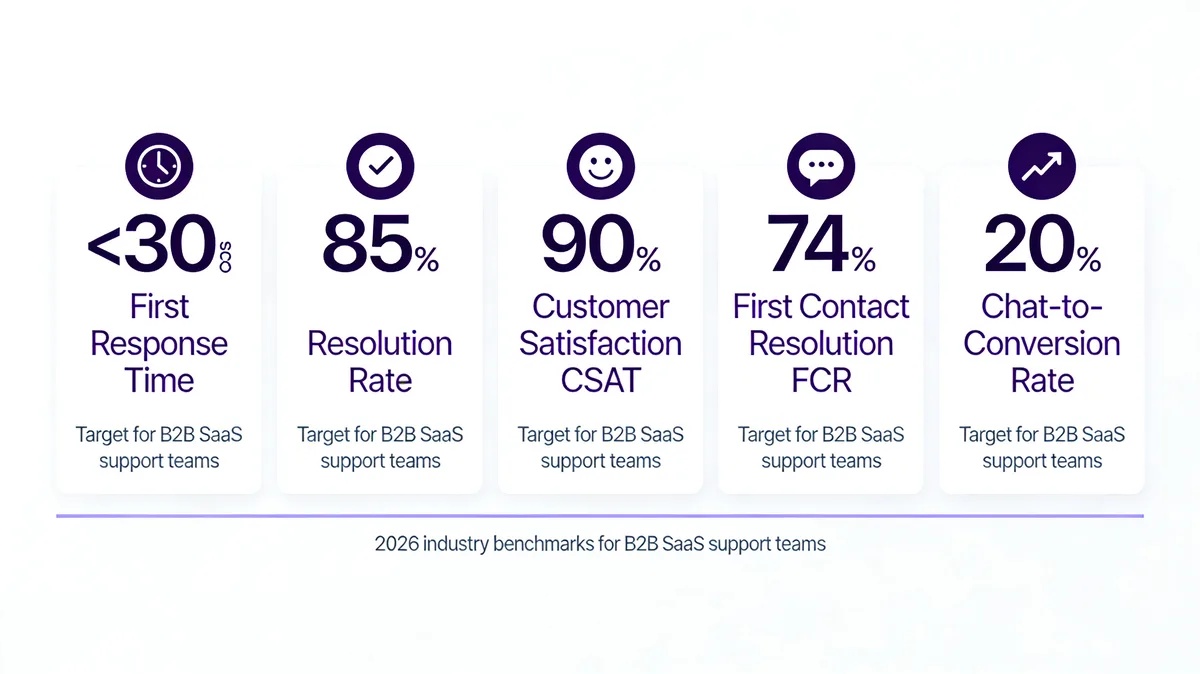
Your team's numbers should sit within striking distance of these benchmarks. If you're more than 20% off on any of them, that's the metric to fix first.
| KPI | 2026 Benchmark | What It Measures | How to Improve |
|---|---|---|---|
| First Response Time | Under 30 seconds | How fast a human or AI replies to the first message | AI greeter + staffed peak hours |
| Resolution Rate | 85%+ | % of chats resolved in one session without escalation | Agent training + knowledge base depth |
| CSAT Score | 90%+ | % of post-chat surveys rated 4 or 5 of 5 | Personalization + recovery on 1-2 ratings |
| First Contact Resolution | 74%+ | % of issues resolved on the customer's first contact | Skill-based routing + better triage |
| Chat-to-Conversion | 15-25% | % of chats that lead to a signup, sale, or upgrade | Proactive triggers on high-intent pages |
The temptation when you start measuring is to chase every metric at once. Don't. Pick the one furthest from benchmark, work on it for 4-6 weeks, then move to the next. Sequential focus beats parallel mediocrity every time.
Why Businesses Implement Live Chat: The Real Benefits
Behind every best practice is a business reason to bother in the first place. Live chat earns its place in the stack because of three concrete payoffs.
Real-time communication that converts
The first payoff is speed. Email replies in hours, phone calls happen on the customer's worst schedule. Chat happens in seconds, in the moment of need. That immediacy is why chat consistently wins on both CSAT and conversion-rate metrics over every other support channel.

Higher ROI than other support channels
Live chat has a strong cost-per-resolution profile because one agent can handle 3-5 concurrent chats vs 1 concurrent phone call. According to heyOliver's analysis of live chat investment, well-implemented chat systems can deliver ROI of 300%+, driven by lower service cost per ticket, higher conversion rates on commercial pages, and improved retention on resolved issues.
Better service quality through structure
Chat forces structure: tags, transcripts, canned responses, dashboards. That structure compounds. Six months in, a well-run chat operation has more data on customer issues than any other support channel, and that data feeds product, marketing, and ops decisions across the company.
Important Pages for Live Chat Window Placement
Not every page deserves chat. Here's the priority order I recommend when teams ask where to put the widget.
• Pricing page: The single highest-intent page on any SaaS site. Chat here closes deals.
• Product/feature pages: Pre-purchase questions about functionality, integrations, and use cases.
• Checkout/cart page: Recovers cart abandonment from confusion or last-minute questions.
• Contact page: Customers who land here want to talk. Chat is the lowest-friction option.
• FAQ/help center: When self-serve fails, chat is the natural next step.
• Customer dashboard/app: For existing customers, in-app chat reduces support friction massively.
Pages I'd skip: blog post sleeves (low intent, high noise), the homepage (most homepage chats are too generic to be useful), and any legal pages (privacy, terms — wrong audience for chat).
Choosing Tools and Avoiding Common Live Chat Mistakes
Most live chat failures aren't about tools — they're about avoidable mistakes that compound. Here are the patterns I see repeatedly in chat audits, and what to do instead.
| Common Mistake | Why It Hurts | What to Do Instead |
|---|---|---|
| Sounding like a script | Customers detect canned language in 1–2 messages and disengage | Personalize every canned response with at least one specific detail |
| Showing "online" when no one's there | Sets an expectation you can't meet, tanking CSAT on first-touch | Auto-set away after 5 mins inactivity, default to AI deflection |
| Ignoring mobile UX | 81% of chats are mobile; broken mobile experience equals broken chat | Monthly mobile QA on real devices, not emulators |
| Over-engineering the pre-chat form | Every extra field drops chat starts 5–15% | Max 1–2 dropdowns; let AI handle classification |
| Bot loops with no human escape | Frustration peaks fast; 70% will not retry chat | Detect frustration keywords and escalate immediately |
| No post-chat survey | You lose the feedback loop on every single conversation | One-question survey + open box, in-chat not email |
| Untagged chats | Volume is invisible; no patterns surface for the product team | Auto-tag with AI on close, agent confirms in 5 seconds |
| Inconsistent agent voice | Customers can tell when they're being passed around | Style guide + weekly transcript review |
The thread connecting these mistakes is the same: every one of them puts operational convenience ahead of customer experience. Reverse that priority and most chat problems solve themselves.
For broader context on what scaling support teams are wrestling with, our deep-dive on customer service challenges and solutions covers the structural issues that show up on top of these chat-specific patterns.
What to Consider for Live Chat Best Practices Success
The practices above aren't a fire-and-forget checklist. They need ongoing maintenance to keep delivering. Here's what to watch over time.
1. Software updates: Chat tools ship features monthly. Keep your stack current — old versions miss security patches and new automation capabilities.
2. Continuous training: Quarterly product training, monthly transcript reviews, and a living style guide keep agent quality from drifting.
3. Experimentation: Test one new thing per month — a new trigger, a new routing rule, a new canned response format. Compound small wins.
4. Customer feedback: Read the open-box survey responses every single week. They're your earliest signal that something is shifting.
5. Stay current: Chat best practices in 2026 are not chat best practices from 2023. The AI layer alone has rewritten the playbook twice. Keep reading, keep auditing, keep adjusting.
Build Your First 90-Day Live Chat Plan
If you take three things from this guide, make them these: get your placement right, get your first-response time under 30 seconds, and ship an AI chatbot trained on your help docs. Those three moves combined have done more for the support teams I work with than any other intervention I've seen in 2026.
The fourth move, once the foundation is in place, is honest measurement. Pick five KPIs, review them weekly, and let the data tell you which of the remaining 17 practices deserves your attention next quarter.
If you're starting fresh or rebuilding a chat operation that's stalled, the easiest accelerator is a tool that ships AI deflection and live chat together out of the box. That's what LiveChatAI is built to do — try the free AI chatbot for customer support on your help docs and see how much of your current chat volume the AI can resolve before a human ever needs to step in.
Frequently Asked Questions
What are common live chat mistakes?
The most common mistakes I see are: showing "online" when no agent is actually available, over-engineering the pre-chat form, relying on canned responses without personalization, ignoring mobile UX, looping customers in bot conversations with no human escape, and skipping the post-chat survey. Each one drops CSAT 10-20 points on its own. Stack two or three together and chat stops being a competitive advantage.
What are the 7 C's of quality customer service?
The 7 C's expand the classic 5 C's with Competence (knowing the product cold) and Credibility (following through on what you commit to). In chat, Competence shows up in how fast and accurately an agent can solve a problem without escalating. Credibility shows up in whether you actually do the thing you promised by the time you promised. Both are training and process problems — not personality problems — which means they're fixable.
How do I improve live chat performance in 2026?
Start with the four highest-impact moves: tighten first-response time to under 30 seconds, add an AI chatbot for repetitive tickets, build a clean 5-metric dashboard, and audit mobile UX on real devices. Those four ship measurable improvement in 4-6 weeks for most teams. Layer in CRM integration, personalization, and skill-based routing once the foundation is stable. The mistake is trying to do all 20 at once.