






To build a mental health chatbot in 2026, set up a no-code platform like LiveChatAI, train it on peer-reviewed content, customize tone and crisis-escalation rules, embed it across channels with a human handoff, then monitor logs with privacy-first analytics. A safe build takes 4 to 8 hours and is meant to support, not replace, licensed care.
Quick overview of the 5-step build:
1. Create your account and set up the workspace — Pick a no-code platform, name your bot, and define its scope.
2. Choose your data sources carefully — Train on curated, evidence-based content only. Nothing scraped from the open web.
3. Customize AI settings for sensitive interactions — Tone, persona, refusal patterns, and crisis triggers.
4. Embed and integrate across channels — Web, mobile, messaging, with a human and crisis handoff baked in.
5. Monitor logs, refine, and run ethical review — Privacy-respecting analytics, regular clinical audits, prompt updates.
What Are Mental Health Chatbots in 2026?
A mental health chatbot is an AI-powered conversational interface that supports people around mental wellness tasks: psychoeducation, mood tracking, journaling prompts, intake triage, resource navigation, and between-session check-ins. The 2026 generation runs on large language models with retrieval over curated knowledge bases, which is a meaningful upgrade over the scripted decision trees of 2019.
What's changed in 2026 is the reach of these tools. According to the American Psychological Association, the number of AI companion apps surged by 700% between 2022 and mid-2025. That growth is exactly why responsible building matters more now than ever.
What a mental health chatbot should do
Think of these as appropriate jobs the chatbot can take on without crossing into clinical territory:
• Intake and screening: Collect standardized assessments (PHQ-9, GAD-7) and route results to a clinician for review.
• Psychoeducation: Answer questions about anxiety, sleep hygiene, CBT concepts, medication side effects with content your clinical team approved.
• Mood and habit tracking: Daily check-ins, journaling prompts, trend reports the patient can share with their therapist.
• Resource navigation: Help users find local clinics, sliding-scale therapists, support groups, crisis lines.
• Between-session support: Gentle reminders for homework assigned by a therapist, breathing exercises, grounding scripts.
What it should NOT do
Just as important is the negative space. A well-built bot refuses to:
• Diagnose anyone with anything.
• Recommend or change medications.
• Provide therapy or interpret a person's emotional state as clinical fact.
• Engage with active crisis disclosures beyond surfacing emergency resources and offering a human handoff.
• Pretend to be a human.
If any of those happen, you've built the wrong thing.
Why Mental Health Chatbots Matter Right Now
The case for building one comes down to access. According to Teachers College, Columbia University, only 50 percent of people with a diagnosable mental health condition get any kind of treatment. The other half are stuck behind cost, geography, stigma, or waitlists that run six months or longer. A well-scoped chatbot can close part of that gap by handling triage, psychoeducation, and resource navigation that would otherwise tie up a clinician's calendar.
The demand side is loud too. The 2026 HLTH mental health report from Rula found anxiety affecting 63.7% of respondents, depression 63.5%, and burnout 33.9%. Care teams cannot scale linearly to meet that. Software has to absorb the routine load so humans can focus on the cases that need them.
The market is responding. According to Research and Markets, the Chatbots for Mental Health and Therapy Market was valued at $1.49B in 2026 and is projected to reach $1.99B by 2030 at a 7.4% CAGR. That growth tracks adoption: a Bipartisan Policy Center survey reports 60% of users tap a mental health-specific app while nearly 50% use a general chatbot for support.
Demand is real. The risk of building badly is also real. The rest of this guide is about doing it right.
How to Build a Mental Health Chatbot Step by Step
5 steps to build a mental health chatbot
I'll walk through the build inside LiveChatAI because it's the platform I use day-to-day and it's the one shown in the screenshots below. The same five-step structure works on any no-code conversational AI tool. What matters more than the tool is how you handle each step.
Step 1: Create Your Account and Define the Chatbot's Scope
This first step isn't really about clicking buttons. It's about deciding what the chatbot is for and writing that decision down before the AI ever sees a prompt. Skip this and you'll end up with a sprawling bot that tries to do everything and does each thing badly.
What to do
1. Sign up at app.livechatai.com/register and confirm your email. The free trial gives you enough credits for the full build and a small pilot.
2. Create a new chatbot from the dashboard. Name it something honest like "Lumen Wellness Companion" — never give it a name that implies it's a human therapist.
3. Write a one-page scope document before anything else. Cover: who the bot is for, the 5 to 10 jobs it can do, the 5 to 10 jobs it must refuse, the crisis-handoff path, the named clinical reviewer, and the audit cadence.
4. Add a second seat for your clinical reviewer so they can read transcripts and edit prompts from day one. Compliance starts when access starts, not at launch.
You'll know it's working when
You have a one-page scope doc you could hand to a regulator, an ethics committee, or a board member without flinching. The doc names the bot, its scope, its refusals, its escalation path, and the clinician who owns it.
Watch out for
• Naming the bot after a human: Calling your bot "Dr. Alex" or "Therapist Sam" is misleading and a regulatory red flag. The FTC has been clear about deceptive AI personas. Use a clearly non-human name and disclose AI status in the welcome message.
• Scope creep on day one: "What if it could also do diet advice and sleep coaching?" Resist. Every extra domain doubles your QA burden and dilutes the safety review. Ship narrow, expand later.
• Building without a named clinical owner: If no licensed clinician is accountable for what the bot says, you don't have a mental health tool. You have a liability.
Pro tip: I write the refusal list before the capability list. Knowing what the bot won't do clarifies what it should do. My current refusal list runs 18 items and started at 6 — it grew every time the bot surprised me in testing. That growth is healthy. Set a recurring 30-day calendar invite to revisit it.
Step 2: Choose Data Sources That Are Curated and Evidence-Based
Step 2 is where most builds go wrong. People feed the bot the whole open web, watch it hallucinate clinical-sounding advice, and then wonder why the QA review fails. The right approach is the opposite: feed it less, but make every source one a clinician would be comfortable citing.
What to do
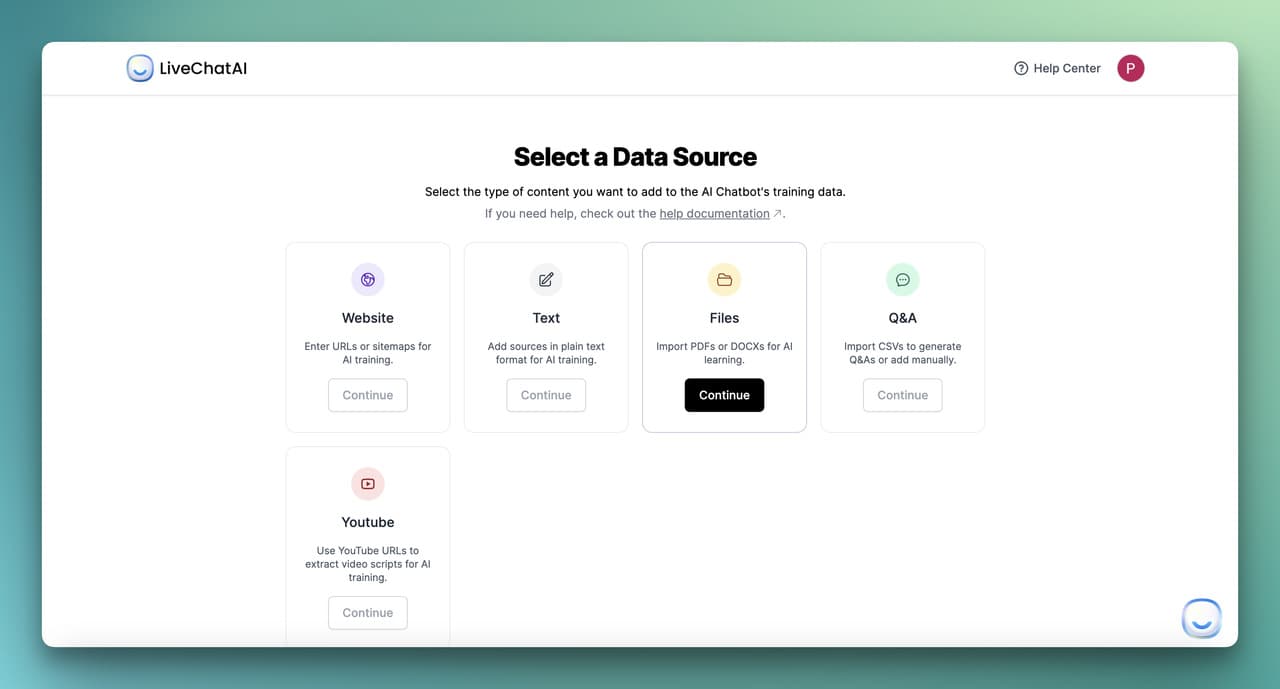
From the Data Sources tab, LiveChatAI gives you five inputs. Use them in this order of preference for a mental health build:
• Q&A pairs (highest priority): Upload a CSV with the 100 to 300 most common patient questions paired with answers your clinical team wrote and signed off on. This is your highest-precision data.
• PDF (peer-reviewed and clinical): Add clinician-approved handouts, NIMH fact sheets, WHO mhGAP intervention guides, your own intake forms. Skip anything published before 2022 that hasn't been re-reviewed.
• Text (your custom psychoeducation): Paste tone-aligned explainers your team wrote — descriptions of CBT concepts, grounding exercises, sleep hygiene basics. Style them in plain English at a 6th-grade reading level.
• Website (selective): Crawl only specific URLs from authoritative sources — NIMH topic pages, SAMHSA program pages, your clinic's own resource library. Never crawl an entire .com.
• YouTube (use sparingly): A few high-quality clinician-led videos can help with tone, but transcripts are noisy and need manual cleanup.
For each source, tag it with the reviewer's name, the review date, and the next re-review date. LiveChatAI's source manager lets you store these as metadata so you can audit later.
You'll know it's working when
Every source in your knowledge base is one a clinical reviewer would attach to a patient handout without hesitation. The bot's answers in early testing read like your clinic's voice, not a generic Wikipedia summary.
Watch out for
• Letting the bot guess from training data alone: The base LLM has read the internet. Some of what it read is wrong. Without a Retrieval-Augmented Generation (RAG) setup that forces the bot to ground answers in your sources, it'll invent confident-sounding content. In LiveChatAI, toggle "Strict mode" so the bot defaults to your knowledge base over its baseline knowledge.
• Uploading patient data as training content: Real patient transcripts in the knowledge base is a HIPAA violation waiting to happen. Use synthetic or fully de-identified examples for any Q&A pairs.
• Crawling competitor or unvetted health blogs: A lot of mental health SEO content reads authoritative but isn't reviewed by clinicians. If you can't find the author's credentials in 30 seconds, don't ingest it.
Pro tip: The 100-question Q&A CSV is the single highest-ROI input I've found. Spend two clinical hours writing the top 100 questions your team gets in DMs, intake calls, and post-session emails — then have a clinician write the answers. A bot grounded in 100 sharp Q&A pairs feels infinitely more useful than one that crawled 10,000 generic pages.
Step 3: Customize AI Settings for Sensitive Interactions
Step 3 is where personality, tone, and safety logic all live. It's also the step that takes the longest to get right because every clinician on your team will have opinions, and they should.

What to do
1. Open the Settings tab. Set the model to GPT-4 class or higher — smaller models miss safety cues. Lower the temperature to 0.3 for clinical accuracy; the default 0.7 produces too much creative drift for this use case.
2. Write a base prompt that includes: the bot's identity (AI assistant, not human, not therapist), its scope (psychoeducation and resource navigation), its refusal patterns, and the exact crisis-detection triggers. A good base prompt for this use case runs 400 to 800 words.
3. In the same tab, define your persona. Aim for warm but plainly informational — closer to a peer support specialist than a therapist or a chirpy customer support rep. Our chatbot persona guide has a workshop format that helps clinical teams agree on tone in one meeting.
4. Build a crisis-trigger list. Any message containing terms like "want to die," "kill myself," "suicide," "self-harm," "overdose," or close variants triggers an immediate response: pause normal conversation, surface emergency resources, offer a live human handoff, and log the event. Treat the trigger list as a living document — review it monthly with a clinician.
5. Enable the welcome message to disclose: this is an AI, what it can and can't do, how to reach a human, what happens to the conversation. Two short paragraphs is enough.
You'll know it's working when
Three test conversations behave the way your clinical team expects: a casual psychoeducation question gets a useful answer with a source, an out-of-scope question (e.g., "what dose of SSRI should I take?") gets a clear refusal and a clinician referral, and a crisis-trigger phrase produces the safety script and handoff without delay.
Watch out for
• A persona that sounds like a friend: Overly chummy bots invite over-disclosure and emotional attachment. We covered this in our guide on making chatbots sound more human — for mental health, dial warmth back about 30% from where you would for e-commerce.
• Forgetting to test crisis triggers in multiple phrasings: A bot that catches "I want to die" but misses "I don't want to be here anymore" is a failure. Test 50+ paraphrases per trigger, including slang and indirect expressions.
• Setting temperature too high: The default 0.7 makes the bot sound more natural and also makes it improvise medical-sounding content. 0.3 is the right ceiling for clinical use cases.
Pro tip: The most useful thing I added to the base prompt was a single line: "If a user shares emotional content, validate first, then ask what kind of help they're looking for — information, a resource, or a human." That one instruction reduced inappropriate advice-giving in my test set by what looked like more than half. Validate, ask, then act.
Step 4: Embed and Integrate Across Channels With a Crisis Handoff
Step 4 puts the bot in front of users. The integration choices matter less than the handoff logic — every channel has to be able to route to a real human and to emergency resources, fast.
What to do
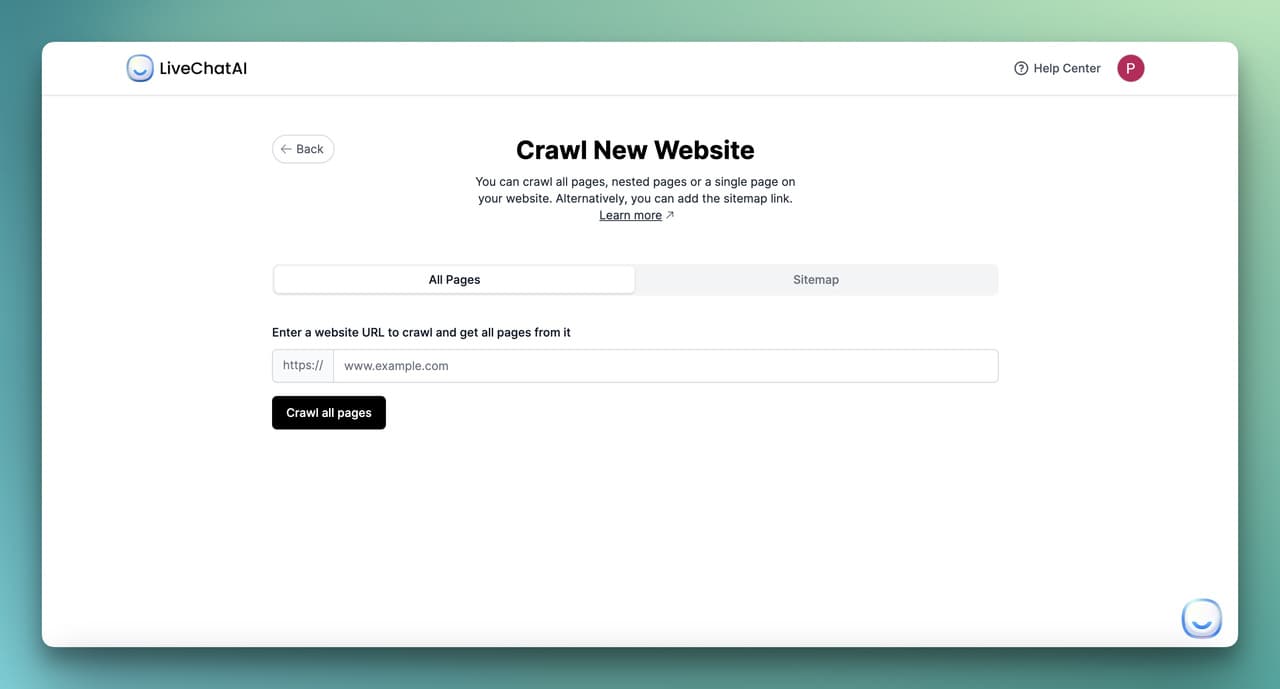
From the Embed & Integrate tab, pick the channels that match where your users actually are:
• Website widget (messenger style): The default for a clinic site or wellness app. Place it on the resources page, not the homepage, to avoid surprising users mid-task.
• Full-page chat: Use this for a dedicated support URL like /companion. Better for longer psychoeducation conversations.
• Inline embed: Drop the bot into a specific blog or article (an anxiety explainer, for example) so the conversation starts in context.
• Mobile app embed: If you ship a patient app, embed via SDK. Native is friendlier than a webview for sensitive conversations.
• WhatsApp, Slack, SMS: Only for closed-community deployments (employee assistance programs, alumni networks) where you've confirmed compliance.
For every channel, configure the human handoff: in LiveChatAI, Settings → Human Support lets you route to live agents during business hours and to a queued ticket plus auto-reply outside hours. Outside-hours behavior must surface the crisis line first, queue second. Our no-code chatbot implementation guide walks through the routing logic in more depth.
You'll know it's working when
You can walk through a full user journey on each channel: start the chat, ask a question, trigger a refusal, trigger a handoff, and end up either with a live human or with the crisis hotline number visible — depending on time of day. Test this monthly, not just at launch.
Watch out for
• Surfacing the bot on landing pages by default: A pop-up bot on a person's first visit to a mental health site can feel invasive. Trigger only on resources/help/blog pages, never on the homepage hero.
• Channel mismatches: SMS doesn't render rich responses, so a bot that relies on buttons and quick replies will look broken there. Audit your prompt outputs per channel before launching.
• Forgetting the "leave conversation" affordance: Users need a clear, low-friction way to end the chat without feeling rejected. A simple "I'm done for now — thanks" quick reply is enough. Don't make them close the window.
Pro tip: I always run a one-week soft launch on a single unlisted URL before exposing the bot to any production traffic. Send the link to five trusted colleagues — at least two clinicians, one person who has lived experience with mental health support, one developer, one accessibility tester. Their feedback in week one prevents at least 80% of the embarrassing launch-week bugs.
Step 5: Monitor Logs, Refine Prompts, and Run Ethical Review
A mental health chatbot is never done. Step 5 is the recurring loop of reading transcripts, spotting failure modes, updating prompts, and refreshing your data sources. Skip this step and the bot slowly drifts into worse behavior.
What to do
1. Open the Chat Inbox at least weekly. Filter for conversations flagged by the AI Suggestions tab and for anything where the user followed up with "that wasn't helpful" or "you didn't understand." Read 20 to 50 transcripts per session.
2. Run a monthly clinical audit. Your named reviewer reads a random 5% sample of conversations and rates each on: accuracy, safety, tone, refusal compliance. Track these metrics over time in a spreadsheet — improvement should be visible quarter to quarter.
3. Update the base prompt and refusal list every 30 days based on what you saw. Document each change in a changelog so you can roll back if a new prompt makes things worse.
4. Refresh your knowledge base every quarter. Mental health guidance evolves — SAMHSA updates, new NICE recommendations, revised crisis line numbers. Old content is a liability.
5. Anonymize before you analyze. Strip names, locations, and other identifiers from logs before any pattern analysis. Use aggregate metrics (most common topics, refusal rate, handoff rate, satisfaction scores) — never quote individual users in internal reports.
You'll know it's working when
You have a 12-month trend showing handoff rates dropping (the bot handles more things well), refusal rates staying steady (the safety floor is intact), and satisfaction scores rising. If handoff and refusal rates both rise sharply, your base prompt has drifted — roll back.
Watch out for
• Treating logs as a marketing dataset: Mental health transcripts are not engagement metrics. Restrict log access to the clinical reviewer, the technical owner, and the privacy officer. No one else.
• Optimizing for engagement: "Time spent in chat" is the wrong metric here. A user who got their answer in two messages and left is a win. A user who chatted for 90 minutes may have built an unhealthy reliance.
• Ignoring small drift signals: A 5% rise in users asking for diagnosis or medication advice means the bot's responses are inviting that. Tighten the refusal prompt the same week.
Pro tip: I keep a single "weird transcript" doc where I paste any conversation that surprised me — good, bad, or strange. After 3 months it became the single best source of prompt-improvement ideas, better than any analytics dashboard. Patterns that don't show up in metrics show up in your gut reading actual conversations.
What Results to Expect From a 90-Day Pilot
Realistic timelines matter for setting expectations with stakeholders. Here's what a careful pilot usually looks like:
• Week 1 to 2: Soft launch with 5 to 10 test users. Expect 30 to 50 conversations, several prompt iterations, and at least one "ohhh that's not what I wanted it to do" moment per day. This is normal and the point of a pilot.
• Week 3 to 6: Expand to 100 to 500 users. You'll see your first real crisis-trigger event. The metric to watch is "time to human handoff in flagged conversations" — under 60 seconds is the floor.
• Week 7 to 12: Open to general use with a clear "beta" badge. Track refusal rate (target: 5 to 15% — too low means the bot's saying too much, too high means it's frustrating users), handoff rate (target: 10 to 25%), and clinical-audit scores (target: 4.0+ out of 5 across all dimensions).
From a clinical capacity standpoint, the early evidence is encouraging. The HLTH report noted that while 60% of respondents reported valuing mental health more than five years ago, only 47.4% had actually accessed services — a chatbot that handles intake, FAQs, and resource navigation can meaningfully shrink that gap by absorbing the 20 to 40% of clinician time that goes to administrative back-and-forth.
Best Practices and Compliance for Mental Health AI Tools
Compliance isn't a checkbox at the end. It's a constraint on every earlier decision. The big four to get right:
HIPAA (US health data)
If your bot collects or processes any Protected Health Information, you need a Business Associate Agreement with your AI vendor. Confirm the BAA covers the LLM provider too, not just the chatbot platform. Encrypt logs at rest and in transit. Set a retention policy — 30 to 90 days is a defensible window for most non-clinical use cases. Document everything: the FDA and HHS care about written process more than perfect technology.
GDPR and UK data protection
Mental health data is a "special category" under GDPR Article 9, which means explicit consent and a Data Protection Impact Assessment are mandatory. Build the consent disclosure into the welcome message. Give users a real "delete my data" option, not a buried email form. Name a Data Protection Officer if you don't have one.
Transparency and disclosure
Users must know they're talking to an AI at the start of every session, not just on first contact. Bake this into the welcome message and surface it again any time the conversation gets emotional. The EU AI Act and a growing number of US state laws require this disclosure for mental health use cases specifically.
Audit trail and clinical accountability
Keep an immutable log of: prompt versions, data source versions, model versions, the clinical reviewer's sign-off dates, every escalation event. If a regulator or plaintiff's lawyer ever asks "who approved this response," you need a one-click answer. Tools like LiveChatAI's source manager and change history make this auditable without extra infrastructure — our essential chatbot features for 2026 guide covers the platform features that make audit-readiness easier.
One uncomfortable truth from the field: users care about whether their data is safe, and most won't ask. They'll just stop using the tool. Every shortcut you take on compliance widens the trust gap and makes the next ten chatbots harder to build.
Real-World Examples and Research on Mental Health Chatbots
The research base for mental health chatbots is still young, but the early peer-reviewed studies show useful, narrow effects. The two most cited examples:
Woebot (Stanford, 2017–present)
Woebot is a CBT-grounded chatbot first studied at Stanford. According to data summarized by PersonalAIUse, the Stanford trial of Woebot reported a 42% reduction in anxiety symptoms over two weeks of daily use. Subsequent peer-reviewed studies have replicated smaller-but-real effects across populations. Woebot is also frequently cited as a model for tone — warm, plainly informational, with clear refusal patterns. Worth studying conversation-by-conversation if you're shaping persona.
AI-assisted CBT apps (JMIR Mental Health, 2023)
A broader meta-evaluation reported a 37% reduction in depression symptoms in users of AI-assisted CBT apps versus waitlist controls. The takeaway isn't "AI replaces therapy" — it's that structured, evidence-based content delivered consistently through a chatbot can produce measurable symptom relief for users who otherwise wouldn't get any.
Wysa, Therabot, and academic projects
Wysa has run trials with the UK NHS for non-clinical anxiety support. Dartmouth's Therabot project published findings on therapist-curated dialogue datasets that informed how a number of 2026 builds approach data curation. The University of Wisconsin's CrisisCompanion challenge is another open project worth tracking — it pushes specifically on the crisis-detection problem most commercial bots underweight.
If you read three things before shipping, make them: the Frontiers in Psychiatry co-development paper on building with young users, the JMIR Mental Health systematic reviews on chatbot efficacy, and the APA's 2026 health advisory on AI mental health tools. That trio covers what works, what doesn't, and what regulators are watching.
Adjacent Use Cases Worth Knowing About
If you're building in healthcare or wellness, the same skills transfer to several adjacent jobs. Our healthcare AI chatbot best practices guide goes deeper on appointment scheduling, symptom triage, and patient education bots. For broader implementation patterns across industries, the 25 real-world chatbot use cases roundup shows how teams across healthcare, education, and SaaS structure their conversational AI rollouts.
Taking Your Mental Health Chatbot Build Live
The point of this guide isn't to convince you that AI can replace mental health care. It can't, and the studies are clear on that. The point is that thoughtful AI can absorb the routine load — intake, psychoeducation, resource navigation, between-session check-ins — so the humans you have can focus on the work that needs them. If you build this way, the bot becomes one of the more useful tools in a care team's stack. If you cut corners on scope, data, persona, or audit, it becomes a liability.
Start with the one-page scope doc. Pick five jobs the bot can do, five it must refuse, and the named clinician who owns it. Then spend the rest of an afternoon in the build steps above. You'll have a defensible v1 ready for soft-launch testing by the end of the week.
If you're ready to try the build, you can start a LiveChatAI workspace and walk through the five steps above end-to-end in a single sitting. When something surprises you in testing — and it will — that's the prompt update making your next version better.
Frequently Asked Questions
Can a mental health chatbot handle emergency situations?
No. A mental health chatbot is not equipped to handle emergencies and shouldn't try to. What a well-built bot does is recognize crisis signals fast (within the same message), pause normal conversation, surface the specific emergency resources for the user's region — 988 in the US, 116 123 (Samaritans) in the UK, local equivalents elsewhere — and offer a one-click handoff to a live human if one is available. Every welcome message and every crisis response must include these resources verbatim.
How do I customize a mental health chatbot for different user populations?
Customization for populations (e.g., teens, veterans, postpartum mothers) starts with the data sources and the persona, not the model. Replace your general psychoeducation content with population-specific clinician-reviewed material. Adjust the persona's language register — teens need a different cadence than clinical-trial participants. Add population-specific refusal patterns: a teen-focused bot needs different escalation logic (parental notification considerations) than an adult-focused one. Always pilot any new population variant with users from that group, never just internally.
How can I integrate the chatbot with live human support?
LiveChatAI's Human Support setting routes handoffs to a live agent inbox during configured hours and to a queued ticket outside hours. The integration matters less than the handoff protocol: define which conversations escalate (crisis triggers, repeat frustration signals, explicit user requests), who receives them (a clinician on call, a triage nurse, a peer specialist), and a response-time SLA (under 60 seconds for crisis, under 4 business hours for non-urgent). Document the protocol and audit it monthly.
How does a mental health chatbot work in 2026?
A 2026 mental health chatbot pairs a large language model (typically GPT-4 class or higher) with a curated knowledge base via Retrieval-Augmented Generation (RAG). When a user sends a message, the bot retrieves the most relevant content from your knowledge base, hands it to the LLM with a strict system prompt, and generates a grounded response. Safety logic runs in parallel: crisis-trigger detection, refusal-pattern matching, and confidence checks. The architecture has matured a lot since the rule-based bots of 2019, but the safety responsibilities are the same.
What's an example of a mental health chatbot that works well?
Woebot is the most-studied example with peer-reviewed efficacy data behind it. Wysa is widely deployed in NHS and corporate wellness contexts. Both share three traits worth copying: a tightly scoped job (CBT-grounded psychoeducation and exercises, not therapy), explicit AI disclosure on first contact and on emotional moments, and crisis-detection logic that surfaces emergency resources fast. Build your bot to share those three traits and you're starting from a defensible place.
What are the benefits of using generative AI for mental health support?
The honest answer: generative AI shines at scale, consistency, and 24/7 availability for non-crisis support tasks. It can deliver standardized psychoeducation to thousands of users at once, handle intake screening so clinicians see prepped patients, send between-session check-ins at the cadence research suggests is most useful, and help users navigate to the right human resource faster. It doesn't replace clinicians and shouldn't try to. The benefit is freeing clinical time for the work only humans can do.
How long does it take to build a mental health chatbot?
A first usable build on a no-code platform like LiveChatAI takes 4 to 8 hours of platform time, plus 20 to 40 hours of clinical content preparation (writing the Q&A pairs, curating the source library, writing the base prompt). The pilot phase should run another 8 to 12 weeks before opening to general users. Anyone selling you a "30-minute mental health chatbot" is either misunderstanding the use case or underselling the risk.
For further reading on chatbot building and adjacent workflows:
• How to Build a Smart Q&A Chatbot
• Chatbot vs ChatGPT: A Comparison
• AI Chatbot Welcome Message Examples