







AI onboarding is the use of artificial intelligence to automate, personalize, and analyze the way new people get started with an organization. It covers two distinct flows: employee onboarding (helping a new hire reach productivity) and customer onboarding (helping a new user reach value inside a product), both powered by chatbots, predictive analytics, and adaptive learning paths.
What is AI onboarding?
AI onboarding is what happens when you stop running your welcome sequence as a static checklist and start running it as a system that listens, decides, and adapts. The artificial intelligence layer reads documents, answers questions in plain language, routes tasks to the right person, and watches for early warning signs that someone is stuck or about to drop off.
I lead Customer Success at LiveChatAI, and we ship onboarding flows for our own users almost every week. The thing I want every HR leader and CS leader to internalize before they read another word is this: there are two completely different products hiding under the phrase "AI onboarding," and they get confused constantly.
The first is AI-powered employee onboarding: a new hire signs an offer, AI handles the paperwork, schedules training, answers benefits questions in Slack, and flags the manager when the new employee hasn't logged into the LMS by day three. The second is AI-powered customer onboarding: someone signs up for your product, an AI assistant walks them through setup, surfaces the next best action based on their role, and pings a CSM when the account looks like it's going cold.
Both flows use the same underlying techniques. Natural language processing parses what the person types. Intent classification figures out whether the question is about payroll or the API. Retrieval pulls the right answer from your internal docs. Automation triggers fire workflows in HRIS, CRM, or product analytics tools. Predictive scoring flags risk before a human notices it.
If your current onboarding is a 40-page PDF and a calendar invite, AI onboarding is the version of that flow where the PDF can talk back, the invite reschedules itself when something goes wrong, and a quiet dashboard tells you which new starters need a second touchpoint this week.
Why AI onboarding matters in 2026
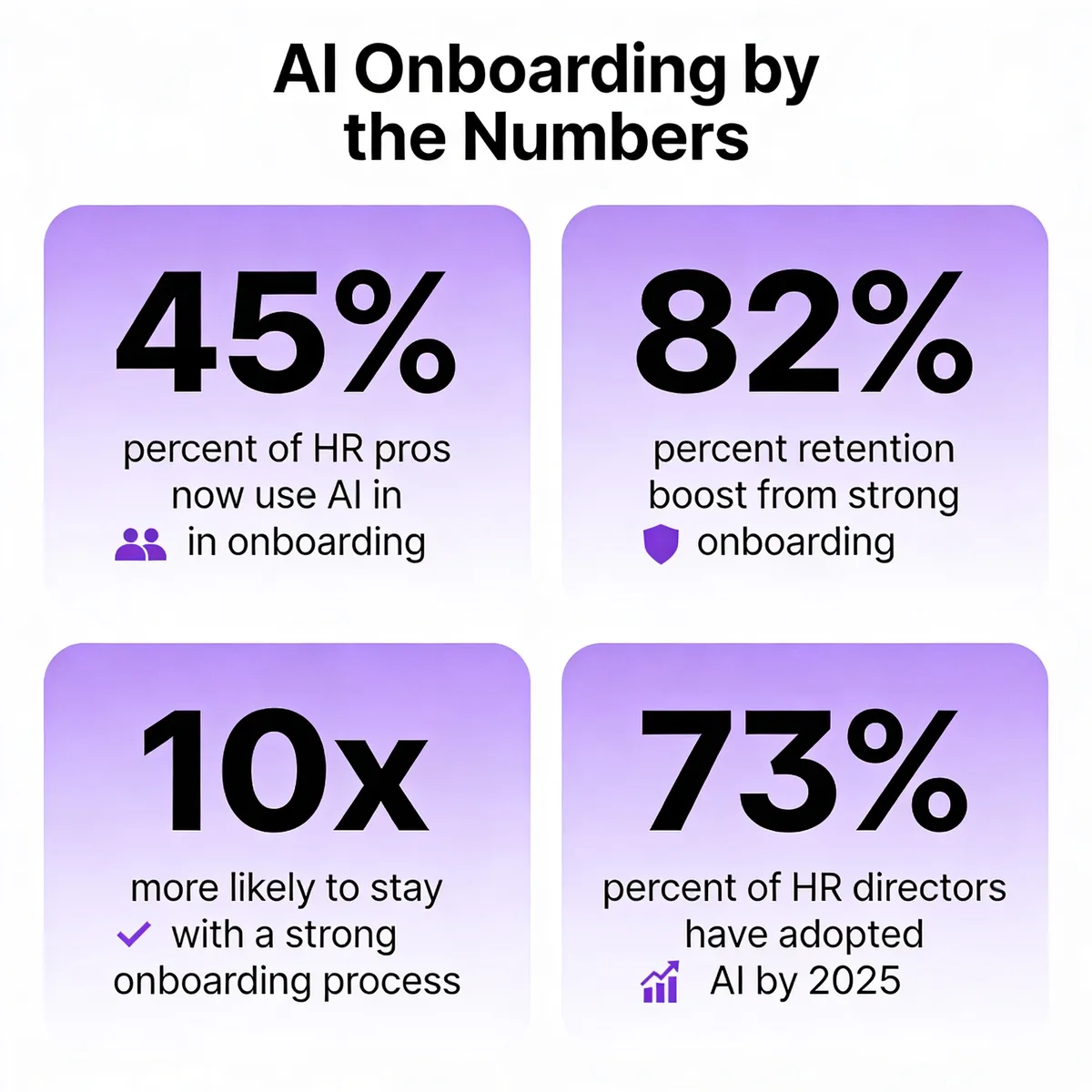
Most onboarding is bad. According to Gallup data, only 12% of U.S. employees say their company did a great job onboarding them. The flip side of that gap is the upside. According to Phenom research, organizations with strong onboarding improve retention by 82%. That isn't a marginal gain, it's a doubling of the people who stay past the painful first year.
HR leaders have noticed. According to SaaSworthy, roughly 45% of HR professionals already use AI in their onboarding processes, with another 25% planning to adopt it soon. Adoption is even higher at the top.
2026 is the year this stops being optional. Three things changed at the same time. First, generative AI got cheap enough to embed in every step of the journey, not just the FAQ bot. Second, agentic AI matured to the point where a single prompt can trigger a multi-system workflow, like provisioning a laptop, creating Jira accounts, and sending a welcome message in one shot. Third, search habits shifted. New hires Google their onboarding questions less and ask their internal AI assistant more, which means the quality of that assistant is now part of your employer brand.
The macro trend backs this up. According to Phenom citing Gartner, by the end of 2026, 40% of enterprise applications will use task-specific AI agents to orchestrate work across systems. Onboarding is one of the highest-impact places to start, because it's repetitive, document-heavy, and emotionally loaded for the person on the receiving end.
Two flavors of AI onboarding (employee vs customer)
The biggest mistake I see vendors and buyers make is treating these two flows as the same product. They share plumbing, but the goals, owners, and success metrics are different. Here's how I split them when our customers ask.
Employee onboarding
Employee onboarding is the hire-to-productive timeline. The clock starts when the offer is signed (sometimes earlier, in preboarding) and stops at some agreed definition of "fully ramped." For a sales rep that might be 90 days to first closed deal. For a backend engineer it might be the first production merge. For a customer support agent it might be solving 30 tickets a day with a quality score above the team average.
Inside that window, AI handles four buckets of work. Paperwork automation pulls signatures, IDs, and tax forms into a single guided flow that updates HRIS records as it goes. Knowledge-base Q&A answers the "what's the WiFi password" and "how do I expense lunch" questions that used to clog the People team's inbox. Role-specific learning paths assign training modules based on title, level, and tenure, then adjust based on quiz scores. Manager check-in nudges remind the hiring manager to run the day-one, week-one, and 30-day conversations that almost always slip.
If you want a starting reference point, our writeup on building an AI HR assistant walks through the architecture of an internal Q&A bot trained on your handbook. That's the most common first project, and it pays back fast because the same questions arrive every Monday.
Customer onboarding
Customer onboarding is the signup-to-value timeline. Success here isn't about a productive employee, it's about a customer who has experienced the "aha" moment your product was designed to deliver. For a CRM that might be importing contacts and sending the first email. For an analytics tool it might be connecting a data source and seeing the first chart. For a chatbot platform like ours, it's the moment someone trains a bot on their site, embeds the widget, and sees the first real customer conversation.
AI in customer onboarding shows up as in-app coaching that reads where the user is and offers the next step, contextual nudges that fire when behavior diverges from a successful pattern, churn-risk scoring that watches for silence after signup, and self-service answers that resolve setup questions without a CSM call. The pattern I keep seeing in our customers' deployments is that the bots that work best are trained on the product's own help center, not the marketing site, because the help center is where the actual answers live.
For a deeper view of how this looks in practice, our breakdown of chatbot use cases covers the customer-onboarding angle in detail, including activation, retention, and expansion conversations.
Key benefits of AI-powered onboarding
Personalized activation paths
The 40-page handbook approach treats every new hire and every new user the same. AI onboarding doesn't. The system reads role, seniority, tooling experience, and early behavior, then assembles a path that skips what the person already knows and goes deeper on what they don't. A senior engineer joining from a Python shop doesn't need the "what is git" video. A first-time CRM user does need the contact-import walkthrough. The result isn't just a better feel, it's measurably less wasted time per person.
Faster time-to-productive (employees) and time-to-value (customers)
This is the headline metric for most buyers and the easiest one to defend in a budget conversation. The mechanics are simple: less waiting, less tab switching, less "let me ask my manager" friction. For customer onboarding, the same logic applies in days instead of weeks. A user who hits the activation event in their first session is far less likely to churn than one who quits halfway through setup.
Better retention via predictive analytics
Retention used to be a lagging metric you'd stare at quarterly and feel bad about. AI flips it forward. The model watches for early signals (no logins in five days, no completed training modules, sentiment dropping in chat replies) and surfaces the at-risk person before the relationship is past saving. According to Yomly, employees who go through a strong onboarding process are 10x more likely to stay. AI onboarding doesn't just deliver a strong process, it tells you which people aren't getting one yet.
Sentiment analysis at every checkpoint
Surveys are a snapshot. Sentiment analysis is a stream. Modern AI reads the tone of every message a new hire or new user sends, scores it, and flags drops. The failure mode I see most often is teams treating this as a dashboard exercise. The value isn't in the chart, it's in the routing rule that pages the manager when sentiment crosses a threshold. Make the alert specific, make it owned, and the data starts changing behavior.
24/7 self-service answers
New people have questions at 11pm on a Sunday. They have questions during a lunch break in a different time zone. The AI assistant answers immediately, with the right policy version, without making the person wait until Monday. Our piece on AI customer service benefits walks through what good self-service looks like and where the boundary should sit between bot and human. The same logic applies to internal HR support.
Cleaner data for HR and CS analytics
Manual onboarding produces messy data. Forms get half-filled, training completion gets logged in three different spreadsheets, and the connection between activity and outcome is a guess. AI onboarding writes structured events as it runs, which means you get a clean dataset for free. Six months in, you can answer questions like "do reps who finish module 4 in week one close 20% more in quarter one?" That kind of analysis is what turns onboarding from a cost center into a measurable lever.
How AI optimizes the onboarding workflow
Automating repetitive paperwork and forms
This is the boring win, and it's the one that pays for the whole project. Tax forms, NDAs, ID verification, equipment requests, benefits enrollment, direct deposit setup. Each of these used to need a coordinator chasing the new hire across three days. AI orchestrates the sequence, pulls existing data forward instead of asking twice, validates entries on the fly, and pushes everything into the HRIS. People-team hours saved per hire vary, but every customer I've talked to lands somewhere between four and eight hours back per new starter.
Personalized learning paths and content recommendations
Static training catalogs assume everyone learns the same way at the same pace. They don't. AI onboarding pulls signal from the person's role, prior experience, and quiz performance, then sequences content accordingly. If someone aces the security quiz on day one, they don't sit through the security video again. If someone fumbles the product training, the system surfaces a refresher and a short call with a peer mentor. The content engine doesn't need to be flashy. It just needs to remove the modules that waste time and add the ones that fix the gaps.
Intelligent task routing and reminders
Onboarding fails most often at handoffs. IT forgets the laptop. The manager forgets the day-one lunch. Finance forgets to add the new hire to the expense system. AI routes each task to the right owner with a deadline, then escalates when something slips. The same pattern applies on the customer side, where the AI watches for signup events and routes follow-up to the CSM, the success engineer, or back to a self-serve path depending on plan tier and account size.
AI chatbots for answering common questions
The Q&A bot is the entry-level use case and it earns its keep. A bot trained on the employee handbook answers payroll, PTO, and benefits questions without anyone in HR opening a ticket. A bot trained on the product help center answers setup questions without the CSM picking up the phone. The bots that work pull from a single source of truth. The bots that don't work pull from five different decks and contradict themselves. If you're running this in Slack, our walkthrough on building an AI chatbot for Slack covers the integration pattern most teams ask about first.
Real-time analytics and onboarding health scoring
Health scoring takes the messy stream of onboarding events and reduces it to a single number per person. Green means the new hire or new user is on track. Yellow means watch them. Red means intervene now. The score is built from completion rate, time-to-event, sentiment, and engagement frequency. The cleanest implementations I've seen surface the score directly inside the manager's daily Slack digest, so they don't have to log into yet another dashboard to know who needs attention.
How to implement AI onboarding step by step
Step 1: Document your current onboarding flow
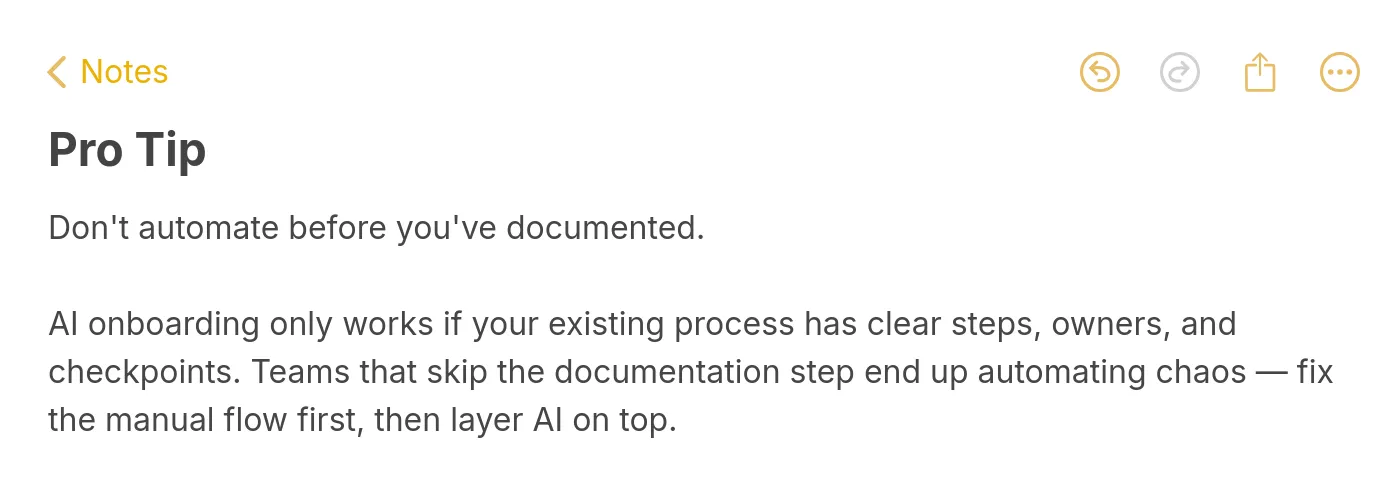
Start with a whiteboard, not a vendor demo. List every step, every form, every email, every handoff. Map who owns each one and how long it takes today. The gaps you find here are the places AI will help most. The reason this step matters is simple: if you can't draw your manual flow, you can't automate it. You'll just rebuild the same broken process inside a new tool.
Step 2: Identify high-impact automation candidates
Not every step is worth automating. Look for the boring, repetitive ones with high volume and low judgment requirements. Forms, FAQs, scheduling, provisioning. These are the ones AI handles well today. Skip the high-judgment moments (the manager's first one-on-one, the cultural fit conversation, the personal welcome). Those need humans, and pretending otherwise is how you ship the cold, robotic onboarding everyone complains about.
Step 3: Pick the right AI tools and integrations
Decide what stack you need before you shop. At minimum: an AI assistant trained on your docs, an automation layer that talks to HRIS or CRM, and an analytics layer that captures events. For employee flows, look for native integrations with Workday, BambooHR, or whatever HRIS you run. For customer flows, look for product analytics integrations and a way to drop the assistant into your app or help center. Avoid tools that promise everything and integrate with nothing.
Step 4: Train your AI on internal docs and FAQs
The quality of your AI assistant is the quality of the documents you feed it. Audit your handbook, your help center, your runbook, your benefits PDFs. Delete the stale stuff. Rewrite the contradictory stuff. Tag the canonical version of every policy. Then point the AI at the cleaned dataset. We rebuilt our own internal Q&A bot last quarter, and the single biggest accuracy gain came from killing the duplicates and keeping one source per topic.
Step 5: Pilot with a small cohort and measure
Don't roll this out company-wide. Pick one team, one role, or one customer segment for the first 30 days. Measure ramp time, time-to-value, completion rates, and sentiment before and after. The pilot gives you proof for the budget conversation, and it surfaces the integration bugs that always show up when real people use the system instead of the QA team.
Step 6: Iterate based on feedback and analytics
Treat the AI like any other product feature. Monthly review, weekly bug triage, quarterly roadmap. Watch the questions the bot couldn't answer and use them to write new docs. Watch the steps where people drop off and rework the flow. The teams that get the most out of AI onboarding aren't the ones with the fanciest tool, they're the ones who keep editing what the tool does.
Common obstacles in AI onboarding (and how to handle them)
• Data privacy and compliance: AI assistants need access to employee or customer data, which raises GDPR, CCPA, and SOC 2 questions immediately. Pick vendors who can show you their data residency map, retention policy, and audit logs before you sign. If your AI is going to sit on top of HRIS data, the security review needs to happen before the pilot, not after.
• Integration with HRIS and CRM: The AI is only as useful as its connections. If it can't read from Workday or write to Salesforce, it's just a chat window. Map the integrations you actually need on day one and walk away from vendors who promise them but ship them in "Q3 of next year." Real APIs, real webhooks, real sync, in production today.
• Change management and adoption: The technology is the easy part. Getting managers to trust the bot, getting new hires to use the bot, and getting the IT team to maintain it is harder. Pair every rollout with internal communication, short demo videos, and a named owner. Without that, the tool quietly dies in the first quarter.
• Hallucination risk: An AI that confidently invents a benefits policy is worse than no AI at all. Use retrieval-augmented generation against your real documents, set the confidence threshold high, and give the bot a graceful "I don't know, here's a human" handoff. Test the failure modes deliberately during the pilot, not in production.
• Over-automation and the lost human touch: If a new hire's first three weeks are entirely bot-driven, they will quit. People still want to meet their team. Reserve the human moments deliberately: the manager intro, the team lunch, the buddy assignment, the first one-on-one. Use AI to remove the friction around these moments, not to replace them.
• Measuring ROI: Buyers ask for ROI numbers and vendors hand out happy charts. Build your own. Pick three or four metrics before you start (time-to-productive, ticket deflection, completion rate, 90-day retention) and instrument them in your existing tools. The story you tell at quarterly review is yours, not the vendor's.
• Bias in role-based personalization: Personalization engines learn from past data. If your past data was biased (about who got promoted, who got the good projects, who left), the AI will replicate that bias in the onboarding paths it serves. Audit the model outputs across demographic segments at least once a quarter, and adjust if you see drift.
Best practices for effective AI onboarding
• Define clear goals before you pick a tool: Decide whether you're optimizing for ramp time, retention, satisfaction, or self-service deflection. Each of those leads to a different tool choice and a different success metric. Goals first, vendor second.
• Keep humans in the loop at high-stakes moments: The first day, the first one-on-one, the first time something goes wrong, the first promotion conversation. AI handles the surrounding scaffolding. Humans handle the meaningful conversations. That balance is the whole game.
• Segment by role, level, and cohort: One generic flow won't fit a senior engineer, a first-time SDR, and a returning intern. Build at least three or four cohort variants and let the AI route the new person into the right one based on profile data. The first cohort split usually produces the biggest measurable improvement.
• Design fallback paths for every automated step: What happens when the AI doesn't know? What happens when the integration fails? What happens when the new hire types something the bot has never seen? Every automated step needs a written fallback. The fallback is what saves the experience when the technology breaks.
• Measure week-one engagement, not just completion: Completion rates are vanity. Engagement (questions asked, modules opened more than once, sentiment scores in chat) tells you whether the person is actually learning. Track engagement weekly for the first 90 days and you'll see the people you're losing before they tell you.
• Iterate the bot's content monthly: The handbook changes. The product changes. The questions people ask change. Schedule a monthly content review where you read the bot's worst answers and rewrite the underlying docs. It's a small ritual that compounds.
• Review compliance and access controls quarterly: Who can see what data, who can edit the bot's training set, who can change the workflow rules. These access controls drift if you don't audit them. A quarterly review takes an hour and prevents the kind of incident that ends careers.
Real-world examples of AI onboarding in action
The case for AI onboarding gets stronger when you read what real companies have shipped. According to recent case study research, IBM cut employee turnover by 25% by using AI analytics in its onboarding process to spot disengagement patterns early and intervene before the new hire decided to leave. The mechanics were straightforward: behavioral signals plus manager nudges plus role-aware learning paths, all running on top of an existing HRIS.
A second example comes from the customer-side of the equation. According to a Fortune 500 case study, a large enterprise rolled out a conversational AI-powered onboarding assistant that handled the routine setup questions across thousands of new accounts and freed the success team to focus on the strategic conversations. The big unlock wasn't deflection volume, it was the redirection of human attention to the moments that actually mattered.
Closer to the SaaS world I work in, our customers running AI-powered onboarding chat report time-to-first-value drops in the 30 to 40% range within the first quarter. The pattern is consistent: a bot trained on the help center, embedded in the app, with a clear escalation path to a human. Nothing exotic. Just well-executed basics.
Pilot AI onboarding with one cohort
The hardest part of AI onboarding isn't the technology. It's the discipline to document the manual flow before automating it, pick a small cohort, measure honestly, and iterate every month. Skip the company-wide rollout this quarter. Pick one team or one customer segment, ship a Q&A bot trained on your real documents, and watch what happens to ramp time and retention over the next 90 days. That single pilot gives you the proof, the data, and the political cover to do the rest right. For a deeper view of how AI agents fit into the wider customer experience, our walkthrough on building an AI agent for customer support picks up where this guide leaves off.
Frequently asked questions
Can AI onboarding help reduce turnover rates?
Yes, and the data is direct. Strong onboarding raises retention by 82% and makes employees 10x more likely to stay past the first year. AI onboarding strengthens the process in the places where it usually breaks: missed follow-ups, slow Q&A, generic training, and zero visibility into who's struggling. When you fix those four things, your 90-day attrition goes down measurably. Pair the AI flow with explicit manager check-ins and you'll see the biggest drop in the first cohort.
What is AI onboarding and how does it differ from traditional onboarding?
Traditional onboarding is a static plan: one handbook, one orientation, one calendar invite per milestone. AI onboarding is a responsive plan: the system reads who the person is, what they already know, and how they're progressing, then adjusts in real time. The handbook becomes a Q&A bot. The orientation becomes a personalized path. The check-ins get triggered by behavior instead of guesswork. Same goals, completely different machinery underneath.
How can AI onboarding improve the experience for new hires?
Three ways. It removes the dead time (no waiting for HR to email back, no forms to fill twice). It personalizes the content (skip what you know, learn what you don't). And it surfaces the human moments at the right time (manager nudge on day one, peer connection on day three, role-specific deep dive on day seven). The combined effect is that the new hire feels seen instead of processed. That perception shows up in the engagement and retention numbers within a quarter.
Is AI onboarding suitable for small businesses?
Yes, and often more useful at small scale. Small businesses don't have a dedicated People team to chase paperwork or answer benefits questions, so the same AI assistant that handles a Fortune 500 use case ends up doing even more work when one founder or one office manager is wearing five hats. Start with the Q&A bot trained on your handbook, layer in form automation, and skip the heavyweight enterprise platforms until you actually need them.
What's the role of chatbots in AI onboarding?
Chatbots are the front door. They're how new hires and new users actually interact with the AI layer. The bot answers questions, routes complex ones to humans, surfaces the next step in the flow, and captures sentiment along the way. A good AI welcome message sets the tone for the whole relationship. A bad one signals that the company doesn't care. The bot isn't the whole onboarding system, but it's the part everyone touches first.
How do I measure the ROI of AI onboarding?
Pick metrics that map to dollars. Time-to-productive multiplied by fully-loaded salary tells you what every saved week is worth. 90-day retention multiplied by replacement cost tells you what every retained hire is worth. Self-service deflection rate multiplied by average ticket cost tells you what the bot saves your support team. Track all three for a quarter, compare against your pre-AI baseline, and the ROI conversation writes itself. The story we tell our own customers is to bake these numbers into the budget request before the rollout, not after.
Further reading on AI chatbots and onboarding automation:
How to Create AI HR Assistant for Productivity & Engagement
How to Create AI Chatbot for Slack: Step-by-Step Guide
25 Real-World Chatbot Use Cases Across Industries
How AI Chatbots Enhance Human Agent Performance
12 Benefits of AI in Customer Service to Guide Your Business