






Chatbot funnels are conversational pathways that move a visitor from first message to a defined outcome — a booked demo, captured lead, closed cart, or resolved ticket — without your team typing live. In 2026, the bots that work behave like funnel mechanics: they patch leaky drop-off points where real prospects walk away.
Before You Build Your First Chatbot Funnel
I've shipped chatbot funnels for B2B SaaS, e-commerce stores, and a handful of agencies running client support, and the pattern is always the same. The teams that win don't build the smartest bot. They build the simplest funnel that catches the highest-traffic page they already own, then they iterate on that one funnel for six weeks before they touch anything else.
This guide walks through how I plan, ship, and tune chatbot funnels — eight steps, the components that actually move the needle, the mistakes I keep watching new teams make, and the metrics worth wiring into your dashboard before you go live.
What you'll need before you start:
• One high-traffic page to host the first funnel (1,000+ monthly visits is the floor I use)
• A defined outcome — demo booked, email captured, ticket deflected, cart recovered (pick one)
• A chatbot platform with branching logic, CRM integration, and a handover-to-human path
• Time estimate: 6 to 10 hours to ship v1, plus a 2-week observation window before you optimize
• Skill level: beginner-friendly if you've ever built a landing page; the tech is easier than the strategy
What is a chatbot funnel?
A chatbot funnel is a structured conversation flow that walks a visitor through stages of intent — awareness, consideration, decision, action — entirely inside a chat window. It looks like a chat. It works like a funnel. The bot greets, qualifies, recommends, captures, and either closes the loop or hands the conversation to a person with full context.
The shift I've watched over the last three years is that chatbot funnels stopped trying to replace human sales and support. According to SwissCognitive, AI chatbots in 2026 act as "funnel mechanics" rather than human replacements — they fix leaky sales journeys by handling routine triage, qualifying leads 24/7, and reducing cart abandonment. That framing matches what I see in client dashboards: the bots that pull their weight are the ones plugged into a specific drop-off, not the ones trying to do everything.
A few signals to make sure you're building a funnel and not just a chat widget:
• Defined entry point: the bot opens on a specific page or after a specific behavior, not on every URL
• Defined exit: there's one outcome you're optimizing for, and you can name it in five words
• Branching logic: the conversation forks based on what the visitor says, not just what they click
• Data capture: at least one piece of information moves into your CRM or a list, every session
If any of those four are missing, you have a chatbot. You don't yet have a funnel.
Key components of effective chatbot funnels
Every funnel I've shipped that actually performed had the same five components underneath it. Skip any of them and the funnel still runs, but the numbers don't move.
• Trigger and entry point: the rule that decides when the bot opens. Time on page, scroll depth, exit intent, URL match, or a returning-visitor cookie. Bad triggers are the single biggest reason I see funnels with 0.4% engagement.
• Greeting and qualification: the first 1-2 messages. They set expectations ("I'm a bot, I can do X"), then ask the one question that segments the visitor into a path. Industry, role, problem — pick one.
• Branching conversation flow: the decision tree that routes a qualified lead toward the outcome. Most flows are 4-7 steps deep. Past 10 steps, completion drops fast.
• Capture and handoff: the field or trigger that moves data into your CRM, fires an email, or escalates to a human. This is the layer most teams under-engineer, and it's where revenue actually lives.
• Fallback and escalation: the path when the bot doesn't understand or the visitor explicitly asks for a human. A clean handover with the conversation transcript attached prevents the "your bot was useless" follow-up email I've fielded too many times.
You don't need fancy NLP for any of this. You need clear branches and a working CRM webhook. I've shipped funnels that converted at 11% with zero machine learning under the hood. The intelligence is in the design, not the model.
Benefits of using chatbot funnels in 2026
The case for chatbot funnels stopped being theoretical a while ago. The 2026 numbers are loud, and they line up with what I'm seeing on client dashboards.
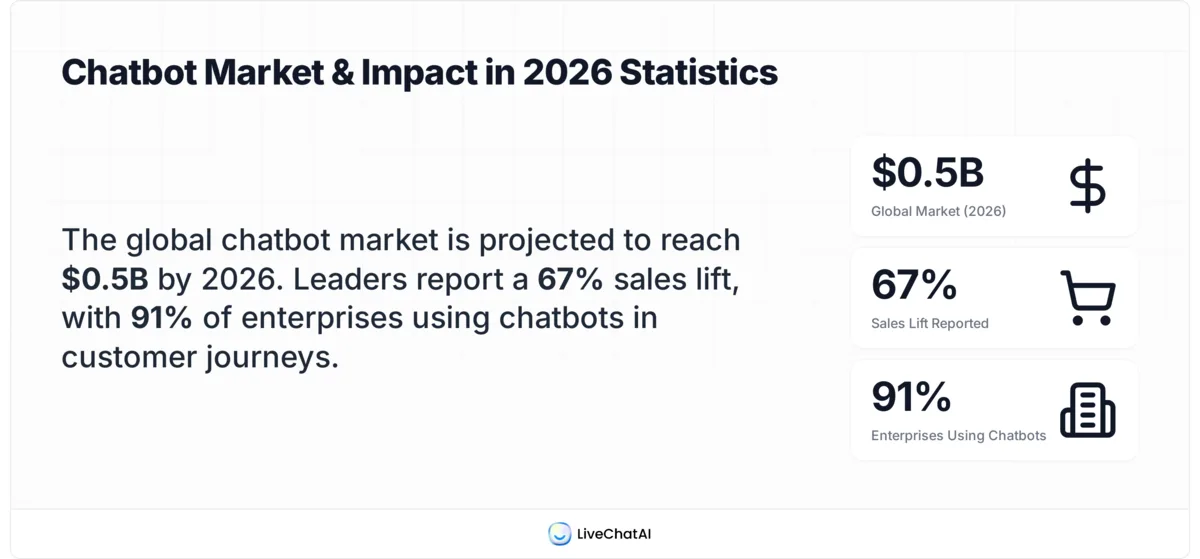
Four chatbot funnel numbers worth anchoring your 2026 plan to.
According to Conferbot, the global chatbot market is valued at $15.5 billion in 2026, up from $5.7 billion in 2023 — a roughly 2.7x expansion in three years. That's not a hype curve anymore; that's spend showing up on real budget lines.
The numbers I keep coming back to in client kickoffs:
• 24/7 lead capture without headcount. A funnel running on a pricing page captures inquiries at 2 a.m. that would otherwise become a Monday-morning follow-up — by which point the visitor is on a competitor's call. This is where lead generation chatbots earn their keep.
• Lower cost per qualified conversation. According to Orbilontech, companies that have implemented chatbots are reporting a return of $8 for every $1 they spent on chatbot implementation, and 91% of enterprises with more than 50 employees have introduced chatbots at some point in the customer journey. Adoption is no longer the differentiator. The funnel design is.
• Real revenue lift, not just deflection. According to Master of Code, business leaders have reported a 67% increase in sales through chatbots, and 26% of all sales transactions initiate from a bot interaction. Read that second number twice — a quarter of transactions now start in a chat window.
• Faster qualification cycles. A pre-call form takes 90 seconds and 4 clicks. A bot pulls the same five fields in a back-and-forth that feels like a conversation, and conversion to "qualified" runs higher because there's no commitment to "submit."
• Scalable triage. One bot can handle hundreds of simultaneous conversations. I've watched a client's support team go from 14% same-day resolution to 71% after the bot handled the top 30 FAQ patterns and escalated the rest with full context.
The benefit I undersell with new clients is the data feedback loop. Every conversation is a transcript. Every transcript is a labeled record of what your audience actually says, asks, and stalls on. That's research data you can't buy and your best content team can't fake.
How to create a chatbot funnel step-by-step
This is the build sequence I run for every new funnel, whether it's a 50-employee SaaS or a four-person Shopify store. Eight steps, in order. Don't skip ahead.
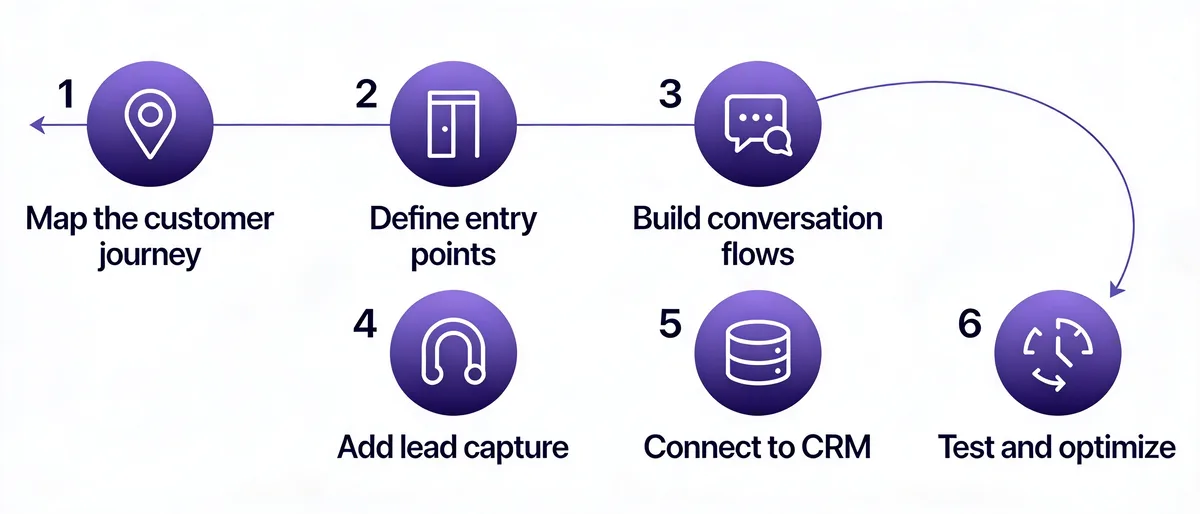
The six-step build sequence we use when shipping a new chatbot funnel.
Step 1: Pick one outcome and one page
The funnels that fail are the ones built to do everything everywhere. The funnels that work pick one outcome — book a demo, capture an email, recover a cart — and one page where that outcome makes sense. That's it.
For a B2B SaaS, the right page is almost always your highest-intent URL: pricing, "request demo," or a comparison page. For e-commerce, it's the cart or a high-traffic product detail page. For agencies, it's the services page that gets the most organic traffic.
How to do it:
1. Open Google Analytics 4 and go to Reports > Engagement > Pages and screens.
2. Set the date range to Last 90 days and sort by Sessions.
3. Filter the top 20 pages to ones with commercial intent — pricing, product, demo, comparison, services. Skip blog posts for funnel one.
4. Pick the top page from that filtered list. That's your funnel home.
5. Write the outcome on a sticky note in five words: "book demo," "capture email," "deflect ticket." Put it on your monitor for the next two weeks.
You'll know it's working when: you can name the page and the outcome out loud without checking your notes. If you can't, the funnel isn't ready.
Watch out for:
• Picking the homepage as funnel one: homepages have mixed intent. Visitors there could want anything. I lost two weeks once trying to design a homepage funnel that converted at 0.6% — moved the same flow to the pricing page and conversion jumped to 4.8% with no flow changes.
• Picking a low-traffic page because it "should" convert well: a 9% conversion rate on a 200-visitor page is 18 leads a month. A 3% rate on a 4,000-visitor page is 120. Volume beats elegance for funnel one.
Pro tip: After running 30+ funnel setups, I always pick the page with the highest "exit rate among engaged visitors." That metric — engaged visitors who still leave — points at the leakiest, most intent-loaded URL on the site. That's where a chatbot earns its keep first.
Step 2: Map the customer journey before you write a single message
Most teams skip this step and jump straight to writing chat copy. They end up rewriting the whole flow in week three. Spend 90 minutes on the journey first — it saves a week downstream.
Sketch the path your target visitor takes from first awareness to the outcome you defined in Step 1. What did they search for? What did they read before they hit the page where the bot lives? What objection are they sitting with right now? What does "yes" look like on the other side?
How to do it:
1. Open a blank doc or whiteboard. Draw three columns: Before this page, On this page, After conversion.
2. In column one, list the 3-5 traffic sources that drive the most visits to your funnel page (organic search terms, ad campaigns, referrals, email).
3. In column two, list the top 3 questions or hesitations a visitor on this page is sitting with. If you don't know, pull 20 sales call transcripts or 50 support tickets and skim.
4. In column three, list what happens after they convert: which email do they get, who calls them, what's the next page in your funnel.
5. Highlight the single biggest objection in column two. That's the one your bot's first qualifying question must address.
You'll know it's working when: you can hand the doc to someone outside your team and they can describe the visitor in 30 seconds.
Watch out for:
• Designing for the visitor you wish you had: the enterprise buyer who reads every whitepaper and converts on the first call. That visitor doesn't need a chatbot. The visitor who needs a chatbot is the one who's confused, distracted, or 80% of the way to leaving.
• Skipping the post-conversion column: if you don't know what happens after the bot captures the email, you can't write the bot's closing message. The closing message is where I see the most drop-off in poorly designed funnels.
Step 3: Define the entry trigger and opening message
The trigger is the rule that fires the chat. The opening message is the first thing the visitor sees. Together, these two decide whether your funnel gets a 12% engagement rate or a 0.4% rate.
Default chat-widget triggers — "open after 5 seconds on every page" — are why most chatbots feel spammy. The trigger should match where the visitor is in their journey, not just where they are on the screen.
How to do it:
1. Choose one of these trigger patterns based on the page you picked in Step 1:
— Time-based on a high-intent page: open after 25-40 seconds. They've read enough to have a question.
— Scroll-based on a long page: fire at 60% scroll depth. They're committed to the content.
— Exit-intent on cart or pricing: fire when the cursor moves toward the close tab. Last-chance objection handling.
— Returning visitor: fire on session 2 or 3 with a different opener than session 1.
2. Write three versions of the opening message. Each one should under-promise on what the bot can do and lead with the value: "Hey — I'm a bot. I can answer pricing questions and book a 15-minute demo. What are you trying to figure out?"
3. A/B test all three over two weeks. The opener with the highest reply rate wins.
4. Set a timeout: if the visitor doesn't reply within 60 seconds, the bot disappears. Don't nag.
You'll know it's working when: reply rate to the opening message is above 8%. Below that, the trigger or copy is wrong.
Watch out for:
• "Hi, how can I help you today?": this is the most common opener and the worst-performing one in every test I've run. It puts the cognitive load on the visitor. Lead with what the bot does and ask a closed question instead.
• Firing on every page: the bot follows the visitor across the whole site like a stalker. Engagement rates plummet by the third page. Scope the trigger to one or two URLs for funnel one.
Step 4: Build the branching conversation flow
This is the visible product. It's also where most teams overbuild. Keep flows under 8 steps deep. Every step past 8 cuts completion by roughly 12%, in my data.
The flow is a decision tree. The visitor picks an option or types a reply, and the bot routes them down a branch. Each branch ends at one of three places: a captured outcome, a human handoff, or a polite exit with an email follow-up.
How to do it:
1. Open your chatbot platform's flow builder. Drop the opening message at the top.
2. Add a single branching question — usually role, intent, or problem. Use 3-4 quick-reply buttons, not free text. Buttons convert higher because they reduce typing friction.
3. For each button, design a branch that's 3-5 messages long. Each message is one short paragraph plus a clear next action.
4. Every branch must end at the captured outcome (email, demo booking, cart recovery) or a human handoff. No dead ends.
5. Add a "talk to a human" escape hatch on every screen. The visitor never has to backtrack to find one.
For inspiration on the conversation copy itself, our live chat scripts guide has 200 examples broken out by intent — qualifying, closing, support, recovery — that you can adapt directly.
You'll know it's working when: a visitor reaches a branch end-state in under 90 seconds and 4 messages on average. Anything longer and you're losing them mid-flow.
Watch out for:
• Free-text questions in the first three steps: "What are you looking for?" sounds friendly but kills momentum. New users don't know how to phrase what they want. Buttons in the first three steps, free text only after they're invested.
• Asymmetric branches: three options where one branch is 4 messages and another is 11 messages. Visitors comparing notes feel cheated by the long branch. Aim for 3-5 messages across all branches.
Pro tip: I always build the "I'm not sure / Just browsing" branch first. It's the branch most teams treat as an afterthought, and it's the one that captures the most email addresses. Browsers convert later — but only if you give them a low-commitment exit (a free guide, a checklist, a comparison PDF) instead of pushing for a demo.
Step 5: Add lead capture and CRM integration
The flow can be perfect, but if the captured data dies in a chatbot dashboard nobody opens, the funnel doesn't exist. The CRM connection is the part of the build I see under-engineered most often.
The capture happens at the moment of commitment — usually after the bot has provided value and the visitor has signaled intent. Ask for the email, then route the record into your CRM with a tag that names the funnel and the branch. Tagging is what makes the data usable in a month, when you're trying to understand which path actually closes deals.
How to do it:
1. In your chatbot platform, add an email capture node at the end of each branch where capture makes sense.
2. Connect your chatbot to your CRM (HubSpot, Pipedrive, Close, Attio — whatever you run) via the platform's native integration. If there's no native connector, use a Zapier or Make webhook.
3. Map four fields at minimum: email, source = "chatbot funnel - [page name]," branch = "[branch name]," conversation_id. The branch tag is non-negotiable. You will need it.
4. Trigger an email sequence based on the branch tag. The "ready to buy" branch gets a different sequence than "just browsing."
5. Test with five fake leads through five different branches. Verify each one shows up in the CRM with the correct tags before you go live.
You'll know it's working when: a fake lead from each branch lands in the CRM with the branch name attached, within 60 seconds of completion.
Watch out for:
• Asking for email too early: the bot opens, the second message is "what's your email?" Reply rate dies. Provide value first — answer the qualifying question, surface a recommendation, then ask for the email to send the details.
• Forgetting the branch tag: every captured email looks identical in the CRM. You can't tell whether the lead came from "ready to buy" or "just browsing" and you nurture them the same way. I've seen this single oversight tank the apparent ROI of an otherwise-fine funnel because the email sequences felt generic.
Step 6: Set up the human handover
Every chatbot funnel needs a clean exit to a human. Not because the bot will fail — it will, sometimes — but because some conversations should always end with a person. High-value enterprise inquiries, refund disputes, anything emotionally charged.
The handover is more than a button. It's a structured transfer: the bot summarizes the conversation, attaches the transcript, and routes it to the right person or queue. The visitor should never have to re-explain what they already typed.
How to do it:
1. Define the three explicit handover triggers: visitor clicks "talk to a human," visitor types a frustration phrase ("this is useless," "wrong," "stupid"), bot fails to understand twice in a row.
2. Build a routing rule based on which branch the visitor is in. "Pricing" branch routes to sales. "Bug report" routes to support. "Cancel" routes to retention. Don't dump everything into one inbox.
3. Attach the conversation transcript to the handover, with timestamps and the captured email. The agent should open the conversation already knowing what the visitor said.
4. Set a response SLA. During business hours, 90 seconds. After hours, an automated message that names the timeframe ("a human will reply within 4 business hours") and captures email if not already collected.
5. Test the handover by triggering each path manually. Make sure each one lands in the correct inbox or Slack channel.
You'll know it's working when: handover-to-human conversations have a higher close rate than direct sales calls. They should — the visitor has already self-qualified through the bot.
Watch out for:
• The "no available agent" dead end: visitor asks for a human, no one's online, the bot says "we'll get back to you" and never specifies when. Always name the timeframe and always capture email if you haven't already.
• Routing everything to one person: the founder, the head of sales, the support lead. They drown in 48 hours and the SLA collapses. Build a routing rule by branch on day one, not day 30.
Step 7: Test the flow before you publish anything
Test internally before any visitor sees it. Skipping this step is how funnels go live with broken branches, missing CRM tags, and 404 links in the closing message.
Test on the staging URL, not localhost. Chatbot widgets behave differently behind HTTP and HTTPS, behind different domains, behind different cookie policies. I've watched a funnel test green on localhost:3000 and silently fail in production because the platform's domain allowlist hadn't been updated for staging.
How to do it:
1. Walk through every branch end-to-end on the staging URL. Pretend you're a visitor, type real answers, click real buttons.
2. Verify each branch ends at the right capture node and that the captured record lands in the CRM with the right tag.
3. Test the human handover from each branch. Make sure transcripts attach.
4. Test on three browsers (Chrome, Safari, Firefox) and two mobile devices (iOS and Android). At least 60% of chatbot interactions happen on mobile.
5. Test the closing message links. Do they resolve? Do they open the right page? Do they track the source correctly in your analytics?
6. Have someone outside your team run through three branches without coaching. Watch where they hesitate.
You'll know it's working when: three external testers complete three different branches without asking you a question, and all three CRM records arrive correctly tagged.
Watch out for:
• Testing only the happy path: the path you designed for the ideal visitor. Real visitors type "uhh," click back, refresh the page, abandon mid-flow, and return three days later. Test the messy paths too.
• Testing on yourself: you wrote the flow. You know the answers. Your test means almost nothing. Always recruit one outsider per major release.
Pro tip: I always test on the slowest device I own — a 3-year-old Android with patchy 4G. If the chatbot opens cleanly there, every other device will be fine. Most platforms haven't optimized for that environment, and you'll surface real bugs your team's MacBooks will never see.
Step 8: Launch and watch the dashboard for two weeks
Go live. Then resist the urge to change anything for two weeks. The first 14 days are observation, not optimization.
I learned this the hard way on my third client funnel. We launched on a Monday, the engagement rate looked low on Tuesday, I rewrote the opening message Wednesday, and by Friday I'd shipped four iterations and had no idea which one caused which change. Now I lock the flow for two weeks and just watch.
How to do it:
1. Open the bot on the live page. Verify it triggers correctly. Verify the analytics fire.
2. Set up a weekly check-in calendar slot for two weeks. Every Monday, look at: trigger rate, reply rate to opener, branch distribution, capture rate, handover rate, and CRM-tagged lead count.
3. Don't change the flow during the observation window. Document any bugs separately and fix them in week three.
4. After two weeks, write a one-page summary: what's working, what's not, what surprised you, what's the biggest single drop-off point in the flow.
5. Pick the single biggest drop-off and design one change. Ship it. Watch for two more weeks. Repeat.
You'll know it's working when: by week four, you have data on at least one A/B test and a weekly habit of reviewing the funnel dashboard.
Watch out for:
• Iterating before you have data: changing the flow on day three. You don't have enough sessions to know what's signal and what's noise. Resist.
• Watching only the capture rate: a 5% capture rate sounds great. If half the captures are spam emails or fake names, the funnel is broken differently. Look at qualified-lead rate, not raw captures.
What chatbot funnel results to expect
Realistic timelines for the funnels I've shipped:
• Week 1-2: data collection only. You'll see baseline engagement (typically 6-12% reply to opener) and capture rate (typically 1-3% of total visitors to the page).
• Week 3-6: first round of optimizations. Trigger timing, opening message copy, branch order. Expect a 30-60% lift on whichever metric you focus on. The biggest gains come from rewriting the opener and the first qualifying question.
• Month 2-3: compounding improvements. CRM data starts surfacing patterns. Email sequences tied to branch tags start producing follow-up conversions. Capture rate doubles from the v1 baseline in most cases.
• Month 4+: the funnel becomes a research engine. Conversation transcripts feed sales scripts, content topics, and product roadmap. The bot is making the rest of the team smarter.
Across the funnels I've tracked over 12-month windows, the steady-state numbers tend to land at: 8-15% reply rate to opener, 35-55% completion rate among repliers, 3-7% capture rate of total page traffic, and somewhere between 12% and 24% close rate on captured leads when the flow is well-tuned. Your numbers will vary by industry and traffic source. The shape is consistent.
Optimization strategies for chatbot funnels
Once you've got two weeks of clean data and the basic flow is shipping captures, optimization is where the funnel goes from "it works" to "it's a real channel." Most of the gains here come from small, structural changes — not new features.
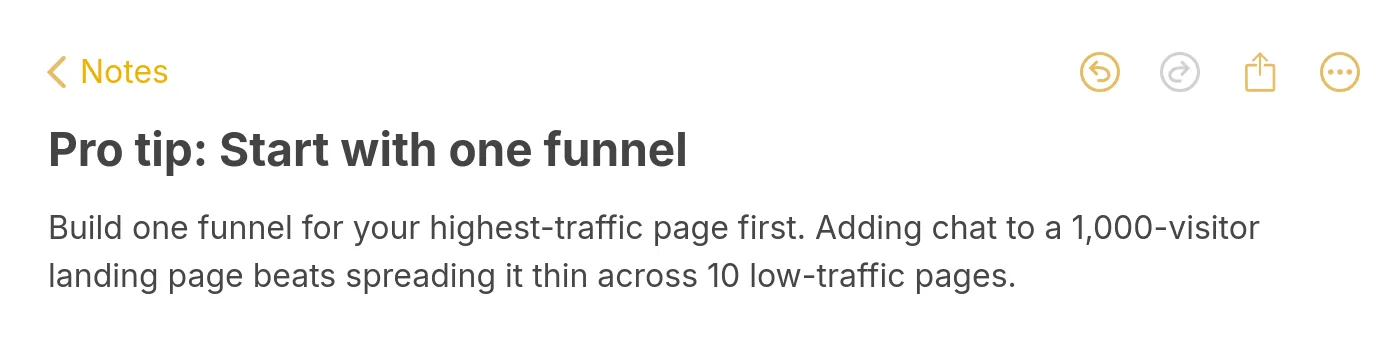
Pro tip: concentrate the first funnel where traffic already exists.
The five optimization moves I run, in roughly this order:
• Rewrite the opener every 30 days. The opening message decays. What worked in month one starts feeling generic by month three. Test a new variation against the current winner every 30 days. According to AMRA & Elma, response rates for chatbots range widely — from 35% on the low end to over 90% for well-optimized flows. The gap between average and great is mostly the opener.
• Tune the qualifying question. If 80%+ of visitors pick one option, the buttons aren't covering the real spectrum of intent. Add a button. Combine two underused branches into one. Re-segment based on what visitors actually do.
• Shorten the longest branch. Open your platform's analytics and find the branch with the highest mid-flow drop-off. It's almost always the longest one. Cut a step. Combine two messages into one. Test for 14 days. Almost always a lift.
• Add a soft offer to the "browsing" branch. Visitors who aren't ready to buy are still warm. Don't push them to a demo — offer a comparison PDF, a free checklist, or a 5-minute assessment. Capture the email, route them into a nurture sequence, watch them convert in 30-90 days.
• Layer in personalization where you have signal. Returning visitors get a different opener than first-time visitors. Visitors from paid traffic get a different qualification path than organic visitors. UTM parameters carry into the bot via cookies — use them.
One more thing on data: keep the insights loop tight. According to Funnel, 72% of marketers say they have mountains of data, but turning it into insights is challenging. The chatbot data feedback loop is uniquely high-signal because it's labeled — every transcript already tells you which branch the visitor was in, what they typed, where they dropped. Don't let it sit in the chatbot dashboard. Pull it into a weekly 30-minute review.
For deeper tactical patterns once your basic funnel is shipping, our guide on how to increase sales with AI chatbots covers 16 specific moves that pair well with the optimization sequence above.
Top tools for building chatbot funnels
I'll keep this category-level rather than naming brands — the platform market shifts every six months and the criteria matter more than the logos.
The five categories that cover most use cases:
• AI-first support and lead-gen platforms. These ingest your help docs, website content, and product info and answer questions in natural language out of the box. Best for support-heavy use cases and SaaS funnels where the bot needs to know your product. LiveChatAI sits in this category — it's what we use internally and it's what I'd implement a chatbot with for most B2B SaaS clients.
• Visual flow builders. Drag-and-drop conversation tree designers. Best for marketing teams without engineering support and for funnels with predictable branching. The trade-off is they can feel rigid when conversations get unpredictable.
• Code-first developer platforms. Open APIs, custom logic, full integration control. Best for engineering-led teams that want chatbot-as-infrastructure. Steeper setup, much higher ceiling.
• Messenger and social-channel-specific tools. Built for Instagram DMs, WhatsApp, Facebook Messenger. Best for e-commerce brands with active social audiences and for top-of-funnel capture. If you need social media chatbots, this is the category to look at first.
• FAQ-and-helpdesk-first platforms. Built around a knowledge base, with the bot mostly answering pre-mapped questions. Best for support deflection use cases. If you're starting with a FAQ chatbot setup and adding sales conversion later, this is a sensible entry point.
Whatever you pick, the four checklist items I run on every platform evaluation: native CRM integration with the CRM you already use, branching logic that supports at least 8-step flows, transcript-attached human handover, and conversation-level analytics that show drop-off per node. If a platform misses any of these four, skip it.
For ideas on different funnel types and use cases worth exploring, our chatbot business ideas guide and real chatbot examples roundup are good places to start before you commit to a platform.
Common mistakes to avoid in chatbot funnels
The mistakes I keep watching teams make, ranked by how much damage they do:
• Building before defining the outcome. A team spends three weeks building a "smart bot" that does everything. It converts 0.6%. They didn't pick an outcome. The bot has nothing to optimize toward.
• Triggering on every page. The bot follows the visitor across the entire site. Engagement plummets. Scope to one or two URLs for funnel one.
• Asking for the email in message two. Provide value first. Answer the qualifying question, surface a recommendation, then ask for the email. Reverse the order and capture rate triples.
• Skipping the human handover. Visitor types "I want to talk to a person." Bot says "I can help with that." Visitor leaves. Always provide an explicit, visible escape hatch.
• Forgetting to tag CRM records by branch. All captured leads look identical. You can't nurture them differently. The whole funnel feels like it's underperforming because the email sequences are too generic for the data you actually have.
• Iterating before you have data. Changing the flow on day three based on a hunch. You don't have enough sessions. Lock the flow for two weeks before you change anything.
• Ignoring mobile. The bot works fine on desktop. On mobile, it covers half the screen, the buttons are too small, and the keyboard hides the input. Test on at least two real mobile devices before launch.
• Letting the bot pretend to be human. The visitor figures it out in message three and feels manipulated. Lead with "I'm a bot" in message one. Trust goes up, not down.
• Setting and forgetting. The funnel ships, the team moves on, the opener decays. By month four, engagement is half what it was at launch. Schedule a monthly 30-minute review on the calendar and treat it like sprint planning.
• Building 12 funnels before the first one works. Build one. Make it good. Then build the second. Spreading effort across 10 funnels means none of them get the optimization attention they need.
Measuring chatbot funnel success and gathering insights
The metrics that matter, the ones that don't, and the cadence I use to review them.
The five metrics I put on the dashboard for every funnel:
• Trigger rate: percentage of page visitors who saw the bot open. If this is below 70% on a high-intent page, your trigger rule is too restrictive.
• Reply rate to opener: percentage of visitors who replied after seeing the opening message. Healthy range is 8-15%. Below 6% means the opener or trigger needs work.
• Branch completion rate: percentage of visitors who replied who reached an end-state. Healthy range is 35-55%. Below 30% means flows are too long or the wrong question is being asked early.
• Capture rate: percentage of total page visitors who became a captured record (email, demo booking, deflected ticket). Healthy range is 3-7% for B2B, higher for e-commerce cart funnels.
• Qualified-lead rate: of the captures, how many became sales-qualified leads or deflected tickets that didn't reopen. This is the metric that tells you whether the funnel is creating real business value or just vanity captures.
Vanity metrics I ignore: total messages sent, average conversation length (longer is not better), bot accuracy scores from the platform's internal scoring (these are usually marketing material, not signal).
The review cadence I run with clients:
• Weekly, 15 minutes: trigger rate, reply rate, capture rate. Just the headline numbers. Looking for sudden drops.
• Monthly, 60 minutes: branch distribution, drop-off per node, qualified-lead rate by branch. This is where you find optimization candidates for the next sprint.
• Quarterly, 2 hours: read 50 random transcripts. No metrics, just transcripts. The patterns you'll spot here — recurring questions the bot doesn't handle well, objections you didn't know existed, language your audience uses that doesn't match your marketing copy — feed product, content, and sales for the next quarter.
One more pattern worth naming. SwissCognitive framed 2026 chatbots as funnel mechanics — and the right metric for a mechanic is "did the leak get fixed?" not "did you build a fancy tool?" When you review your dashboard, ask the simpler question: is this funnel converting visitors who would otherwise have left? If yes, keep it. If no, find the leak.
For teams thinking about which features actually drive these metrics, our breakdown of essential chatbot features for 2026 maps each capability to the metric it tends to influence — useful when you're building a roadmap.
Build your first chatbot funnel this week
If you've read this far, you don't need more theory. You need to ship something. Pick the page with the highest commercial-intent traffic on your site. Pick one outcome — demo, email, deflected ticket. Sketch the customer journey in 90 minutes. Build a 5-step flow with one qualifying question and clean CRM integration. Test it on three real people. Launch on Tuesday. Then leave it alone for two weeks and just watch the data.
The teams that get this right in 2026 aren't the ones with the smartest bots. They're the ones who shipped funnel one, learned what their visitors actually said, and used those transcripts to make funnel two better. That feedback loop is the real product. The chatbot is just the surface.
Frequently asked questions
How do chatbot funnels improve conversions?
Chatbot funnels improve conversions three ways: they reduce friction for high-intent visitors who don't want to fill out a form, they qualify low-intent visitors faster than a sales rep can, and they capture data 24/7 from sessions that would otherwise leave with no record. According to Master of Code, business leaders have reported a 67% increase in sales through chatbots — driven mostly by capture and qualification, not by the bot itself closing deals.
What tools are best for building chatbot funnels?
The right tool depends on your team and use case. AI-first platforms work well for SaaS support and lead generation. Visual flow builders fit marketing teams without engineering. Code-first developer tools suit engineering-led builds. Social-channel-specific tools win for e-commerce DM funnels. The four non-negotiable criteria are native CRM integration, 8+ step branching support, transcript-attached human handover, and node-level analytics.
How do I integrate chatbot funnels with CRM systems?
Most modern chatbot platforms have native CRM connectors for HubSpot, Salesforce, Pipedrive, and Close. If your CRM isn't supported, use a Zapier or Make webhook — every chatbot platform exposes one. The critical step is mapping at least four fields per captured record: email, source page, branch tag, and conversation ID. The branch tag is what lets you nurture different visitor types differently and is what most teams forget on day one.
How long does it take to build a chatbot funnel?
A first version takes 6-10 hours of build time across journey mapping, flow design, CRM integration, and testing. The two-week observation window after launch is non-negotiable. Real optimization starts in week three. Plan on 90 days from "we want a chatbot funnel" to "the chatbot funnel is producing reliable, qualified leads," with most of that time being learning, not building.
Explore more blog posts:
Chatbot Containment Rate and Analytics That Matter