






A chatbot decision tree is a structured map of conversation paths, where each user input routes to a predefined branch with a specific reply, follow-up question, or handoff. Decision trees power rule-based and hybrid bots, keep critical flows (returns, bookings, escalations) predictable, and stay the cheapest, most reliable way to automate your top 20 support intents.
What is a chatbot decision tree?
A chatbot decision tree is a branching flowchart that maps every meaningful user input to a specific bot response, follow-up question, or system action. Each node is a decision point. Each edge is a path the conversation can take.
I've designed dozens of chatbot decision trees for SaaS and e-commerce teams, and the simplest way I describe one to a new client is this: a decision tree is the recipe, the chatbot is the cook. The bot can't improvise a path the tree doesn't list. That sounds limiting until you realize most support conversations are repeats of the same 15-25 questions, and predictability is exactly what you want for refunds, order tracking, demo bookings, and password resets.
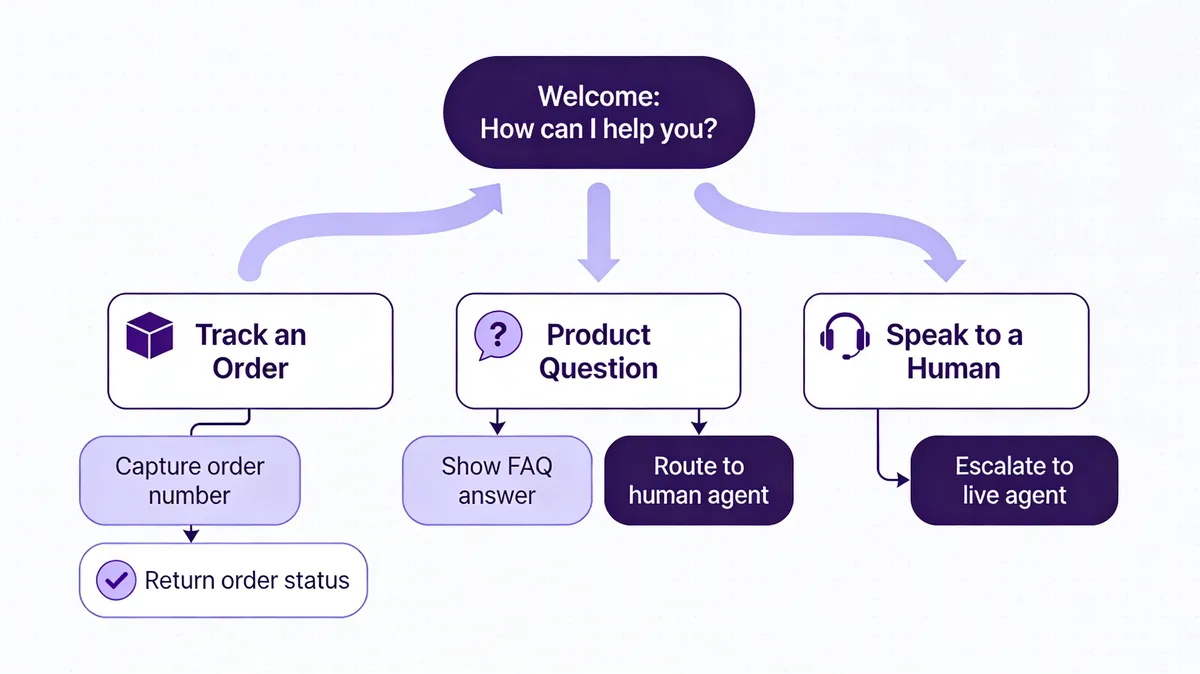
The diagram above is the shape almost every production tree I've built starts with. One welcome node. Three to five top-level intents. A fallback that escalates to a human after two failed matches. Anything more complex than that on day one usually gets cut in the second audit.
Decision trees sit at one end of the chatbot spectrum. At the other end, you have full LLM bots that generate responses on the fly. Most modern deployments live in the middle: a tree handles the structured 80% (intents you can name in advance), and an AI fallback handles the messy 20%. For a deeper split, see our breakdown of rule-based vs AI chatbots.
Types of chatbot decision trees
Not every decision tree is built the same way. The four shapes below cover almost everything I see in production, from a 6-node FAQ bot on a Shopify storefront to a 200-node insurance triage flow.
TypeBest forBuild effortHandles open-ended input?Rule-basedFAQs, returns, hours, password resetsLow (1-2 days)NoHybrid (rule + AI fallback)Most production botsMedium (1-2 weeks)Partial — AI catches missesAI-augmented (intent classifier)Long-tail support, multi-product catalogsHigh (2-4 weeks + training data)YesMulti-intent / context-awareInsurance, banking, healthcare triageVery high (1-3 months)Yes, with memory
Rule-based decision trees
The classic shape. The user clicks a button or types an exact keyword. The bot follows the matching branch. No machine learning involved. Rule-based trees are predictable, cheap, and fast to ship — I've stood up working FAQ bots in a single afternoon. The trade-off is fragility: anything outside the script falls into a fallback, and users notice.
Hybrid trees (rule + AI fallback)
The default for almost every LiveChatAI customer audit I run. The tree handles the named intents (order tracking, returns, pricing). Anything the tree can't match drops into an AI layer trained on your help docs. You get the predictability of rules where it matters, plus AI safety net for the long tail.
AI-augmented trees (intent classifier in front)
Instead of buttons, users type freely. An intent classifier (think a small NLU model) maps the input to one of your tree's named intents, then the rule logic takes over. Better UX than pure buttons, harder to maintain — every new intent needs training examples. Worth it for catalogs over ~50 SKUs or support docs over ~100 articles.
Multi-intent / context-aware trees
The reader says "I want to cancel my plan and get a refund for the last charge." That's two intents in one message. Multi-intent trees handle compound requests, hold context across turns ("which plan?" referring back to the cancellation), and escalate to a human when confidence drops. Mostly a regulated-industry pattern: insurance, banking, healthcare.
Why chatbot decision trees still matter in 2026
You'd think LLMs would have killed off decision trees by now. They haven't, and after watching hundreds of chatbot conversations across SaaS and e-commerce teams, I can see why. The structured 80% of customer questions don't need a model that can write poetry. They need a bot that says the right thing 100 times in a row without hallucinating a refund policy.
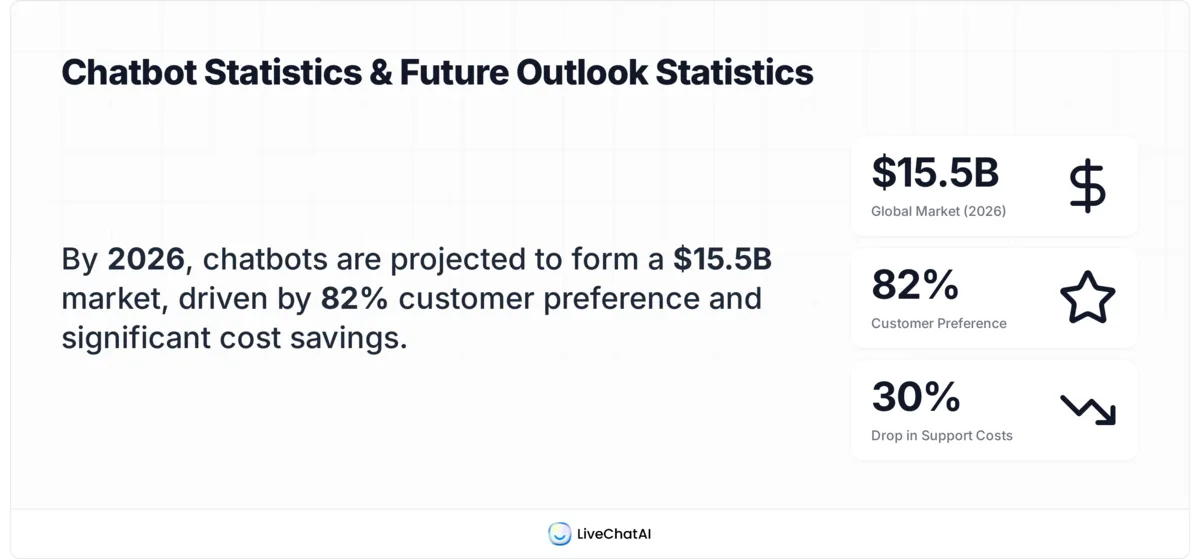
The numbers back this up. According to Route Mobile, 82% of customers would use a chatbot instead of waiting for a human representative. According to Scalify, website chatbots produce 20-35% more leads, handle 68% of inquiries autonomously, and reduce support costs by 30%.
That 68% is the headline. Two-thirds of inbound questions are repetitive enough that a well-mapped decision tree resolves them without a human ever opening the conversation. The remaining 32% is what your AI fallback or live agents are for.
Decision trees also outperform pure LLM bots on three things that matter for support: deterministic outcomes (the same input always produces the same output, which auditors and compliance teams actually require), zero hallucination risk on high-stakes flows like billing or returns, and lower per-conversation cost (no model token bill on the 80% you're routing through rules). The market reflects this — according to Conferbot, the global chatbot market is valued at $15.5 billion in 2026, up from $5.7 billion in 2023, and most of that growth is hybrid deployments, not pure LLM ones.
Key elements of an effective decision tree
Every tree I've shipped that worked had the same six pieces. Every tree I've audited that failed was missing one of them. Use this as a pre-build checklist.
• A clear entry node: One opening message, one obvious next action. Either three to five top-level intent buttons ("Track my order", "Return an item", "Talk to a human") or a single open-text prompt with examples below it. Don't dump twelve options on the user — that's the chatbot equivalent of handing someone a phonebook.
• Branching logic that mirrors how users actually think: Group by intent, not by your internal team structure. Customers don't care that "shipping" lives in your fulfillment team and "returns" in support. They want one branch labeled "My order" with both inside.
• Fallback paths for every dead end: Every node needs a "didn't catch that" exit. After two consecutive misses, the bot should offer to escalate. Not five. Two. Users give up around miss three on average.
• Escalation triggers: Define when the bot must hand off to a human, and bake it into the tree. Examples: refund over $X, words like "cancel" or "complaint", VIP customer flag, or any time the AI fallback's confidence drops below a threshold. Hard-coded triggers prevent the bot from arguing with an angry customer.
• Data capture at the right moments: Email and order ID near the start of any flow that needs them, not at the end. If the conversation breaks mid-flow, your team still has enough to follow up. I've seen teams lose hours of conversations because they only asked for email at handoff.
• Exit confirmation: Every successful flow ends with a "Did this solve your problem?" yes/no. That single question feeds your chatbot analytics dashboard with the only metric that matters — resolution rate — and gives you a clean signal for which branches need rework.
How to build a chatbot decision tree in 6 steps
Here's the workflow I run for every new tree, including LiveChatAI deployments. It takes about a week from blank page to first live conversation, and another two weeks of tuning before I'd call it done.
1. Map your top intents from real conversation data. Pull the last 90 days of support tickets, live chat transcripts, and email subjects. Cluster them by intent. The top 10-15 will cover roughly 70-80% of your inbound volume — those are your day-one branches. Don't guess. Don't ask the team what customers ask. Read what customers actually wrote. The gap between perceived top questions and real top questions is huge in every audit I've done.
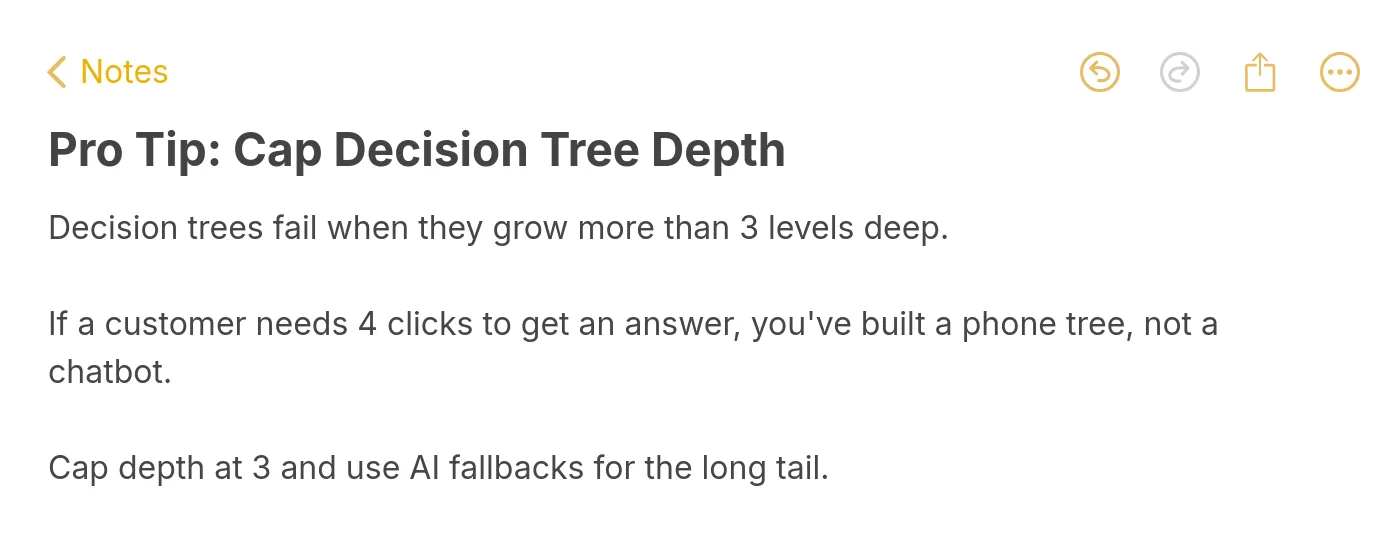
2. Draft the tree on paper before any tool. Whiteboard, sticky notes, or a Figma file. Three columns: trigger, bot reply, next step. Go three levels deep maximum on the first draft. If you can't fit a flow on one screen, it's too complex.
3. Write the bot copy in your brand voice. This is where most teams underinvest. The tree structure can be perfect and the bot still feels robotic if every reply starts with "I understand you'd like to..." Write like a person. Short sentences. Contractions. One question at a time. If you have a defined chatbot persona, use it consistently across every node. Read each reply out loud — if it sounds like a corporate auto-reply, rewrite it.
4. Define the human handoff explicitly. What channel does the conversation move to (Slack, your helpdesk inbox, email)? What context gets passed (full transcript, customer email, page they're on)? Who picks it up first? An undefined handoff is the fastest way to lose a customer mid-conversation.
5. Build it in your platform of choice. Whether you go with LiveChatAI's drag-and-drop builder, a Shopify-native widget, or a self-hosted open-source flow engine, the tool matters less than the tree design. Wire up your top-level intents first, smoke-test each branch end-to-end before moving to depth.
6. Test with five real users before going live, then tune weekly. Five users will surface 80% of your usability problems. Watch them, don't help them, write down where they stall. After launch, review your fallback hits weekly — those are the conversations the tree didn't anticipate, and they're your roadmap for the next iteration. For storefront teams, our roundup of ecommerce chatbots covers platforms with built-in tree-tuning analytics.
Common decision tree mistakes to avoid
The same four mistakes show up in nearly every audit. None of them are technical — they're design choices someone made under pressure and never revisited.
• Trees that go too deep: Beyond three levels, users abandon. I've measured 40-50% drop-off between level three and level four in real LiveChatAI deployments. If a flow needs more than three nodes to resolve, either redesign the questions to be more decisive or hand off to a human at level three.
• No fallback for unmatched input: A button-only tree with no text input and no "I need something else" option creates a trap. Users hit a question your tree didn't anticipate, can't escape, and bounce. Every node needs a visible exit.
• Ambiguous button labels: "Account" vs "Profile" vs "My info" — users have no idea which leads where. Pick concrete, action-oriented labels: "Change my password", "Update my billing address", "View my orders". Verbs, not nouns.
• No human escape hatch: Every tree needs a persistent "Talk to a human" option, visible at every node. Hiding it behind three menu layers tells users you don't actually want to help them. The bot's job is to handle the easy stuff, not gatekeep your support team.
When to use decision trees vs full AI (LLM) chatbots
This is the question I get every week from teams choosing a stack. There's no universal answer, but the decision usually breaks along three lines: intent diversity, risk tolerance, and budget.
FactorUse a decision treeUse a full LLM botNumber of distinct intentsUnder 3050+ or growing weeklyStakes per conversationHigh (billing, refunds, compliance)Lower (general info, brainstorming)Need for deterministic outputsYes (audit trail, regulated)No (creative, exploratory)Token cost concernYes (high volume, thin margins)No (low volume or premium pricing)Hallucination risk acceptable?NoYes (with guardrails)
In practice, almost no production bot is purely one or the other. The pattern that works best is a tree for the top 80% of named intents, with an LLM fallback for the long tail. For a side-by-side breakdown of when each shines, see our guide on chatbot vs ChatGPT. Visual chatbot design tips matter too — even the best tree fails if the chat widget looks broken on mobile.
The deciding question I ask every team: if your bot gets a question wrong, what's the worst-case outcome? If the answer is "the customer rephrases", an LLM is fine. If the answer is "we issue a refund we shouldn't", you need a tree.
Map your first chatbot decision tree this week
You don't need a six-month project to ship something useful. The fastest path I've seen is this: spend Monday pulling 90 days of support tickets, Tuesday clustering them into 10-15 intents, Wednesday-Thursday drafting the tree on a whiteboard and writing the copy, Friday building it in LiveChatAI or whichever platform you're on. Test with five users the following Monday. Live by Wednesday.
That bot won't be perfect. It'll cover maybe 60% of your inbound questions instead of the 80% you're aiming for, and the copy will need rewrites. But it'll be in front of real users, generating real fallback data, which is the only way to get to a tree that actually works. Decision trees aren't a "design once and ship" artifact — they're a living document, and the sooner you start iterating, the sooner you reach the point where two-thirds of your support tickets close themselves.
Frequently asked questions
How complex can a chatbot decision tree be?
Technically, decision trees can have hundreds of nodes and dozens of branching paths. Practically, the ones that perform best stay under 30 named intents and three levels deep. I've seen 200-node trees in regulated industries (insurance, banking) where every flow has to be auditable, but those need a dedicated conversation designer to maintain. For most SaaS and e-commerce teams, a 15-25 intent tree handles 70-80% of inbound volume, with an AI fallback covering the rest.
Do I need technical expertise to create a decision tree?
No. Most modern platforms — LiveChatAI included — use drag-and-drop builders where you wire nodes together visually. The hard part isn't the tool, it's the upfront design work: pulling real conversation data, clustering intents, writing copy that sounds human. A non-technical content marketer can ship a working tree in a week if they're willing to sit with the data first.
How often should I update my chatbot's decision tree?
Weekly review of fallback hits, monthly audit of resolution rates per branch, quarterly rewrite of underperforming flows. Set a calendar reminder. The single biggest reason chatbots stop working is that nobody updates them after launch — your product changes, your pricing changes, your customers' questions change, and the tree quietly rots.
What's the difference between a chatbot flowchart and a decision tree?
The terms get used interchangeably, but there's a useful distinction. A flowchart is the visual representation — boxes and arrows. A decision tree is the underlying logic the flowchart describes. You can have the same decision tree drawn as a flowchart in Figma, a JSON config in code, or a series of nodes in a chatbot builder. They're three views of the same thing.
Can a decision tree handle multilingual support?
Yes, with branch duplication. Each language gets its own subtree, triggered either by browser language detection or a top-level "Choose your language" node. Translation is the easy part. The hard part is keeping the trees in sync when one language gets updated and the others don't. I'd budget an extra 20-30% maintenance time per additional language.
For further reading, you might be interested in the following:
What is Ticket Management? Key Points & Practices