






The benefits of AI in customer service go beyond faster replies. AI handles ticket routing, sentiment analysis, multilingual support, and predictive issue detection while cutting resolution costs by up to 70%. These 12 advantages show how support teams at B2B SaaS companies can reduce workload, improve CSAT scores, and scale without proportional headcount growth.
What Are the 12 Benefits of AI in Customer Service?
Quick glance at all 12 benefits:
1. Instant 24/7 Availability — Handle customer queries around the clock without staffing night shifts
2. Faster Resolution Times — Cut average handling time by 20% or more with AI-assisted responses
3. Lower Support Costs — Resolve tier-1 tickets at under $3 per resolution vs. $7-12 for human agents
4. Smarter Ticket Routing — Classify and assign tickets by topic, urgency, and customer tier automatically
5. Personalized Customer Experiences — Use conversation history and behavior data to tailor responses
6. Customer Sentiment Analysis — Detect frustration, satisfaction, or churn risk in real time
7. Predictive Issue Detection — Identify and address problems before customers report them
8. Multilingual Support — Serve customers in 50+ languages without hiring translators
9. Data-Driven Insights — Surface patterns across thousands of conversations for product and process improvements
10. Agent Productivity Boost — Free human agents from repetitive queries to focus on complex cases
11. Scalability Without Linear Headcount — Handle 10x ticket volume without 10x staff
12. Higher Customer Satisfaction Scores — Deliver consistent quality that lifts CSAT by 17% on average
1. Instant 24/7 Availability: Never Miss a Customer Query
AI-powered chatbots don't take breaks, call in sick, or log off at 5 PM. They respond to customer queries within seconds, any time of day, across every time zone your customers operate in. For B2B SaaS companies serving global clients, this eliminates the need for follow-the-sun staffing models that require three separate support teams.
How to implement:
1. Deploy an AI chatbot trained on your knowledge base, help docs, and past ticket data. Tools like LiveChatAI let you upload your content and launch a trained bot in minutes.
2. Set up fallback rules: if the AI's confidence score drops below 70%, route the conversation to a human agent queue with full context attached.
3. Configure auto-replies for off-hours that acknowledge the query and set expectations: "We've received your question and our AI is working on it. A human agent will follow up within 4 hours if needed."
According to SupportYourApp, 69% of customers now prefer chatbots for basic issues because they get answers instantly. The math is straightforward: a single AI chatbot handles unlimited concurrent conversations, while a human agent manages 3-4 at best. For a 500-ticket-per-day operation, that's the difference between needing 15 night-shift agents and needing zero.
2. Faster Resolution Times: Cut Average Handling Time by 20%
Speed matters more than most support teams realize. Every extra minute a customer waits correlates with lower satisfaction and higher churn probability. AI accelerates resolution in two ways: it answers simple questions outright, and it pre-loads context for human agents handling complex ones.
How to implement:
1. Train your AI on your top 50 most-asked questions (check your ticket analytics for the actual list). These typically cover password resets, billing inquiries, feature availability, and integration setup.
2. Enable AI-assisted drafting for human agents: the AI reads the incoming ticket, pulls relevant help articles, and drafts a suggested response the agent can edit and send in one click.
3. Set up auto-categorization so tickets land in the right queue immediately, skipping the manual triage step that adds 5-15 minutes per ticket.
A Harvard Business School study found that AI helped human agents respond to chats 20% faster, with the biggest gains for less experienced agents. New hires who'd normally take 3 months to reach full productivity got there in 6 weeks when AI suggested responses. That's not just faster replies; it's faster onboarding for your entire team.
3. Lower Support Costs: Resolve Tier-1 Tickets for Under $3
Human-only support is expensive. A single tier-1 ticket costs $7-12 when you factor in agent salary, benefits, training, and software licenses. AI flips that equation by resolving routine queries at a fraction of the cost, without sacrificing quality.
How to implement:
1. Audit your ticket volume by complexity. Most B2B SaaS companies find that 60-70% of tickets are tier-1 (password resets, "how do I" questions, billing status checks).
2. Deploy an AI agent for customer support that handles tier-1 queries end-to-end. Configure it to resolve, not just deflect. The AI should actually reset the password, check the billing status, or walk through the setup steps.
3. Track cost-per-resolution monthly. Calculate: (total AI platform cost + human agent cost for escalated tickets) / total tickets resolved.
According to Lorikeet CX, companies using AI for tier-1 support resolve 65% of issues without human intervention, achieving first-contact resolution at under $3 per ticket. For a company processing 10,000 tickets per month, that translates to roughly $40,000-$70,000 in monthly savings compared to fully human-staffed support.
4. Smarter Ticket Routing: Eliminate Manual Triage
Manual ticket routing wastes time and creates inconsistency. One agent reads the ticket, guesses the category, and forwards it. If they guess wrong, the ticket bounces between teams. AI routing reads the ticket content, classifies it by topic and urgency, checks the customer's account tier, and assigns it to the right specialist in under a second.
How to implement:
1. Define your routing rules: which topics go to which team, which customer tiers get priority, and what keywords signal urgency (e.g., "data loss," "can't access," "billing error").
2. Train the AI classifier on 6 months of historical tickets, including the final resolution team (not the initially assigned team). This teaches the model where tickets actually belong.
3. Add customer segmentation data so enterprise clients route to senior agents while free-tier users get AI-first support with human escalation available.
The difference shows up in first-contact resolution rates. When tickets reach the right agent on the first try, resolution happens 40% faster because there's no back-and-forth between departments. According to NICE, organizations using AI routing typically achieve higher self-service adoption, lower support costs, and improved agent productivity simultaneously. The compounding effect matters: better routing means happier agents, which means lower turnover, which means lower training costs.
5. Personalized Customer Experiences: Beyond "Dear Valued Customer"
Generic support responses signal to customers that you don't know them. AI changes that by pulling in conversation history, product usage data, account details, and behavioral patterns to craft responses that feel personal without requiring the agent to spend 10 minutes reading through old tickets.
How to implement:
1. Connect your AI to your CRM and product analytics so it can access the customer's plan tier, feature usage, past tickets, and account health score.
2. Build response templates that dynamically insert context: "I see you've been using [feature X] for 3 months and recently upgraded to [plan Y]. Here's how to set up [thing they're asking about] on your current plan."
3. Enable proactive outreach: if a customer's usage drops 40% week-over-week, trigger a check-in message before they submit a ticket or cancel.
Research published in the ACR Journal found that AI-powered customer service had path coefficients of 0.45 for customer satisfaction and 0.52 for perceived efficiency. In plain terms, personalization doesn't just feel nice; it directly moves the metrics that predict retention. A customer who feels understood is a customer who renews. For more on how chatbots balance automation with personalization, see this AI chatbots vs. human customer service comparison.
6. Customer Sentiment Analysis: Read Between the Lines
Customers don't always say "I'm angry." They say "This is the third time I've asked about this" or "I guess I'll just figure it out myself." AI sentiment analysis catches these signals, flags at-risk conversations, and alerts agents before a frustrated customer churns.
How to implement:
1. Enable real-time sentiment scoring on all incoming conversations. Most AI platforms assign a score from -1 (very negative) to +1 (very positive) based on word choice, punctuation, and conversational patterns.
2. Set escalation triggers: any conversation that drops below -0.3 sentiment automatically routes to a senior agent with a "customer at risk" flag.
3. Build a weekly sentiment dashboard that tracks average sentiment by product area, agent, and customer segment. If sentiment around your billing module drops 15% in a week, that's a product issue, not a support issue.
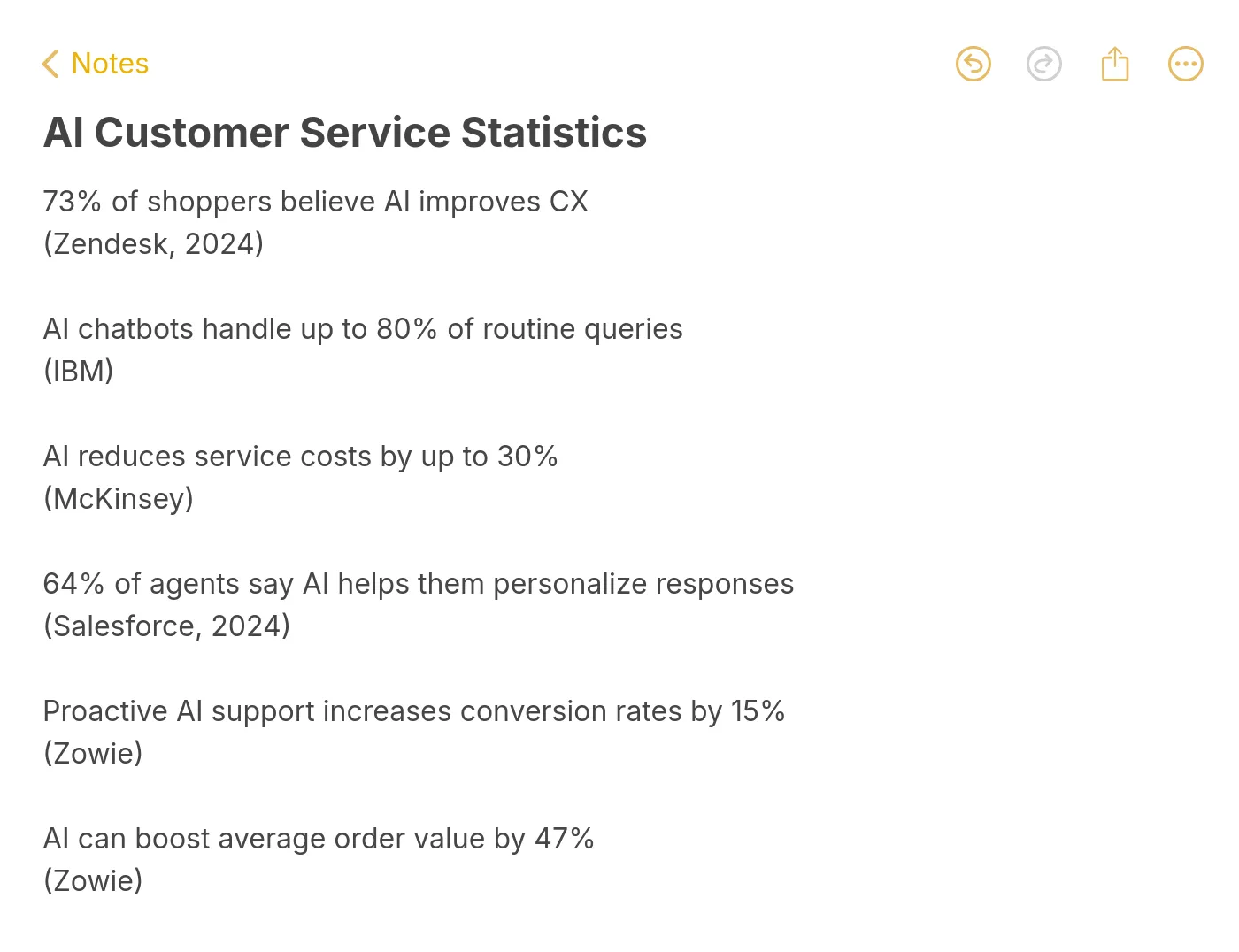
Sentiment analysis also feeds directly into your Net Promoter Score predictions. Instead of waiting for quarterly NPS surveys (which get 10-15% response rates), AI can estimate NPS from every conversation. According to IBM, mature AI adopters report 17% higher customer satisfaction compared to organizations with less mature AI implementations. The gap isn't just about having AI. It's about using sentiment data to continuously improve.
7. Predictive Issue Detection: Fix Problems Before Customers Notice
Reactive support waits for tickets. Predictive support sees a spike in API error logs, cross-references it with customer usage patterns, and sends a "We noticed an issue and we're on it" message before anyone complains. That shift from reactive to proactive is one of the highest-ROI applications of AI in customer service.
How to implement:
1. Feed your AI system with product telemetry data: error rates, latency spikes, failed login attempts, and feature adoption drops.
2. Create alert rules: if error rate for a specific feature exceeds 2x the 7-day average, auto-generate a status update and push it to affected customers via email and in-app notification.
3. Build a feedback loop: after the proactive message goes out, track whether those customers still submit tickets. If they do, refine the message content. If they don't, you just prevented potentially hundreds of tickets.
According to Oliver Wyman, AI digital agents that handle pre-call, in-call, and post-call solutions enhance service by predicting needs and optimizing processes. The financial case is strong: preventing a ticket costs $0 in support labor, while resolving one costs $7-12. For a company that generates 500 predictable-issue tickets per month, that's $3,500-$6,000 saved monthly, plus the goodwill from customers who never had to contact support at all.
8. Multilingual Support: Serve 50+ Languages Without Hiring Translators
Hiring native-speaking agents for every language your customers speak isn't practical. A mid-sized SaaS company with users in 30 countries would need dozens of language-specific agents. AI translation handles this by converting incoming messages to English (or your agents' language), processing the response, and translating it back, all in under 2 seconds.
How to implement:
1. Enable auto-language detection on your AI chatbot. Modern NLP models identify the customer's language from the first message with 95%+ accuracy.
2. Translate your knowledge base into your top 5-10 customer languages using AI, then have native speakers review the translations once. This gives the AI pre-verified content to draw from instead of translating on the fly every time.
3. Set up language-specific escalation paths: if a French-speaking customer needs a human agent, route to a French-speaking team member. If none is available, the AI continues with real-time translation and flags the conversation for human review.
The business impact goes beyond convenience. Companies that offer support in a customer's native language see 30-40% higher satisfaction scores for those interactions. For SaaS products expanding internationally, multilingual AI support removes one of the biggest barriers to entering new markets. You don't need to staff a support team in Tokyo before launching in Japan. Explore how omnichannel chatbots extend this capability across channels like WhatsApp, Slack, and web chat simultaneously.
9. Data-Driven Insights: Turn Conversations Into Product Intelligence
Every support conversation contains product feedback. The problem is that most teams can't process it at scale. An agent handles 40 tickets a day and remembers the patterns anecdotally. AI reads every ticket, tags recurring themes, and surfaces quantified insights: "327 customers asked about CSV export this month, up 180% from last month."
How to implement:
1. Set up automatic topic tagging on all conversations. Categories should map to your product areas: billing, onboarding, feature requests, bugs, integrations, and account management.
2. Build a weekly "Voice of Customer" report that ranks topics by volume, sentiment, and customer tier. Enterprise customer complaints about API reliability carry different weight than free-tier users asking about dark mode.
3. Share these reports with your product team directly. Don't filter through support management. The data is most actionable when product managers see the raw patterns.
As Zappi notes, AI processes vast amounts of data faster and more accurately than humans, identifying patterns and trends that can improve products and services. The companies getting the most value from AI in customer service aren't just using it to answer questions faster. They're using conversation data to build better products. Check out the AI revolution in customer support statistics for more data on this trend.
10. Agent Productivity Boost: Let Humans Do What Humans Do Best
AI doesn't replace your support team. It removes the tasks they shouldn't be doing. Password resets, subscription status checks, "where do I find X" questions: these are repetitive, low-skill tasks that consume 60-70% of most agents' time. Offloading these to AI lets human agents focus on complex troubleshooting, relationship building, and account retention conversations.
How to implement:
1. Identify your "AI-ready" ticket categories: any question that has a single correct answer and doesn't require judgment calls. Password resets, billing inquiries, feature availability checks, and basic how-to questions all qualify.
2. Give agents AI-powered tools: summarized ticket history, suggested responses, relevant help articles pulled automatically, and customer context panels that show account health, recent activity, and past issues.
3. Track agent satisfaction alongside customer satisfaction. If agents report spending less time on repetitive tasks and more time on meaningful conversations, your AI deployment is working. If they report fighting the AI's suggestions, recalibrate.
According to EverHelp, 92% of businesses report improved CSAT after implementing AI. The productivity gains compound: agents who aren't burned out from answering the same question 50 times a day write better responses, show more empathy, and stay at the company longer. For a deeper look at the AI-human collaboration model, read about how AI chatbots enhance human agents.
11. Scalability Without Linear Headcount: Handle Volume Spikes Gracefully
Product launches, outages, seasonal peaks, and viral moments all create ticket surges. Traditional support teams handle surges by overtime, temporary hires, or simply making customers wait. AI absorbs the extra volume without breaking a sweat because adding 10,000 more conversations costs the same as adding 10.
How to implement:
1. Stress-test your AI system before you need it. Simulate a 5x traffic spike and verify the bot maintains response quality and speed under load.
2. Create surge-specific response flows. During a known outage, the AI should proactively acknowledge the issue, provide ETA for resolution, and suppress duplicate tickets instead of treating each one as a unique problem.
3. Set up auto-scaling for your human team: during surges, AI handles all tier-1 queries while humans focus exclusively on tier-2 and tier-3 issues. When volume normalizes, agents resume their normal mixed workload.
A Gartner survey found that 91% of customer service leaders are under pressure to implement AI in 2026. Scalability is the primary driver. Hiring 20 agents to cover a product launch week and then laying them off afterward isn't sustainable or ethical. AI gives you elastic capacity that scales with demand and costs nothing extra during quiet periods. For SaaS companies growing 30%+ year-over-year, this is the difference between support costs scaling linearly and support costs staying flat. See AI adoption industry benchmarks for how your peers are handling this.
12. Higher Customer Satisfaction Scores: The Metric That Ties It All Together
Every benefit above feeds into CSAT. Faster responses, personalized interactions, proactive issue detection, and consistent quality across channels all contribute to customers rating their experience higher. But AI also raises the floor: even your worst support interactions improve because the AI ensures no ticket gets lost, no customer waits 48 hours for a first response, and no query gets a completely wrong answer.
How to implement:
1. Track CSAT at two levels: AI-only interactions (where the bot resolved the issue without human involvement) and AI-assisted interactions (where the bot helped an agent). Compare both against your pre-AI baseline.
2. Set up automated post-conversation surveys triggered by the AI. Keep them to one question: "Did we solve your problem? Yes / No / Partially." This gets 3-4x the response rate of traditional multi-question surveys.
3. Use AI to analyze free-text survey responses. Instead of manually reading 500 comments, let the AI cluster feedback into themes and flag the top 5 issues driving dissatisfaction.
According to Dante AI, 75% of customers now prefer AI agents over humans for support interactions, with enterprise AI adoption reaching 80% and the market hitting $15 billion. The customers who said they wanted to talk to a human? They still exist, but they're now the minority. And the data suggests they prefer humans not because AI is bad, but because their past AI experiences were bad. Well-implemented AI changes that perception fast. For the full picture on pros and cons of AI chatbots, that guide breaks down what works and what still needs a human touch.
What Does the Future of AI in Customer Service Look Like?
The trajectory is clear. AI handles more, humans handle less routine work, and the quality bar for customer service keeps rising. But Forrester offers a grounding perspective: 2026 won't be the year AI transforms customer service overnight. It will be the year of hard work, simplifying, restructuring, and standardizing processes to prepare for AI's full potential.
Three trends worth watching:
AI agents that take actions, not just answer questions. Current chatbots answer "What's my subscription status?" Future AI agents will process the cancellation, apply the discount, or upgrade the plan, all within the same conversation. Real-world chatbot use cases already show this shift happening.
Trust and transparency as differentiators. According to M-Files, customers in 2026 evaluate AI through the lens of trust, transparency, and ethics. Companies that clearly label AI interactions, explain how decisions are made, and make human escalation easy will win over those that try to pass off bots as humans.
The global AI customer service market reaching $15 billion. According to ChatMaxima, the market hit $15.12 billion in 2026. That spending isn't speculative. It's driven by proven ROI from the benefits covered above.
Making AI Work for Your Support Team
The 12 benefits of AI in customer service aren't theoretical. Companies are getting real results right now: lower costs, faster responses, happier customers, and support teams that can actually focus on work that matters.
If you're starting from scratch, begin with three things: deploy a chatbot for 24/7 tier-1 coverage, enable AI-assisted response drafting for your human agents, and set up automated ticket routing. These three changes typically deliver 30-40% cost reduction within the first quarter.
For teams ready to go further, LiveChatAI trains on your existing content and resolves up to 70% of queries without human involvement. You can test it with your own knowledge base and see results in the first week.
Frequently Asked Questions
What are the advantages of AI in customer service?
AI in customer service provides 24/7 availability, faster resolution times, lower per-ticket costs, automated routing, personalized responses, sentiment analysis, predictive issue detection, multilingual support, data-driven insights, agent productivity gains, elastic scalability, and higher CSAT scores. The most immediate advantage for most teams is cost reduction: AI resolves tier-1 tickets at under $3 each compared to $7-12 for human agents, while maintaining or improving satisfaction scores.
How has AI impacted customer service?
AI has shifted customer service from reactive ticket resolution to proactive customer management. According to IBM's research, mature AI adopters report 17% higher customer satisfaction than companies with less mature implementations. The biggest impact is on efficiency: companies using AI resolve 65% of tier-1 issues without human involvement, freeing agents for complex cases that actually require judgment and empathy.